Usage Note 42835: Applying a style to SAS® Web Report Studio reports opened using the SAS® Add-In for Microsoft Office
 |  |  |  |
Starting with SAS Web Report Studio 4.2, the recommended way to view reports in Microsoft Office products is to use the SAS® Add-In 4.2 for Microsoft Office (or later).
Note: You also can open reports directly in SAS® Enterprise Guide® 4.3.
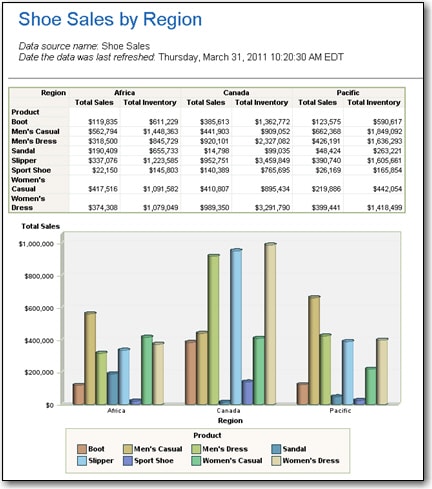
For the most consistent results, you should modify the SAS Add-In options to apply the same style used by the report. For example, the following display shows a report that is using the built-in Meadow style sheet.
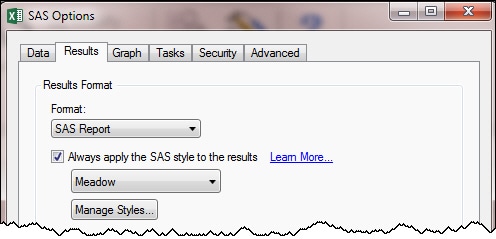
To ensure that the Meadow style is applied when the report is opened in Microsoft Excel, perform the following steps:
- Access the SAS tools. For example, select the SAS ribbon.
- Select Tools ► Options and click the Results tab.
- Select the option to apply the SAS style to results and then select Meadow. (The name of the option depends on which version of the SAS Add-In you are using. The following display shows the option in version 5.1.)
- Click OK.
To open the report, perform the following steps:
- Select Reports, navigate to the report location, and click Open.
- Specify the location to insert the report and click OK.
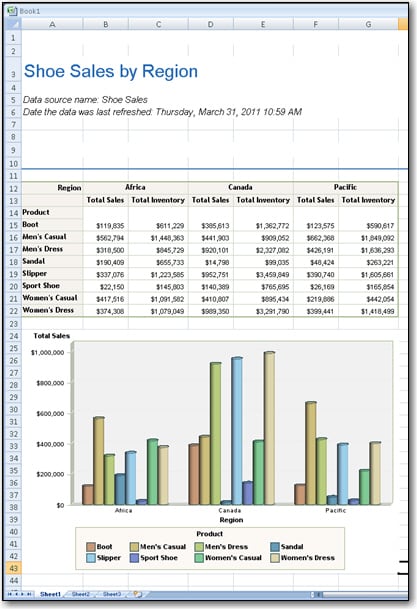
The report is opened with the Meadow style sheet applied, as shown in the following display.
Note: For a related style issue, see SAS Note 43140.
Note: SAS Web Report Studio does not export reports in native Excel format (.xls). As a result, if you use the SAS Web Report Studio export feature to open reports in Excel, you might experience the issues described in SAS Note 30964.
Operating System and Release Information
| Product Family | Product | System | Product Release | SAS Release | ||
| Reported | Fixed* | Reported | Fixed* | |||
| SAS System | SAS Add-in for Microsoft Office | Microsoft® Windows® for x64 | 4.2 | 9.2 TS2M0 | ||
| Microsoft Windows Server 2003 Datacenter Edition | 4.2 | 9.2 TS2M0 | ||||
| Microsoft Windows Server 2003 Enterprise Edition | 4.2 | 9.2 TS2M0 | ||||
| Microsoft Windows Server 2003 Standard Edition | 4.2 | 9.2 TS2M0 | ||||
| Microsoft Windows Server 2003 for x64 | 4.2 | 9.2 TS2M0 | ||||
| Microsoft Windows Server 2008 for x64 | 4.2 | 9.2 TS2M0 | ||||
| Microsoft Windows XP Professional | 4.2 | 9.2 TS2M0 | ||||
| Windows Vista | 4.2 | 9.2 TS2M0 | ||||
| Windows Vista for x64 | 4.2 | 9.2 TS2M0 | ||||
| SAS System | SAS Enterprise Guide | Microsoft® Windows® for x64 | 4.3 | 9.2 TS2M3 | ||
| Microsoft Windows Server 2003 Datacenter Edition | 4.3 | 9.2 TS2M3 | ||||
| Microsoft Windows Server 2003 Enterprise Edition | 4.3 | 9.2 TS2M3 | ||||
| Microsoft Windows Server 2003 Standard Edition | 4.3 | 9.2 TS2M3 | ||||
| Microsoft Windows Server 2003 for x64 | 4.3 | 9.2 TS2M3 | ||||
| Microsoft Windows Server 2008 | 4.3 | 9.2 TS2M3 | ||||
| Microsoft Windows Server 2008 for x64 | 4.3 | 9.2 TS2M3 | ||||
| Microsoft Windows XP Professional | 4.3 | 9.2 TS2M3 | ||||
| Windows 7 Enterprise 32 bit | 4.3 | 9.2 TS2M3 | ||||
| Windows 7 Enterprise x64 | 4.3 | 9.2 TS2M3 | ||||
| Windows 7 Home Premium 32 bit | 4.3 | 9.2 TS2M3 | ||||
| Windows 7 Home Premium x64 | 4.3 | 9.2 TS2M3 | ||||
| Windows 7 Professional 32 bit | 4.3 | 9.2 TS2M3 | ||||
| Windows 7 Professional x64 | 4.3 | 9.2 TS2M3 | ||||
| Windows 7 Ultimate 32 bit | 4.3 | 9.2 TS2M3 | ||||
| Windows 7 Ultimate x64 | 4.3 | 9.2 TS2M3 | ||||
| Windows Vista | 4.3 | 9.2 TS2M3 | ||||
| Windows Vista for x64 | 4.3 | 9.2 TS2M3 | ||||
| Type: | Usage Note |
| Priority: |
| Date Modified: | 2011-03-31 14:11:47 |
| Date Created: | 2011-03-31 11:04:42 |