Installation Note 42008: Microsoft Office errors might occur when the SAS® Add-In for Microsoft Office loads
 |  |  |  |
After a successful installation of the SAS Add-In for Microsoft Office, an Office error might occur when you invoke Microsoft Excel or Word.
Such errors occur after a successful installation of SAS Add-In 4.2 or 4.3 on a machine on which a previous version of the SAS Add-in was installed.
For example:
- The SAS Add-in for Microsoft Office 1.3 or 2.1 is installed.
- The SAS Add-in 1.3 or 2.1 is uninstalled properly.
- The SAS Add-In 4.2 or 4.3 is successfully installed
- The errors occur.
The errors might be caused by a leftover configuration file that was not deleted by the uninstall process. This file might instruct Microsoft Office to use .Net Framework 1.1, rather than later versions. The SAS Add-In 4.2 and 4.3 does not work with .Net Framework 1.1. The Add-In must use .Net Framework 2.0 and higher.
The following error examples occur with Excel, but similar errors might also occur with Word.

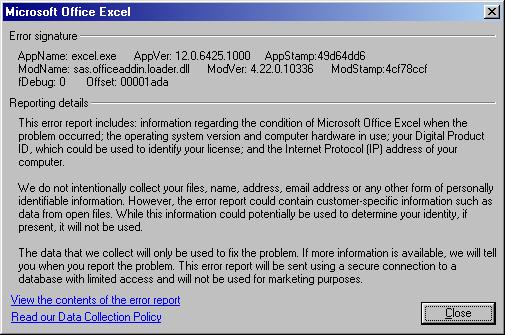

If you experience any of the above errors, you should determine whether there is a leftover excel.exe.config file or winword.exe.config file in your system. These files must be deleted or renamed.
To find and deal with this file, perform the following steps:
- Browse to the location where Office is installed. The location depends on your version of Microsoft Office.
- Look for either the excel.exe.config file, or winword.exe.config.
- Rename or remove the excel.exe.config file and winword.exe.config file.
- Open Excel or Word to see whether a SAS menu is present. Under the following circumstances, it might be necessary to examine the disabled Add-In:
- if the Add-In was disabled from the previous errors, and
- if the errors occur and prompt you to disable the add-in, then you should select No at the prompt.
For Office 2003, the location is C:\Program Files\Microsoft Office\Office11
Operating System and Release Information
| Product Family | Product | System | Product Release | SAS Release | ||
| Reported | Fixed* | Reported | Fixed* | |||
| SAS System | SAS Add-in for Microsoft Office | Microsoft® Windows® for x64 | 4.2 | 9.2 TS2M2 | ||
| Microsoft Windows Server 2003 Datacenter Edition | 4.2 | 9.2 TS2M2 | ||||
| Microsoft Windows Server 2003 Enterprise Edition | 4.2 | 9.2 TS2M2 | ||||
| Microsoft Windows Server 2003 Standard Edition | 4.2 | 9.2 TS2M2 | ||||
| Microsoft Windows Server 2003 for x64 | 4.2 | 9.2 TS2M2 | ||||
| Microsoft Windows Server 2008 | 4.2 | 9.2 TS2M2 | ||||
| Microsoft Windows Server 2008 for x64 | 4.2 | 9.2 TS2M2 | ||||
| Microsoft Windows XP Professional | 4.2 | 9.2 TS2M2 | ||||
| Windows 7 Enterprise 32 bit | 4.2 | 9.2 TS2M2 | ||||
| Windows 7 Enterprise x64 | 4.2 | 9.2 TS2M2 | ||||
| Windows 7 Home Premium 32 bit | 4.2 | 9.2 TS2M2 | ||||
| Windows 7 Home Premium x64 | 4.2 | 9.2 TS2M2 | ||||
| Windows 7 Professional 32 bit | 4.2 | 9.2 TS2M2 | ||||
| Windows 7 Professional x64 | 4.2 | 9.2 TS2M2 | ||||
| Windows 7 Ultimate 32 bit | 4.2 | 9.2 TS2M2 | ||||
| Windows 7 Ultimate x64 | 4.2 | 9.2 TS2M2 | ||||
| Windows Vista | 4.2 | 9.2 TS2M2 | ||||
| Windows Vista for x64 | 4.2 | 9.2 TS2M2 | ||||
| Type: | Installation Note |
| Priority: | medium |
| Date Modified: | 2011-06-03 08:44:24 |
| Date Created: | 2011-01-04 10:57:07 |