Usage Note 41984: SAS® Web Report Studio does not support linking to multiple target reports
 |  |  |  |
SAS Web Report Studio enables you to link graphs and tables in one report to another report or report section (4.2). In addition, if the target report is relational and has prompts, then you can pass values from the graph or table to the target report.
However, you cannot link specific components of a graph or cells in a table to different target reports or sections. For example, you cannot link the bar representing males to a report named Male Students and the bar representing females to a report named Female Students.
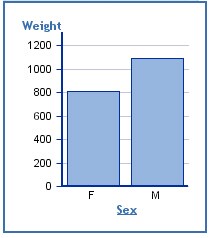
However, if the target report has has a prompt for Sex, then you can pass the value of the clicked bar (M or F) to that prompt, thereby subsetting the results in the target report.
Following are three report linking samples:
- Sample 26174: Using SAS Web Report Studio to pass prompt values between linked reports
- Sample 41526: Using SAS Web Report Studio to pass prompt values between sections in the same report
- Sample 40009: Using report linking to display detail data in an OLAP-based SAS® Web Report Studio report
Operating System and Release Information
| Product Family | Product | System | Product Release | SAS Release | ||
| Reported | Fixed* | Reported | Fixed* | |||
| SAS System | SAS Web Report Studio | Microsoft Windows 2000 Advanced Server | 3.1 | 9.1 TS1M3 SP4 | ||
| Microsoft Windows 2000 Datacenter Server | 3.1 | 9.1 TS1M3 SP4 | ||||
| Microsoft Windows 2000 Server | 3.1 | 9.1 TS1M3 SP4 | ||||
| Microsoft Windows 2000 Professional | 3.1 | 9.1 TS1M3 SP4 | ||||
| Microsoft Windows NT Workstation | 3.1 | 9.1 TS1M3 SP4 | ||||
| Microsoft Windows Server 2003 Datacenter Edition | 3.1 | 9.1 TS1M3 SP4 | ||||
| Microsoft Windows Server 2003 Enterprise Edition | 3.1 | 9.1 TS1M3 SP4 | ||||
| Microsoft Windows Server 2003 Standard Edition | 3.1 | 9.1 TS1M3 SP4 | ||||
| Microsoft Windows XP Professional | 3.1 | 9.1 TS1M3 SP4 | ||||
| Windows Vista | 3.1 | 9.1 TS1M3 SP4 | ||||
| Windows Vista for x64 | 3.1 | 9.1 TS1M3 SP4 | ||||
| 64-bit Enabled AIX | 3.1 | 9.1 TS1M3 SP4 | ||||
| 64-bit Enabled Solaris | 3.1 | 9.1 TS1M3 SP4 | ||||
| HP-UX IPF | 3.1 | 9.1 TS1M3 SP4 | ||||
| Type: | Usage Note |
| Priority: |
| Date Modified: | 2010-12-30 11:38:07 |
| Date Created: | 2010-12-30 11:21:50 |