Usage Note 41691: A prompt to install Chinese Simplified Fonts might display when printing a SAS® Web Report Studio report
 |  |  |  |
When SAS Web Report Studio is running in a Japanese, Chinese, Korean, or other CJK locale, you might see the following prompt when attempting to print.
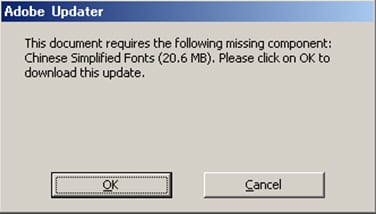
This problem is most likely to occur when SAS Web Report Studio has been configured on a UNIX environment. On UNIX, all SAS fonts are copied to the following location:
<java_home>/lib/fonts
On UNIX environments, the font location must be specified in two locations.
- You must set a property using the Configuration Manager plug-in to SAS Management Console. For details, see Specify Fonts for PDF Reports Generated by SAS Web Report Studio .
- You must add following line to the outputgen.ini file:
-Dcom.sas.report.render.view.pdf.itext.font.fontDirectories=/usr/local/SAS92BI/jre1.5.0_12/lib/fonts
After making these changes, restart your Web application server.
Operating System and Release Information
| Product Family | Product | System | Product Release | SAS Release | ||
| Reported | Fixed* | Reported | Fixed* | |||
| SAS System | SAS Web Report Studio | 64-bit Enabled AIX | 4.2 | 9.2 TS2M0 | ||
| 64-bit Enabled Solaris | 4.2 | 9.2 TS2M0 | ||||
| HP-UX IPF | 4.2 | 9.2 TS2M0 | ||||
| Linux for x64 | 4.2 | 9.2 TS2M0 | ||||
| Solaris for x64 | 4.2 | 9.2 TS2M0 | ||||
| Type: | Usage Note |
| Priority: |
| Date Modified: | 2010-12-15 12:23:48 |
| Date Created: | 2010-11-29 10:20:27 |