Installation Note 40889: I_FINANCIAL_INSTRUMENT table is not populated correctly after running Populate I_FINANCIAL_INSTRUMENT ETL job
 |  |  |  |
In the SAS® Credit Risk Management for Banking intermediate job named Populate I_FINANCIAL_INSTRUMENT, the join condition between the FINANCIAL_INSTRUMENT table and the TIME_FREQUENCY table is incorrect.
The join condition reads:
Moreover, there is an extraneous condition on the WHERE clause.
The WHERE clause reads:
If you run this job without making these changes, then the target table (I_FINANCIAL_INSTRUMENT) is incorrectly populated.
As a workaround, use the following steps to update the Populate I_FINANCIAL_INSTRUMENT job with the correct join condition. These steps assume that you have already installed the SAS® Detail Data Store for Banking and unpackaged the SAS Credit Risk Management for Banking ETL jobs (see "How to Install the ETL Jobs" in the SAS® Credit Risk Management for Banking: Administrator's Guide):
- Open SAS® Data Integration Studio.
- In the Folders Tree, double-click the Populate I_FINANCIAL_INSTRUMENT job name. You can now see the ETL job flow in the Job Editor.
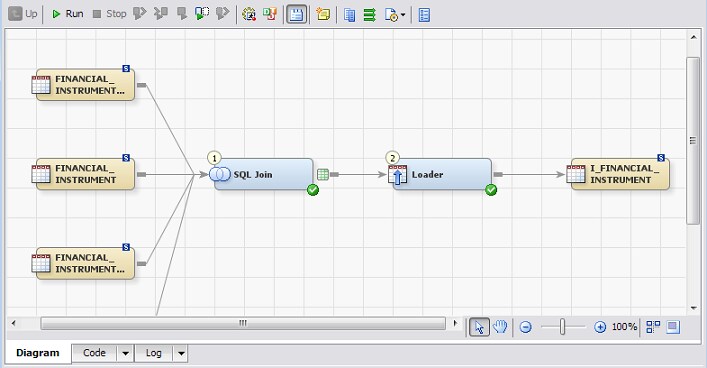
- In the Job Editor, right-click the SQL Join node, and then select Open. The SQL join opens in the Job Editor.
- In the Navigation pane, select the third Join. You can now see a table with the join clauses at the left of the Navigation pane.
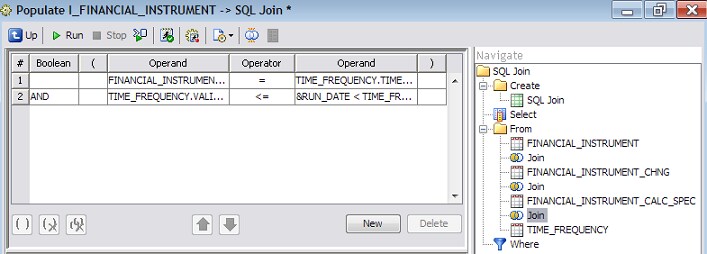
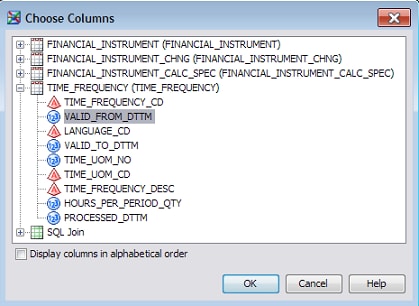
- In the second row of the table, select the first Operand column. Then, click the arrow at the right of this field, and select Choose Column(s).
- Select the TIME_FREQUENCY.VALID_FROM_DTTM column, and click OK.
- In the Navigation pane, select the WHERE clause. You can now see a table with the join clauses at the left of the Navigation pane.
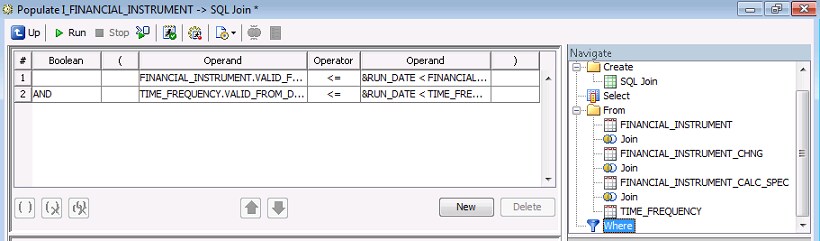
- Select the second row of the table, and click Delete.
- Close the Populate I_FINANCIAL_INSTRUMENT -> SQL Join* window. When prompted, select Yes to save your changes.
After you have edited the join condition in this ETL job, continue through the remaining documented steps for ETL Job Deployment in the SAS® Credit Risk Management for Banking: Administrator's Guide.
Operating System and Release Information
| Product Family | Product | System | Product Release | SAS Release | ||
| Reported | Fixed* | Reported | Fixed* | |||
| SAS System | SAS Credit Risk Management for Banking | Microsoft® Windows® for x64 | 4.6 | 4.7 | 9.3 TS1M2 | |
| Microsoft Windows Server 2003 Datacenter Edition | 4.6 | 4.7 | 9.3 TS1M2 | |||
| Microsoft Windows Server 2003 Enterprise Edition | 4.6 | 4.7 | 9.3 TS1M2 | |||
| Microsoft Windows Server 2003 Standard Edition | 4.6 | 4.7 | 9.3 TS1M2 | |||
| Microsoft Windows Server 2003 for x64 | 4.6 | 4.7 | 9.3 TS1M2 | |||
| Microsoft Windows Server 2008 | 4.6 | 4.7 | 9.3 TS1M2 | |||
| Microsoft Windows Server 2008 for x64 | 4.6 | 4.7 | 9.3 TS1M2 | |||
| Microsoft Windows XP Professional | 4.6 | 4.7 | 9.3 TS1M2 | |||
| Windows 7 Enterprise 32 bit | 4.6 | 4.7 | 9.3 TS1M2 | |||
| Windows 7 Enterprise x64 | 4.6 | 4.7 | 9.3 TS1M2 | |||
| Windows 7 Home Premium 32 bit | 4.6 | 4.7 | 9.3 TS1M2 | |||
| Windows 7 Home Premium x64 | 4.6 | 4.7 | 9.3 TS1M2 | |||
| Windows 7 Professional 32 bit | 4.6 | 4.7 | 9.3 TS1M2 | |||
| Windows 7 Professional x64 | 4.6 | 4.7 | 9.3 TS1M2 | |||
| Windows 7 Ultimate 32 bit | 4.6 | 4.7 | 9.3 TS1M2 | |||
| Windows 7 Ultimate x64 | 4.6 | 4.7 | 9.3 TS1M2 | |||
| Windows Vista | 4.6 | 4.7 | 9.3 TS1M2 | |||
| Windows Vista for x64 | 4.6 | 4.7 | 9.3 TS1M2 | |||
| 64-bit Enabled AIX | 4.6 | 4.7 | 9.3 TS1M2 | |||
| 64-bit Enabled HP-UX | 4.6 | 4.7 | 9.3 TS1M2 | |||
| 64-bit Enabled Solaris | 4.6 | 4.7 | 9.3 TS1M2 | |||
| HP-UX IPF | 4.6 | 4.7 | 9.3 TS1M2 | |||
| Linux | 4.6 | 4.7 | 9.3 TS1M2 | |||
| Linux for x64 | 4.6 | 4.7 | 9.3 TS1M2 | |||
| Solaris for x64 | 4.6 | 4.7 | 9.3 TS1M2 | |||
| Type: | Installation Note |
| Priority: | high |
| Date Modified: | 2010-09-28 11:46:29 |
| Date Created: | 2010-09-14 11:22:17 |