Problem Note 40611: Why does my value display as (0.00) in SAS® Financial Management when I expect the total to be 0 or 0.00?
 |  |  |  |
In SAS Financial Management, a series of numbers entered in a cell of a Data-entry table or a calclation result displayed in a Read-only table might display as (0.00), when you actually expect the result to be 0 or 0.00. This occurs when a series of arithmetic operations on floating-point numbers produces results that appear to be incorrect by very small amounts.
For example, in the screen shot below, cell B10 displays the result of a series of operations that you expect to total to 0 or to 0.00. Instead, (0.00) is displayed in cell B10, and you see in the Excel formula bar the number [-1.23634436022257E-12], the equivalent of [-0.000000000000123634436022257], which is a VERY small non-zero number.
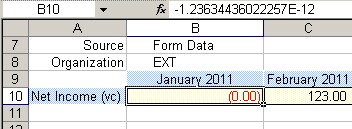
This behavior is not a problem in or a limitation of SAS or SAS Financial Management; this behavior occurs because the numbers are stored in binary format to reduce storage requirements and to enable computation to occur across different computing platforms.
According to Microsoft knowledge base entry 214118,The Institute of Electrical and Electronics Engineers (IEEE) 754 standard is a method of storing floating-point numbers in a compact way that is easy to manipulate. This standard is used by Intel coprocessors and most PC-based programs that implement floating-point math.
Some numbers that are simple, nonrepeating decimal numbers are converted into repeating binary numbers that cannot be stored with perfect accuracy.
For example, the number 1/10 can be represented in a decimal number system with a simple decimal: .1
However, the same number in binary format becomes the repeating binary decimal: .0001100011000111000111 (and so on). This number cannot be represented in a finite amount of space
Some users have expressed concern that these very small floating-point arithmetic rounding errors might result in a cumulative material impact if enough of them are encountered. Since SAS Financial Management uses Microsoft Excel as the reporting interface, please refer to the "Workaround" section of Microsoft knowledge base entry 214118 for ways to circumvent to this issue.
Please note that the result displayed can be controlled through the use of Rounding functionality and also by using 'Precision as displayed'. For more information, please refer to SAS Note 30707.
Operating System and Release Information
| Product Family | Product | System | SAS Release | |
| Reported | Fixed* | |||
| SAS System | SAS Financial Management | Microsoft® Windows® for 64-Bit Itanium-based Systems | ||
| Microsoft Windows Server 2003 Datacenter 64-bit Edition | ||||
| Microsoft Windows Server 2003 Enterprise 64-bit Edition | ||||
| Microsoft Windows XP 64-bit Edition | ||||
| Microsoft® Windows® for x64 | ||||
| Microsoft Windows 2000 Advanced Server | ||||
| Microsoft Windows 2000 Datacenter Server | ||||
| Microsoft Windows 2000 Server | ||||
| Microsoft Windows 2000 Professional | ||||
| 64-bit Enabled AIX | ||||
| 64-bit Enabled Solaris | ||||
| Type: | Problem Note |
| Priority: | medium |
| Date Modified: | 2010-09-17 00:56:07 |
| Date Created: | 2010-08-17 11:27:05 |