Installation Note 40557: Installations might fail on the Windows 7 operating system or on the Windows Server 2008 R2 operating system if Windows AppLocker is running
 |  |  |  |
When you are installing SAS® 9.2 (TS2M3) on the Windows 7 operating system or on Windows Server 2008 R2 operating system, the installation might fail. This can happen whether you are doing a quiet installation, an installation from media, or from an electronic software download.
The errors that you might encounter are described below.
From the MITdate_time.log File
MITController : An error occurred during processing:
MITController : CreateProcess: "C:\Program Files\Java\jre1.5.0_12\bin\java.exe"
-cp "C:\Program Files\SAS/SASVersionedJarRepository/9.2/eclipse/plugins/sas.
launcher.jar" com.sas.app.NonAPI -install error=2
MITController : java.io.IOException: CreateProcess: "C:\Program Files\Java\
jre1.5.0_12\bin\java.exe" -cp "C:\Program Files\SAS/
SASVersionedJarRepository/9.2/eclipse/plugins/sas.launcher.jar"
com.sas.app.NonAPI -install error=2
From the Event Viewer
* Activation context generation failed for "C:\Program Files\SAS\
SharedFiles\Integration Technologies\SASComb.dll". Dependent Assembly
Microsoft.VC80.ATL,processorArchitecture="X86",
publicKeyToken="1fc8b9a1e18e3b",
type="win32",version="8.0.50727.4053" could not be found. Please use
sxstrace.exe for detailed diagnosis.

Log name: Application
Source: SideBySide
Event ID: 33
Level: Error

*  Activation context generation failed for "C:\Program Files\SAS\
SharedFiles\Integration Technologies\SASspk.dll". Dependent Assembly
Microsoft.VC80.ATL,processorArchitecture="X86",
publicKeyToken="1fc8b9a1e18e3b",
type="win32",version="8.0.50727.4053" could not be found. Please use
sxstrace.exe for detailed diagnosis.

Log name: Application
Source: SideBySide
Event ID: 33
Level: Error

*  Activation context generation failed for "C:\Program Files\SAS\
SharedFiles\Graph\V9\SASGXML9.dll". Dependent Assembly
Microsoft.VC80.ATL,processorArchitecture="X86",
publicKeyToken="1fc8b9a1e18e3b", type="win32",version="8.0.50727.4053" could
not be found. Please use sxstrace.exe for detailed diagnosis.

Log name: Application
Source: SideBySide
Event ID: 33
Level: Error

*  Activation context generation failed for "C:\Program Files\SAS\
SharedFiles\Graph\V9\SASGrph9.dll". Dependent Assembly
Microsoft.VC80.ATL,processorArchitecture="X86",
publicKeyToken="1fc8b9a1e18e3b", type="win32",version="8.0.50727.4053" could
not be found. Please use sxstrace.exe for detailed diagnosis.

Log name: Application
Source: SideBySide
Event ID: 33
Level: Error
From the SDW.log
* INFO: Stage #2 Step #3 (Base SAS)
com.sas.ssn.MITConnector executeMIT
INFO: MIT Parameters:  -silent -skipversioncheck -skiplanguagecheck -view
com.sas.tools.maint.mit.view.HeadlessView -file "C:\SAS Software
Depot\products\base__92ts2m0_cd051__win__en__sp0__1\
install.xml" -packageDir "C:\SAS Software Depot\ products\
base__92ts2m0_cd051__win__en__sp0__1" -sashome "C:\Program Files\SAS"
com.sas.ssn.MITConnector$ExitHandlingSecurityManager checkExit
INFO: Return Code: -3
com.sas.ssn.Chaining installNext
SEVERE: Install failure for: Base SAS
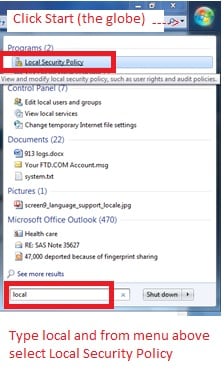
This can happen if the Windows AppLocker is running. Windows AppLocker is new with Windows 7 and Windows Server 2008 R2.
To open AppLocker, click Start and enter local. Then, select Local Security Policy from the top menu, as shown here:
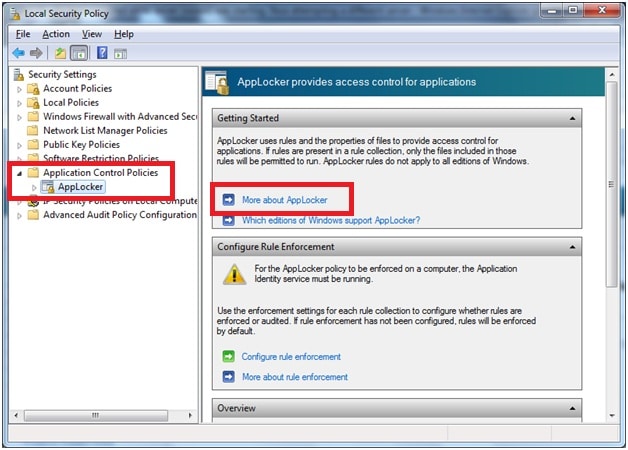
When the Local Security Policy window is open, click Application Control Policies and then select AppLocker. For more information, click More about AppLocker.
Operating System and Release Information
| Product Family | Product | System | Product Release | SAS Release | ||
| Reported | Fixed* | Reported | Fixed* | |||
| SAS System | Base SAS | Microsoft Windows Server 2008 | 9.21_M3 | 9.2 TS2M3 | ||
| Microsoft Windows Server 2008 for x64 | 9.21_M3 | 9.2 TS2M3 | ||||
| Windows 7 Enterprise 32 bit | 9.21_M3 | 9.2 TS2M3 | ||||
| Windows 7 Enterprise x64 | 9.21_M3 | 9.2 TS2M3 | ||||
| Windows 7 Home Premium 32 bit | 9.21_M3 | 9.2 TS2M3 | ||||
| Windows 7 Home Premium x64 | 9.21_M3 | 9.2 TS2M3 | ||||
| Windows 7 Professional 32 bit | 9.21_M3 | 9.2 TS2M3 | ||||
| Windows 7 Professional x64 | 9.21_M3 | 9.2 TS2M3 | ||||
| Windows 7 Ultimate 32 bit | 9.21_M3 | 9.2 TS2M3 | ||||
| Windows 7 Ultimate x64 | 9.21_M3 | 9.2 TS2M3 | ||||
| Type: | Installation Note |
| Priority: | high |
| Date Modified: | 2013-06-13 15:30:23 |
| Date Created: | 2010-08-11 09:32:01 |