Installation Note 40345: An invalid data error occurs when you invoke the SAS® Add-In for Microsoft Office
 |  |  |  |
When you invoke the SAS Add-In for Microsoft Office, you might receive the following error:
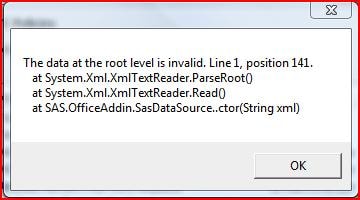
This problem occurs because of a corrupt data source XML file.
To correct the corrupt file, follow these steps:
Caution: Always back up your registry before you make any changes to it. Changes to the Windows registry can render your system unusable and require that you reinstall your operating system. SAS is not responsible when you edit the Microsoft Windows registry. For more information about backing up your registry, see Windows Help or the Microsoft Web site.
- Select Start ► Run.
- Type regedit.
- In the Registry Editor window, select HKEY_CURRENT_USER ► Software ► SAS Institute Inc. ► Add-In For Microsoft Office ► 2.1 ► ActiveData.
- In ActiveData, delete all DataSource entries.
- Make sure that MRU Length is set to 0.
- Close the Registry Editor window.
Operating System and Release Information
| Product Family | Product | System | Product Release | SAS Release | ||
| Reported | Fixed* | Reported | Fixed* | |||
| SAS System | SAS Add-in for Microsoft Office | Microsoft Windows 2000 Advanced Server | 2.1 | 9.1 TS1M3 SP4 | ||
| Microsoft Windows 2000 Datacenter Server | 2.1 | 9.1 TS1M3 SP4 | ||||
| Microsoft Windows 2000 Server | 2.1 | 9.1 TS1M3 SP4 | ||||
| Microsoft Windows 2000 Professional | 2.1 | 9.1 TS1M3 SP4 | ||||
| Microsoft Windows NT Workstation | 2.1 | 9.1 TS1M3 SP4 | ||||
| Microsoft Windows Server 2003 Datacenter Edition | 2.1 | 9.1 TS1M3 SP4 | ||||
| Microsoft Windows Server 2003 Enterprise Edition | 2.1 | 9.1 TS1M3 SP4 | ||||
| Microsoft Windows Server 2003 Standard Edition | 2.1 | 9.1 TS1M3 SP4 | ||||
| Microsoft Windows XP Professional | 2.1 | 9.1 TS1M3 SP4 | ||||
| Type: | Installation Note |
| Priority: | medium |
| Date Modified: | 2010-08-05 15:31:17 |
| Date Created: | 2010-07-14 15:12:03 |