Usage Note 39616: Creating optional prompts for use in SAS® Web Report Studio 4.2 and later
 |  |  |  |
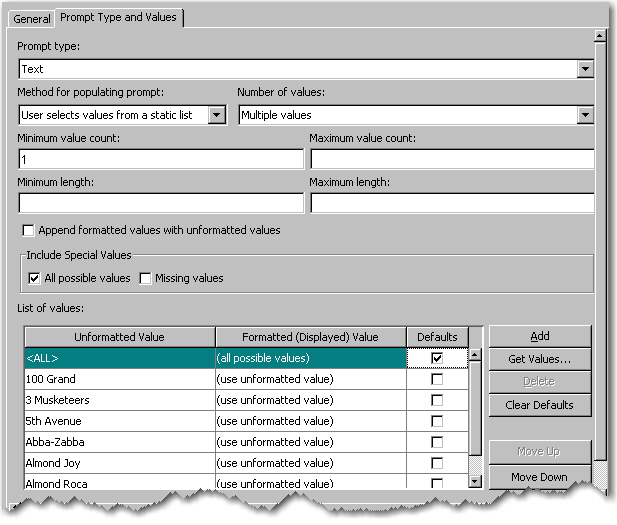
Beginning with 4.2, SAS® Information Map Studio provides a built-in option to include All possible values as a prompt selection.
Note: If you are using SAS Information Map Studio 3.1, see Sample 30924 for how to create a prompt value that represents all possible values.
The option appears under the Include Special Values section on the Prompt Type and Values tab in the Prompt dialog box. It is available only for list (static or dynamic) prompts that support multiple values. If you select All possible values for a static list, then you must also include other values in the list.
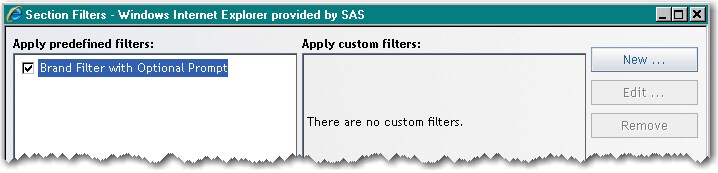
To use the prompt in SAS Web Report Studio, select it in the Section Filters dialog box.
Note: Beginning with 4.3, you can also create this type of prompt in SAS Web Report Studio.
Operating System and Release Information
| Product Family | Product | System | Product Release | SAS Release | ||
| Reported | Fixed* | Reported | Fixed* | |||
| SAS System | SAS Information Map Studio | Microsoft® Windows® for x64 | 4.2 | 9.2 TS2M0 | ||
| Microsoft Windows Server 2003 Datacenter Edition | 4.2 | 9.2 TS2M0 | ||||
| Microsoft Windows Server 2003 Enterprise Edition | 4.2 | 9.2 TS2M0 | ||||
| Microsoft Windows Server 2003 Standard Edition | 4.2 | 9.2 TS2M0 | ||||
| Microsoft Windows Server 2003 for x64 | 4.2 | 9.2 TS2M0 | ||||
| Microsoft Windows Server 2008 for x64 | 4.2 | 9.2 TS2M0 | ||||
| Microsoft Windows XP Professional | 4.2 | 9.2 TS2M0 | ||||
| Windows Vista | 4.2 | 9.2 TS2M0 | ||||
| Windows Vista for x64 | 4.2 | 9.2 TS2M0 | ||||
| Type: | Usage Note |
| Priority: | |
| Topic: | Data Management ==> Data Sources ==> Information map |
| Date Modified: | 2010-05-12 12:11:45 |
| Date Created: | 2010-05-12 11:54:25 |