Installation Note 39598: An incorrect destination location displays when installing SAS® Enterprise Miner (TM) Tree Desktop Application
 |  |  |  |
The SAS Enterprise Miner Tree Desktop Application installs in the default Shared Files location. The default location is C:\Program Files\SAS\Shared Files. If the Shared Files were installed in a different directory on your machine, then Enterprise Miner Tree Desktop Application will also install in that different Shared Files location.
However, the Destination Folder location that is displayed in the Tree Desktop Application installer window always shows the 'C' drive path, even if the Shared Files were installed in a different directory on your machine:
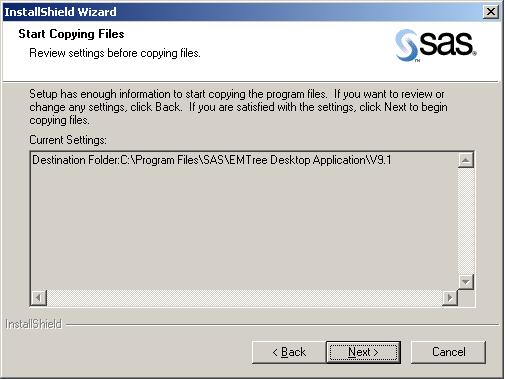
If your Shared File location is not in the default Destination Folder location, then ignore the destination location that is displayed during the installation, and click Next.
The real destination folder is wherever the Shared Files directory lives. Here is an example showing the full path to SAS Enterprise Miner Tree Desktop Application:
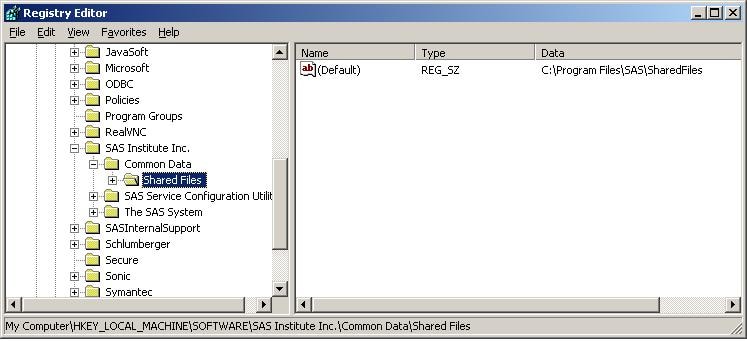
To verify where your Shared Files directory is located, search in Windows Explorer for "Shared Files", or verify the registry setting. To verify the registry setting, follow these steps:
- Click Start>Run and type regedit.
- Go to HKEY_LOCAL_MACHINE\SOFTWARE\SAS Institute Inc.\Common Data\Shared Files
- The Shared File directory path for your machine is shown on the right side under Data. This is the Shared File path location that will be used to install Enterprise Miner Tree Desktop Application. If this path is not on drive C as shown in the Destination Folder location that is displayed in the Tree Desktop Application installer window, then the Shared File directory path that is shown in the registry is where the Enterprise Miner Tree Desktop Application will be installed.
Additional resources:
11500, "When installing SAS 9.1, the Shared Files directory is installed to C:\Program Files\SAS\Shared Files during the System Requirements Wizard"
31318, "How to remove and reinstall SAS® Enterprise Miner(TM) Tree Desktop Application"
Operating System and Release Information
| Product Family | Product | System | Product Release | SAS Release | ||
| Reported | Fixed* | Reported | Fixed* | |||
| SAS System | SAS Enterprise Miner Tree Desktop Application | Windows Vista for x64 | 9.1.33 | 9.1 TS1M3 SP4 | ||
| Windows Vista | 9.1.33 | 9.1 TS1M3 SP4 | ||||
| Microsoft Windows XP Professional | 9.1.33 | 9.1 TS1M3 SP4 | ||||
| Microsoft Windows Server 2003 Standard Edition | 9.1.33 | 9.1 TS1M3 SP4 | ||||
| Microsoft Windows Server 2003 Enterprise Edition | 9.1.33 | 9.1 TS1M3 SP4 | ||||
| Microsoft Windows Server 2003 Datacenter Edition | 9.1.33 | 9.1 TS1M3 SP4 | ||||
| Microsoft Windows NT Workstation | 9.1.33 | 9.1 TS1M3 SP4 | ||||
| Microsoft Windows 2000 Professional | 9.1.33 | 9.1 TS1M3 SP4 | ||||
| Microsoft Windows 2000 Server | 9.1.33 | 9.1 TS1M3 SP4 | ||||
| Microsoft Windows 2000 Datacenter Server | 9.1.33 | 9.1 TS1M3 SP4 | ||||
| Microsoft Windows 2000 Advanced Server | 9.1.33 | 9.1 TS1M3 SP4 | ||||
| Type: | Installation Note |
| Priority: | high |
| Date Modified: | 2010-11-12 13:14:02 |
| Date Created: | 2010-05-11 09:56:52 |