Usage Note 39502: How to configure Microsoft Internet Explorer for Windows 2003 Server and Windows 2008 Server
When trying to download files (for example, SAS Third Party Software) to a Microsoft Windows server
2003 or 2008 machine, you might see the following error message:
Security Alert
Your current security settings do not allow this file to be downloaded.
You must turn off security for the Administrators and/or users (depending on
who is downloading the files) for the Internet Explorer Enhanced Security
Configuration.
On Windows Server 2003, follow these instructions:
1. Click Start> Control Panel> Add/Remove Programs > Add/Remove Windows Components.
2. Unselect the Internet Explorer Enhanced Security Configuration, click Next,
and then Finish.
On Windows Server 2008, follow these instructions:
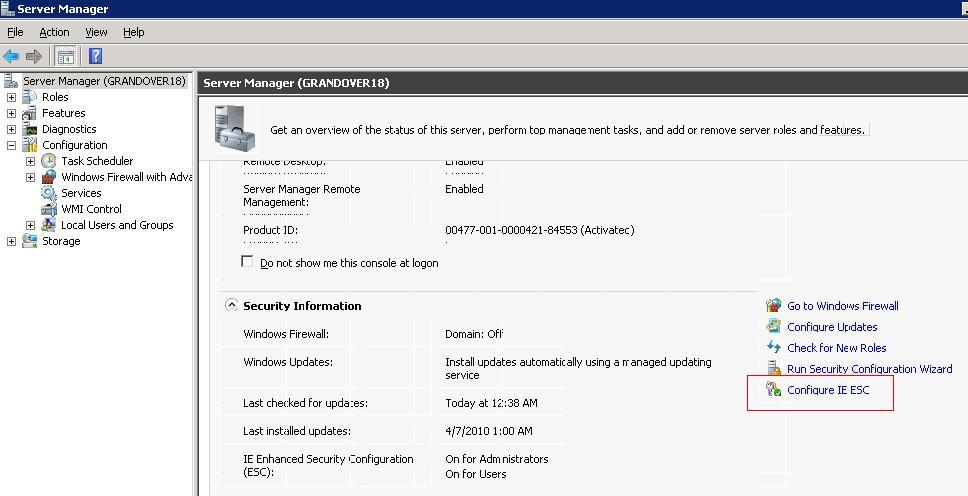
1. Click Start > Run and type ServerManager.msc to open the Server Manager
2. Click on the Configure IE ESC.
 3. Select Off for either the Administrators or Users groups (depending on who
is downloading the software).
3. Select Off for either the Administrators or Users groups (depending on who
is downloading the software).
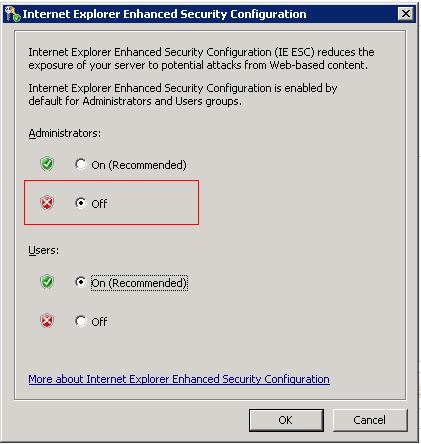 4. Select OK.
You should then be able to download the software needed on this machine.
4. Select OK.
You should then be able to download the software needed on this machine.
Operating System and Release Information
| SAS System | N/A | Microsoft Windows Server 2008 | | |
| Microsoft Windows Server 2003 Datacenter Edition | | |
| Microsoft Windows Server 2003 Enterprise Edition | | |
| Microsoft Windows Server 2003 Standard Edition | | |
| Microsoft Windows Server 2003 Datacenter 64-bit Edition | | |
| Microsoft Windows Server 2003 Enterprise 64-bit Edition | | |
*
For software releases that are not yet generally available, the Fixed
Release is the software release in which the problem is planned to be
fixed.
If you are trying to download files (for example, SAS Third Party Software applications) on a Windows Server 2003 or Windows Server 2008, you might need to configure the need Internet Explorer Enhanced Security Configuration to turn off security. You can do this for administrators and/or users.
| Date Modified: | 2010-05-03 09:27:59 |
| Date Created: | 2010-04-30 10:28:55 |


