Sample 39284: Adding the date that an OLAP cube was refreshed to a SAS® Web Report Studio report
 |  |  |  |
Overview
Users often want to know when the data that they are viewing was last updated. SAS Web Report Studio provides two dynamic text values that can be included in a header or footer. Those values are "Date the data was last refreshed" and "Date modified". However, neither of these values necessarily corresponds to the last time cube data was refreshed. This sample explains how to add the date that an OLAP cube was refreshed to a SAS Web Report Studio report.
Note: This sample updates an existing information map. It does not create a new information map.
Updating the information map
Update the information map using PROC INFOMAPS code similar to what is shown below. To ensure that the cube refresh date will always be current, this code should be appended to the PROC OLAP code that is used to refresh the cube.
data _NULL_;
   call symput("CubeRefreshDate",put(today(),date7.));
run;

proc infomaps
metauser="sasdemo"
metapass="Orion123"
metaserver="yourserver.com"
metaport=8561
metarepository="Foundation";
update infomap "Sample" mappath="/Shared Data/Maps" description="The data in this cube was last refreshed on &CubeRefreshDate";
save infomap "Sample" mappath="/Shared Data/Maps";
run;
|
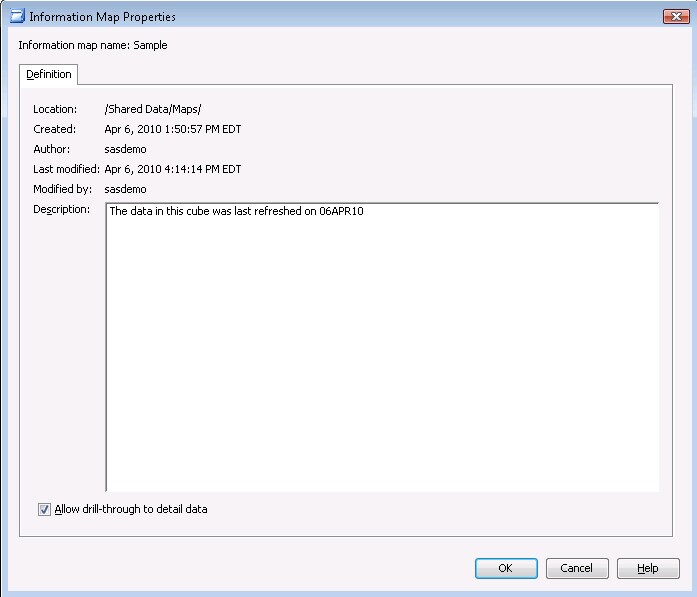
After submitting this code, view the Properties for the information map. In the Description box, you can see that the description now includes the cube refresh date.
Displaying the cube refresh date in the report
To add the cube refresh information to the report, perform the following steps:
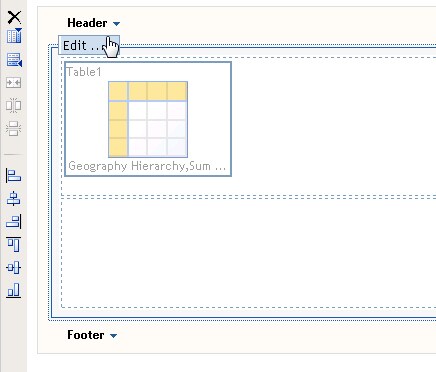
- In your report, select Edit from the Header menu.
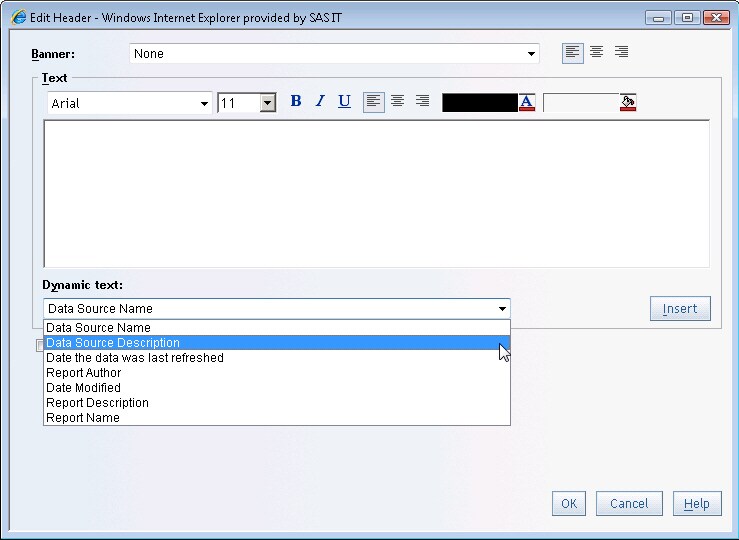
- In the Edit Header dialog, select Data Source Description from the Dynamic text list and click Insert.
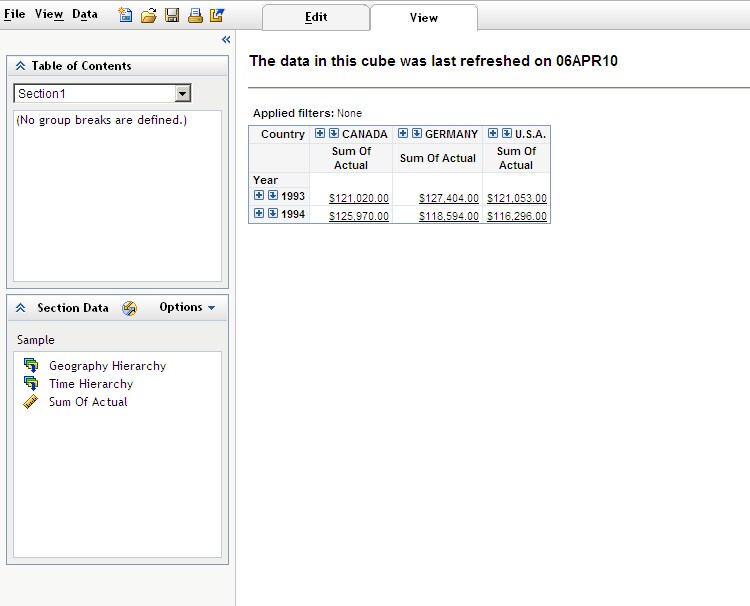
- View the report to see the description displaying the date that the cube was last refreshed.
Additional Documentation
For more information about the INFOMAPS procedure, see Base SAS 9.2 Guide to Information Maps.
For more information about SAS Web Report Studio, see the SAS Web Report Studio documentation page.
These sample files and code examples are provided by SAS Institute Inc. "as is" without warranty of any kind, either express or implied, including but not limited to the implied warranties of merchantability and fitness for a particular purpose. Recipients acknowledge and agree that SAS Institute shall not be liable for any damages whatsoever arising out of their use of this material. In addition, SAS Institute will provide no support for the materials contained herein.
These sample files and code examples are provided by SAS Institute Inc. "as is" without warranty of any kind, either express or implied, including but not limited to the implied warranties of merchantability and fitness for a particular purpose. Recipients acknowledge and agree that SAS Institute shall not be liable for any damages whatsoever arising out of their use of this material. In addition, SAS Institute will provide no support for the materials contained herein.
| Type: | Sample |
| Topic: | Query and Reporting ==> Interactive Querying Query and Reporting ==> OLAP (Online Analytical Processing) |
| Date Modified: | 2010-04-19 16:32:13 |
| Date Created: | 2010-04-06 16:17:34 |
Operating System and Release Information
| Product Family | Product | Host | Product Release | SAS Release | ||
| Starting | Ending | Starting | Ending | |||
| SAS System | SAS Web Report Studio | z/OS | 4.2 | |||
| Microsoft® Windows® for x64 | 4.2 | |||||
| Microsoft Windows 95/98 | 4.2 | |||||
| Microsoft Windows 2000 Advanced Server | 4.2 | |||||
| Microsoft Windows 2000 Datacenter Server | 4.2 | |||||
| Microsoft Windows 2000 Server | 4.2 | |||||
| Microsoft Windows 2000 Professional | 4.2 | |||||
| Microsoft Windows NT Workstation | 4.2 | |||||
| Microsoft Windows Server 2003 Datacenter Edition | 4.2 | |||||
| Microsoft Windows Server 2003 Enterprise Edition | 4.2 | |||||
| Microsoft Windows Server 2003 Standard Edition | 4.2 | |||||
| Microsoft Windows Server 2008 | 4.2 | |||||
| Microsoft Windows XP Professional | 4.2 | |||||
| Windows 7 Enterprise 32 bit | 4.2 | |||||
| Windows 7 Enterprise x64 | 4.2 | |||||
| Windows 7 Home Premium 32 bit | 4.2 | |||||
| Windows 7 Home Premium x64 | 4.2 | |||||
| Windows 7 Professional 32 bit | 4.2 | |||||
| Windows 7 Professional x64 | 4.2 | |||||
| Windows 7 Ultimate 32 bit | 4.2 | |||||
| Windows 7 Ultimate x64 | 4.2 | |||||
| Windows Millennium Edition (Me) | 4.2 | |||||
| Windows Vista | 4.2 | |||||
| 64-bit Enabled AIX | 4.2 | |||||
| 64-bit Enabled Solaris | 4.2 | |||||
| HP-UX IPF | 4.2 | |||||
| Linux for x64 | 4.2 | |||||
| Solaris for x64 | 4.2 | |||||