Usage Note 38772: Reference lines might not line up as expected on a line graph in SAS® Web Report Studio
 |  |  |  |
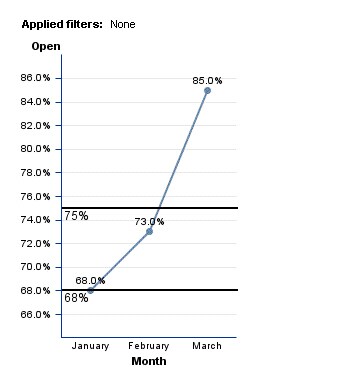
When adding reference lines on a line graph in SAS Web Report Studio, the reference line might not display as expected. This problem is most likely to occur if the data item that is assigned to Line Height has been formatted in the information map.
For example, 0.68 has been specified for this reference line value. You can see that the reference line does not line up with the 68% tick mark value.
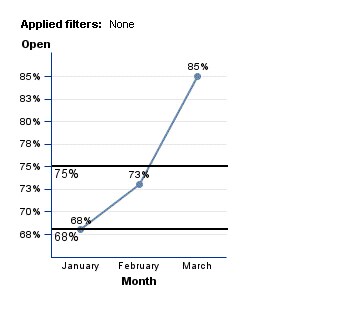
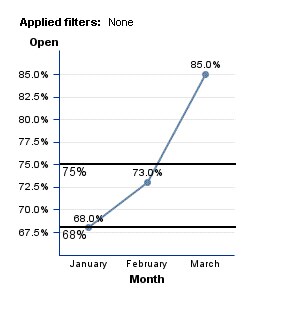
This problem occurs because the axis range values have been rounded to the nearest percentage. If you format the Line Height data item so that it displays one decimal place, you will see the actual axis range is 67.5.
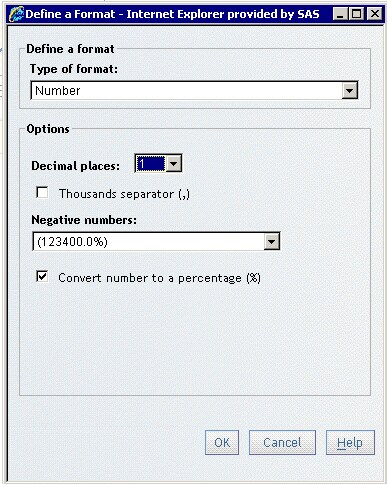
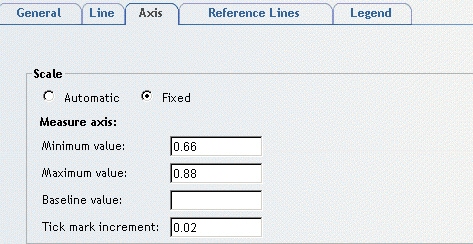
To circumvent the problem, you can specify a fixed axis range for the line graph.
Operating System and Release Information
| Product Family | Product | System | Product Release | SAS Release | ||
| Reported | Fixed* | Reported | Fixed* | |||
| SAS System | SAS Web Report Studio | z/OS | 4.2 | 9.2 TS2M0 | ||
| Microsoft® Windows® for x64 | 4.2 | 9.2 TS2M0 | ||||
| Microsoft Windows Server 2003 Datacenter Edition | 4.2 | 9.2 TS2M0 | ||||
| Microsoft Windows Server 2003 Enterprise Edition | 4.2 | 9.2 TS2M0 | ||||
| Microsoft Windows Server 2003 Standard Edition | 4.2 | 9.2 TS2M0 | ||||
| Microsoft Windows XP Professional | 4.2 | 9.2 TS2M0 | ||||
| Windows Vista | 4.2 | 9.2 TS2M0 | ||||
| 64-bit Enabled AIX | 4.2 | 9.2 TS2M0 | ||||
| 64-bit Enabled Solaris | 4.2 | 9.2 TS2M0 | ||||
| HP-UX IPF | 4.2 | 9.2 TS2M0 | ||||
| Linux for x64 | 4.2 | 9.2 TS2M0 | ||||
| Solaris for x64 | 4.2 | 9.2 TS2M0 | ||||
| Type: | Usage Note |
| Priority: |
| Date Modified: | 2010-03-04 16:09:36 |
| Date Created: | 2010-02-17 10:12:20 |