Sample 37523: Creating cascading prompted filters in SAS® Information Map Studio
 |  |  |  |  |
Overview
One of major new features in SAS Information Map Studio 4.2 is the ability to set up dependencies between the prompts. To establish the dependencies, you must create a compound filter that uses prompts, as explained in this sample.
About the sample data
To create the Shoe Sales information map used in the sample, you can submit the PROC INFOMAPS code on the Full Code tab in this sample. The steps in the sample refer to this information map.
Create the prompt
For the sample, dependencies will be established between the Region and Subsidiary categories from the Shoe Sales information map. Since the order of dependency is based on the order of the prompts in the filter expression, the region prompt will be defined first in the expression.
- In SAS Information Map Studio, open the Shoe Sales information map.
- Select Insert ► New Filter and name the filter Product Location Filter.
- To create the region portion of the filter, perform these steps:
- Select Region from the Data Item list.
- Select Prompt user for value(s), and then click New.
- In the Name box, enter Region Prompt.
- In the Displayed text box, enter Select a region to see a related list of subsidiaries.
- Select the Prompt Type and Values tab.
- From the Method for populating prompt list, select User selects values from a dynamic list. This method is not required for the first prompt, but it is required for subsequent prompts in the cascade.
- Click OK to return to the New Filter dialog box.
- Click Combinations to display the Filter combination box, and then click Add to add the region portion of the expression to the box.
- To create the subsidiary portion of the filter, perform these steps:
- Select Subsidiary from the Data Item list.
- Select Prompt user for value(s), and then click New.
- In the Name box, enter Subsidiary Prompt.
- In the Displayed text box, enter Select a subsidiary.
- Select the Prompt Type and Values tab.
- From the Method for populating prompt list, select User selects values from a dynamic list.
- Click OK to return to the New Filter dialog box.
- Click Add to add the new expression to the existing expression for region.
- Select the Establish dependencies between prompts option, which is located beneath the Filter combinations box.
- Click OK to exit the New Filter dialog box.
Note: You cannot establish dependencies for any dynamic prompts that use tables as their data sources.
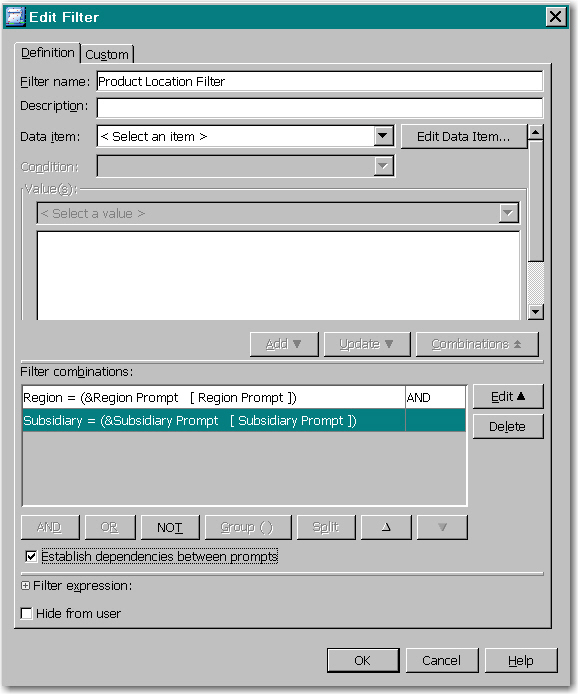
Here is what the completed filter looks like.
Test the prompt
- Select Tools ► Run a Test Query.
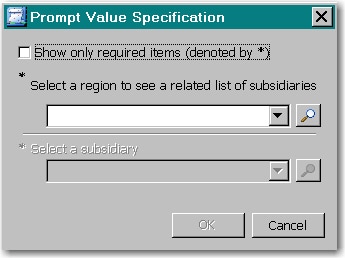
- Move the data items and the Product Location Filter to the Selected items box, and click Run Test. The prompts have no default values, so the prompt window initially looks like this:
- Select, for example, Eastern Europe as the region, and notice that the subsidiary list is subset to display only Eastern European cities.

Additional Documentation
For more information about SAS Information Map Studio, see the SAS Information Map Studio documentation page.
These sample files and code examples are provided by SAS Institute Inc. "as is" without warranty of any kind, either express or implied, including but not limited to the implied warranties of merchantability and fitness for a particular purpose. Recipients acknowledge and agree that SAS Institute shall not be liable for any damages whatsoever arising out of their use of this material. In addition, SAS Institute will provide no support for the materials contained herein.
Before submitting this code, these tasks must be done:
- A copy of the SHOES table and its library (in this sample, SASHELP) must be registered in metadata.
- The location of the information map (specified by mpath) and the PROC INFOMAPS statement must be modified to use the correct values for your environment.
Note: For information about registering libraries and tables, see the SAS 9.2 Intelligence Platform: Data Administration Guide.
%let mpath=/Shared Data/your-map-folder;

proc infomaps metauser="your-userID"
	metapass="your-password"
	metaserver="your-metadata-server.com"
	metaport=8561
	metarepository=Foundation
	mappath="&mpath";

* delete infomap "Shoe Sales";
open infomap "Shoe Sales";
insert datasource sasserver="SASApp"
	table="SASHELP"."Shoes" _all_;
save;
* list _all_;
run;
These sample files and code examples are provided by SAS Institute Inc. "as is" without warranty of any kind, either express or implied, including but not limited to the implied warranties of merchantability and fitness for a particular purpose. Recipients acknowledge and agree that SAS Institute shall not be liable for any damages whatsoever arising out of their use of this material. In addition, SAS Institute will provide no support for the materials contained herein.
| Type: | Sample |
| Topic: | Data Management ==> Data Sources ==> Information map Query and Reporting ==> Interactive Querying Query and Reporting |
| Date Modified: | 2009-10-21 20:24:25 |
| Date Created: | 2009-10-21 13:33:28 |
Operating System and Release Information
| Product Family | Product | Host | Product Release | SAS Release | ||
| Starting | Ending | Starting | Ending | |||
| SAS System | SAS Information Map Studio | Microsoft® Windows® for x64 | 4.2 | 9.2 TS2M0 | ||
| Microsoft Windows Server 2003 Datacenter Edition | 4.2 | 9.2 TS2M0 | ||||
| Microsoft Windows Server 2003 Enterprise Edition | 4.2 | 9.2 TS2M0 | ||||
| Microsoft Windows Server 2003 Standard Edition | 4.2 | 9.2 TS2M0 | ||||
| Microsoft Windows XP Professional | 4.2 | 9.2 TS2M0 | ||||
| Windows Vista | 4.2 | 9.2 TS2M0 | ||||