Sample 37055: How to use WINDOW and DISPLAY statements to enter user parameters
Overview
Use WINDOW and DISPLAY statements within a DATA step to request user input for a SAS program. These statements are part of Base SAS and do not require the use of frames or SAS/AF.
The window created by the sample code is displayed in the Results tab
Additional Documentation
WINDOW Statement
DISPLAY Statement
These sample files and code examples are provided by SAS Institute
Inc. "as is" without warranty of any kind, either express or implied, including
but not limited to the implied warranties of merchantability and fitness for a
particular purpose. Recipients acknowledge and agree that SAS Institute shall
not be liable for any damages whatsoever arising out of their use of this material.
In addition, SAS Institute will provide no support for the materials contained herein.
This sample demonstrates a blank field for the user to type in and a password field that does not display the characters typed.
data _NULL_ ;
length msg $50;

window parms
   #9  @26 'Please input requested parameters:'
           color=black
   #12  @19 'First Parameter: ' protect=yes +1 parm1 $10. attr=underline
   #16  @19 'Password: ' protect=yes +1 pwd $10. attr=underline display=no
   #18  @26 msg  protect=yes color=red
   #20 @27 'Press ENTER to continue';
do until (msg eq ' ');
  display parms;
  if pwd eq ' ' then
    msg = 'Password is a required field';
  else
    msg = ' ';
end;
call symputx('parm1',parm1);
call symputx('pwd',pwd);
stop;
run;

/* demonstrate that macro variables have been defined */
data _NULL_;

put "parm1=&parm1" / "pwd=&pwd";
run;
These sample files and code examples are provided by SAS Institute
Inc. "as is" without warranty of any kind, either express or implied, including
but not limited to the implied warranties of merchantability and fitness for a
particular purpose. Recipients acknowledge and agree that SAS Institute shall
not be liable for any damages whatsoever arising out of their use of this material.
In addition, SAS Institute will provide no support for the materials contained herein.
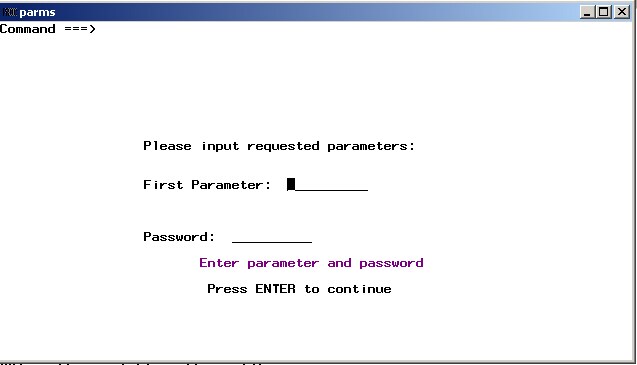
WINDOW and DISPLAY statements can be used in place of changing program statements to get user input that varies for each run of a SAS program.
| Type: | Sample |
| Topic: | SAS Reference ==> Statements ==> Window Display ==> DISPLAY
SAS Reference ==> Statements ==> Window Display ==> WINDOW
|
| Date Modified: | 2009-09-15 12:35:35 |
| Date Created: | 2009-09-01 17:19:46 |
Operating System and Release Information
| SAS System | Base SAS | z/OS | 9.1 TS1M3 | |
| Microsoft® Windows® for 64-Bit Itanium-based Systems | 9.1 TS1M3 | |
| Microsoft Windows Server 2003 Datacenter 64-bit Edition | 9.1 TS1M3 | |
| Microsoft Windows Server 2003 Enterprise 64-bit Edition | 9.1 TS1M3 | |
| Microsoft Windows XP 64-bit Edition | 9.1 TS1M3 | |
| Microsoft Windows 2000 Advanced Server | 9.1 TS1M3 | |
| Microsoft Windows 2000 Datacenter Server | 9.1 TS1M3 | |
| Microsoft Windows 2000 Server | 9.1 TS1M3 | |
| Microsoft Windows 2000 Professional | 9.1 TS1M3 | |
| Microsoft Windows NT Workstation | 9.1 TS1M3 | |
| Microsoft Windows Server 2003 Datacenter Edition | 9.1 TS1M3 | |
| Microsoft Windows Server 2003 Enterprise Edition | 9.1 TS1M3 | |
| Microsoft Windows Server 2003 Standard Edition | 9.1 TS1M3 | |
| Microsoft Windows Server 2008 | 9.1 TS1M3 | |
| Microsoft Windows XP Professional | 9.1 TS1M3 | |
| Windows Vista | 9.1 TS1M3 | |
| 64-bit Enabled AIX | 9.1 TS1M3 | |
| 64-bit Enabled HP-UX | 9.1 TS1M3 | |
| 64-bit Enabled Solaris | 9.1 TS1M3 | |
| HP-UX IPF | 9.1 TS1M3 | |
| Linux | 9.1 TS1M3 | |
| OpenVMS Alpha | 9.1 TS1M3 | |
| Tru64 UNIX | 9.1 TS1M3 | |


