Sample 36785: Creating a custom message to display when users log off or time-out of the SAS® Business Intelligence web applications
 |  |  |  |
Overview
In the initial configuration, the SAS Business Intelligence web applications such as SAS® Web Report Studio and SAS® Information Delivery Portal display a predefined message when users log off or time-out of the applications. You also can create your own custom message. For example, you might want to provide a reminder about outage times. This sample explains the steps to create a custom message that will display when users log off.
Note: You can create only one custom message. If you want a custom message to display when users log off and when they time-out, then you must write a message that applies to both cases.
Note: In SAS® 9.3 and later, this feature is documented in the SAS Intelligence Platform: Middle-Tier Administration Guide.
Change the log-off message options
- Log into SAS® Management Console using an administrative account such as sasadm@saspw.
- Navigate to Application Management ► Configuration Manager ► SAS Application Infrastructure.
- Right-click on SAS Application Infrastructure, and select Properties.
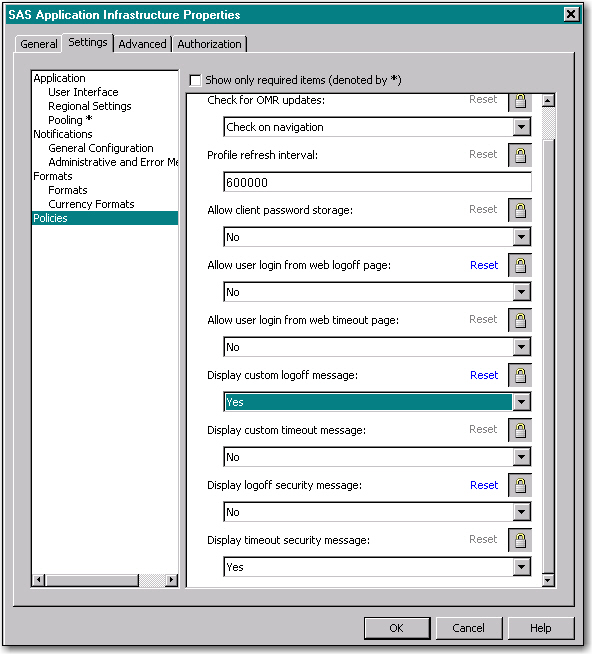
- Click the Settings tab and select Policies.
- Make the following policy changes to display the custom message and turn off the default message:
- For Display custom logoff message, select Yes.
- For Display logoff security message, select No.
- Click OK to save changes.
Note: For this example, the default time-out security message is still set to display when users time-out, and the option to allow users to log back in from the logoff page is turned off.
Create the custom message
- In your SAS installation directory, navigate to the
SASWebInfrastructurePlatform/9.x/Static/wars/sas.svcs.logondirectory. For example, if you are using SAS 9.3, the directory might beC:\Program Files\SASHome\SASWebInfrastructurePlatform\9.3\Static\wars\sas.svcs.logon. - In this directory is a file named
logoff_custom.jsp. Make a back up of this file before proceeding. - In a plain text editor, open
logoff_custom.jspand type in your custom message. Following is a sample message. - Save your changes to the file.
<%--
    This JSP file is included as part of the logoff.jsp if a site
    has enabled the custom logoff page message policy. The tags
    below are provided as a simple convenience for those sites
    that want to simply provide an embedded text message. These
    tags can be modified or removed if additional customization
    is required.
--%>
<span class="msg">

<p><b>Daily Outage Reminder:</b> 2 a.m. to 4 a.m.</p>

<p>Log back into <a href="http://machinename:8080/SASPortal">SAS Information Delivery Portal</a>.</p>
<p>Log back into <a href="http://machinename:8080/SASWebReportStudio">SAS Web Report Studio</a>.</p>

</span>
|
Rebuild the SAS® Web Infrastructure Platform
For instructions on rebuilding the SAS Web Infrastructure Platform, see the topic "Rebuilding the SAS Web Applications" in the SAS Intelligence Platform: Web Application Administration Guide for your version of SAS. Select to rebuild Web Infrastructure Platform 9.x.
Note: Rebuilding can take 15 minutes or more.
Redeploy the SAS Web Infrastructure Platform
After the SAS Web Infrastructure Platform is rebuilt, you must redeploy it. Follow the directions for your web application server in the topic "Redeploying the SAS Web Applications" in the SAS Intelligence Platform: Web Application Administration Guide for your version of SAS.
Test the message
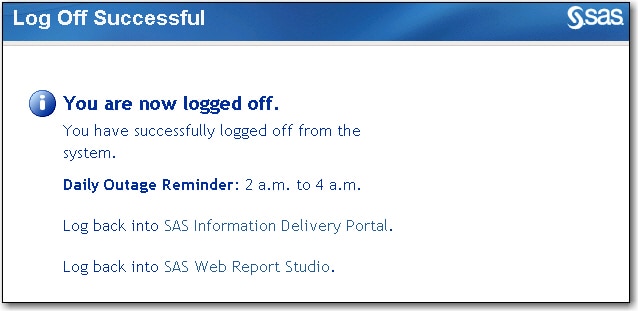
Log into a web application such as SAS Web Report Studio, and then click the Log Off link. You should see the custom message that you just created. In the example shown in the following display, the custom message begins at Daily Outage Reminder. The default information on this page varies slightly depending on your version of SAS.
These sample files and code examples are provided by SAS Institute Inc. "as is" without warranty of any kind, either express or implied, including but not limited to the implied warranties of merchantability and fitness for a particular purpose. Recipients acknowledge and agree that SAS Institute shall not be liable for any damages whatsoever arising out of their use of this material. In addition, SAS Institute will provide no support for the materials contained herein.
These sample files and code examples are provided by SAS Institute Inc. "as is" without warranty of any kind, either express or implied, including but not limited to the implied warranties of merchantability and fitness for a particular purpose. Recipients acknowledge and agree that SAS Institute shall not be liable for any damages whatsoever arising out of their use of this material. In addition, SAS Institute will provide no support for the materials contained herein.
| Type: | Sample |
| Topic: | System Administration ==> Web Query and Reporting |
| Date Modified: | 2009-08-10 16:37:03 |
| Date Created: | 2009-08-07 13:55:53 |
Operating System and Release Information
| Product Family | Product | Host | Product Release | SAS Release | ||
| Starting | Ending | Starting | Ending | |||
| SAS System | SAS Web Report Studio | z/OS | 4.2 | 9.2 TS2M0 | ||
| Microsoft® Windows® for x64 | 4.2 | 9.2 TS2M0 | ||||
| Microsoft Windows Server 2003 Datacenter Edition | 4.2 | 9.2 TS2M0 | ||||
| Microsoft Windows Server 2003 Enterprise Edition | 4.2 | 9.2 TS2M0 | ||||
| Microsoft Windows Server 2003 Standard Edition | 4.2 | 9.2 TS2M0 | ||||
| Microsoft Windows XP Professional | 4.2 | 9.2 TS2M0 | ||||
| Windows Vista | 4.2 | 9.2 TS2M0 | ||||
| 64-bit Enabled AIX | 4.2 | 9.2 TS2M0 | ||||
| 64-bit Enabled Solaris | 4.2 | 9.2 TS2M0 | ||||
| HP-UX IPF | 4.2 | 9.2 TS2M0 | ||||
| Linux for x64 | 4.2 | 9.2 TS2M0 | ||||
| Solaris for x64 | 4.2 | 9.2 TS2M0 | ||||
| SAS System | SAS Information Delivery Portal | z/OS | 4.2 | 9.2 TS2M0 | ||
| Microsoft® Windows® for x64 | 4.2 | 9.2 TS2M0 | ||||
| Microsoft Windows Server 2003 Datacenter Edition | 4.2 | 9.2 TS2M0 | ||||
| Microsoft Windows Server 2003 Enterprise Edition | 4.2 | 9.2 TS2M0 | ||||
| Microsoft Windows Server 2003 Standard Edition | 4.2 | 9.2 TS2M0 | ||||
| Microsoft Windows XP Professional | 4.2 | 9.2 TS2M0 | ||||
| Windows Vista | 4.2 | 9.2 TS2M0 | ||||
| 64-bit Enabled AIX | 4.2 | 9.2 TS2M0 | ||||
| 64-bit Enabled Solaris | 4.2 | 9.2 TS2M0 | ||||
| HP-UX IPF | 4.2 | 9.2 TS2M0 | ||||
| Linux for x64 | 4.2 | 9.2 TS2M0 | ||||
| Solaris for x64 | 4.2 | 9.2 TS2M0 | ||||
| SAS System | SAS Enterprise BI Server | z/OS | 4.2 | 9.2 TS2M0 | ||
| Microsoft® Windows® for 64-Bit Itanium-based Systems | 4.2 | 9.2 TS2M0 | ||||
| Microsoft Windows Server 2003 Datacenter 64-bit Edition | 4.2 | 9.2 TS2M0 | ||||
| Microsoft Windows Server 2003 Enterprise 64-bit Edition | 4.2 | 9.2 TS2M0 | ||||
| Microsoft Windows XP 64-bit Edition | 4.2 | 9.2 TS2M0 | ||||
| Microsoft® Windows® for x64 | 4.2 | 9.2 TS2M0 | ||||
| Microsoft Windows Server 2003 Datacenter Edition | 4.2 | 9.2 TS2M0 | ||||
| Microsoft Windows Server 2003 Enterprise Edition | 4.2 | 9.2 TS2M0 | ||||
| Microsoft Windows Server 2003 Standard Edition | 4.2 | 9.2 TS2M0 | ||||
| Microsoft Windows XP Professional | 4.2 | 9.2 TS2M0 | ||||
| Windows Vista | 4.2 | 9.2 TS2M0 | ||||
| 64-bit Enabled AIX | 4.2 | 9.2 TS2M0 | ||||
| 64-bit Enabled HP-UX | 4.2 | 9.2 TS2M0 | ||||
| 64-bit Enabled Solaris | 4.2 | 9.2 TS2M0 | ||||
| HP-UX IPF | 4.2 | 9.2 TS2M0 | ||||
| Linux | 4.2 | 9.2 TS2M0 | ||||
| Linux for x64 | 4.2 | 9.2 TS2M0 | ||||
| Solaris for x64 | 4.2 | 9.2 TS2M0 | ||||