Sample 35938: Create an axis label on multiple lines using the Graph Template Language (GTL)
This sample uses the Graph Template Language (GTL) to produce a layout with entries to simulate an axis label on multiple lines.
These sample files and code examples are provided by SAS Institute
Inc. "as is" without warranty of any kind, either express or implied, including
but not limited to the implied warranties of merchantability and fitness for a
particular purpose. Recipients acknowledge and agree that SAS Institute shall
not be liable for any damages whatsoever arising out of their use of this material.
In addition, SAS Institute will provide no support for the materials contained herein.
This sample uses the Graph Template Language (GTL) to produce a layout with entries to simulate an axis label on multiple lines.
proc template;
   define statgraph plot;
   begingraph;
   entrytitle 'Vertical Axis Label Spans Three Lines';
      layout overlay / yaxisopts=(label="Petal (*ESC*){unicode '000a'x}Width(*ESC*){unicode '000a'x}In mm");
         ellipse x=PetalLength y=PetalWidth / display=( outline fill )
                 type=predicted legendlabel="95% Prediction Ellipse" name="ELLIPSE";
         scatterplot x=PetalLength y=PetalWidth / primary=true
                 markerattrs=( color=navy symbol=circlefilled)
                 legendlabel="Petal Width (mm)" name="SCATTER";
         discretelegend "ELLIPSE" "SCATTER" / location=inside halign=right valign=bottom;
      endlayout;
   endgraph;
   end;
run;

ods listing close;
ods html file='multiple.html' path='.';

ods graphics / width=600px height=400px;
proc sgrender data=sashelp.iris template=plot;
run;

ods html close;
ods listing;
These sample files and code examples are provided by SAS Institute
Inc. "as is" without warranty of any kind, either express or implied, including
but not limited to the implied warranties of merchantability and fitness for a
particular purpose. Recipients acknowledge and agree that SAS Institute shall
not be liable for any damages whatsoever arising out of their use of this material.
In addition, SAS Institute will provide no support for the materials contained herein.
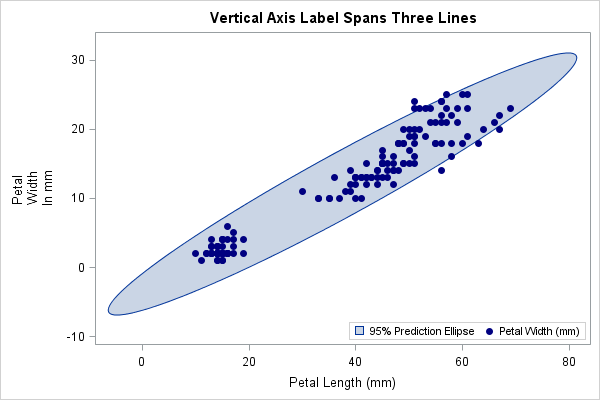
This sample uses the Graph Template Language (GTL) to produce a layout with entries to simulate an axis label on multiple lines.
| Type: | Sample |
| Topic: | SAS Reference ==> Procedures ==> SGRENDER
Query and Reporting ==> Creating Reports ==> Graphical ==> Graph Template Language (GTL)
|
| Date Modified: | 2009-06-11 13:49:53 |
| Date Created: | 2009-05-15 09:42:13 |
Operating System and Release Information
| SAS System | SAS/GRAPH | z/OS | 9.2 TS1M0 | |
| Microsoft® Windows® for 64-Bit Itanium-based Systems | 9.2 TS1M0 | |
| Microsoft Windows Server 2003 Datacenter 64-bit Edition | 9.2 TS1M0 | |
| Microsoft Windows Server 2003 Enterprise 64-bit Edition | 9.2 TS1M0 | |
| Microsoft Windows XP 64-bit Edition | 9.2 TS1M0 | |
| Microsoft® Windows® for x64 | 9.2 TS1M0 | |
| Microsoft Windows Server 2003 Datacenter Edition | 9.2 TS1M0 | |
| Microsoft Windows Server 2003 Enterprise Edition | 9.2 TS1M0 | |
| Microsoft Windows Server 2003 Standard Edition | 9.2 TS1M0 | |
| Microsoft Windows XP Professional | 9.2 TS1M0 | |
| Windows Vista | 9.2 TS1M0 | |
| 64-bit Enabled AIX | 9.2 TS1M0 | |
| 64-bit Enabled HP-UX | 9.2 TS1M0 | |
| 64-bit Enabled Solaris | 9.2 TS1M0 | |
| HP-UX IPF | 9.2 TS1M0 | |
| Linux | 9.2 TS1M0 | |
| Linux for x64 | 9.2 TS1M0 | |
| OpenVMS on HP Integrity | 9.2 TS1M0 | |
| Solaris for x64 | 9.2 TS1M0 | |


