Installation Note 35680: A "...not enough space to install" error occurs when you are installing the SAS® Solutions Services Add-In for Microsoft Office
 |  |  |  |
When installing the SAS Solutions Services Add-In for Microsoft Office, you might see the following error:
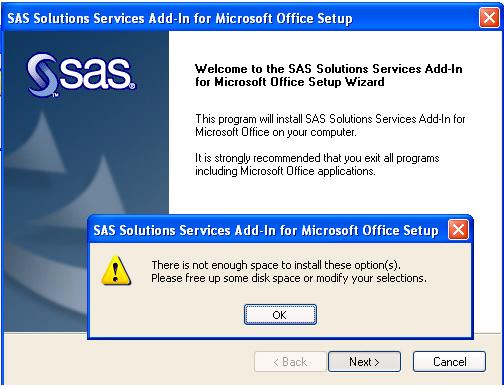
This problem occurs when the installer finds an Excel key in the registry for a version of Microsoft Office that is newer than the installed version. The installer does not handle this situation correctly. It continues without initializing the variable that is supposed to hold the Microsoft Office location. That uninitialized variable is used later to check disk space where the error is thrown.
This error puts the installer in a loop, at which point you have to use the Task Manager to terminate the setup process: Click Start ► Run and enter taskmgr.exe.
This problem was corrected in SAS Solutions Services Add-In for Microsoft Office version 1.4.1, which was released with Revision 39 (CDSet 69).
Note: CDSet Version/CDSet 69 is equivalent to Revision 39. An easy way to remember how to match the revision number to the CD Set number is to add 30 to the Revision number.
Operating System and Release Information
| Product Family | Product | System | SAS Release | |
| Reported | Fixed* | |||
| SAS System | SAS Add-in for Microsoft Office | Microsoft Windows 2000 Advanced Server | 9.1 TS1M3 SP4 | 9.1 TS1M3 SP4 |
| Microsoft Windows 2000 Datacenter Server | 9.1 TS1M3 SP4 | 9.1 TS1M3 SP4 | ||
| Microsoft Windows 2000 Server | 9.1 TS1M3 SP4 | 9.1 TS1M3 SP4 | ||
| Microsoft Windows 2000 Professional | 9.1 TS1M3 SP4 | 9.1 TS1M3 SP4 | ||
| Microsoft Windows NT Workstation | 9.1 TS1M3 SP4 | 9.1 TS1M3 SP4 | ||
| Microsoft Windows Server 2003 Datacenter Edition | 9.1 TS1M3 SP4 | 9.1 TS1M3 SP4 | ||
| Microsoft Windows Server 2003 Enterprise Edition | 9.1 TS1M3 SP4 | 9.1 TS1M3 SP4 | ||
| Microsoft Windows Server 2003 Standard Edition | 9.1 TS1M3 SP4 | 9.1 TS1M3 SP4 | ||
| Microsoft Windows XP Professional | 9.1 TS1M3 SP4 | 9.1 TS1M3 SP4 | ||
| Windows Vista | 9.1 TS1M3 SP4 | 9.1 TS1M3 SP4 | ||
| Windows Vista for x64 | 9.1 TS1M3 SP4 | 9.1 TS1M3 SP4 | ||
| Type: | Installation Note |
| Priority: | high |
| Date Modified: | 2013-01-04 17:32:16 |
| Date Created: | 2009-04-24 09:55:09 |