Problem Note 34938: The SAS Shared Services might fail to start/configure
 |  |  |  |
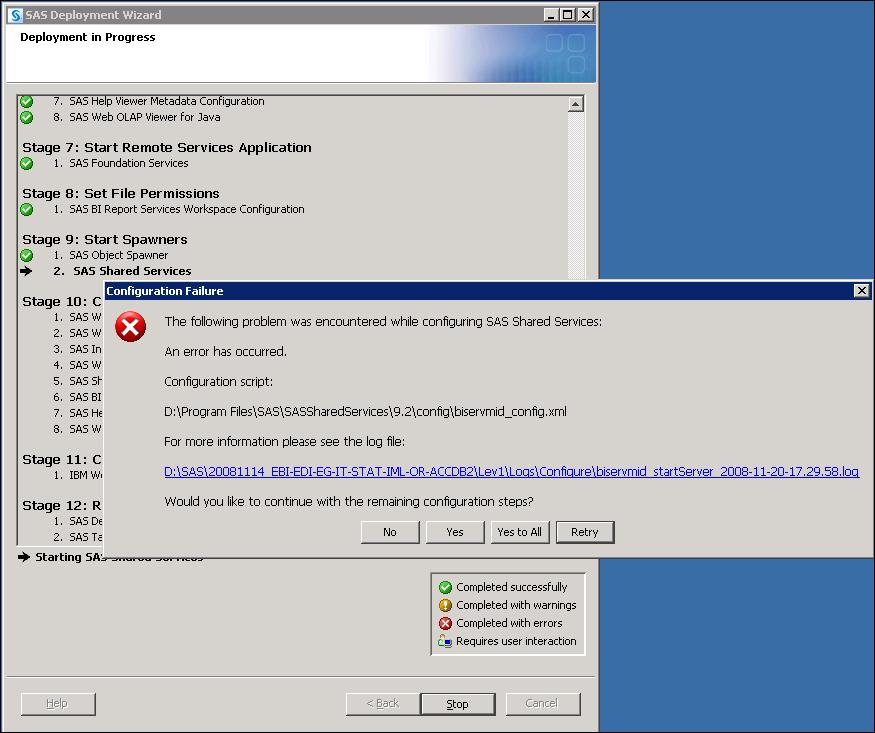
When configuring the SAS Shared Services, the pooled workspace server fails to start. If this happens, you might receive the following error:
   Configuration Failure:
   The following problem was encountered while configuring SAS Shared
   Services:
   An error has occured.
   Configuration script:
   C:\Program Files\SAS\SASSharedServices\9.2\config\biservmid_config.xml
   For more information please see the log file:
   C:\SAS\<configdir>\Lev1\Logs\Configure\biservmid_startServer_<date>.log
   Would you like to continue with the remaining configuration steps?
   No   Yes   Yes to All   Retry
In the biservmid_startServer_<date>.log you might see the following error message:
   --- Nested Exception ---
   C:\Program Files\SAS\SASSharedServices\9.2\config\biservmid_config.xml:583: The following error occurred
   while executing this line:
   C:\Program Files\SAS\SASDeploymentManager\9.2\products\cfgwizard__92210__prt__xx__sp0__1
   \Utilities\storageTasks.xml:79: org.apache.bsf.BSFException: The application script threw an exception:
   com.sas.services.connection.FatalConnectionFactoryException: Failed to start the server.
[stCreateMetadata] User Context: creating login credentials using one-time password.
[stCreateMetadata] EXCEPTION: Failed to start the server.
  [antcall] Exiting D:\\Program Files\\SAS\\SASSharedServices\\9.2\\config\\biservmid_config.xml.
BUILD FAILED
One cause for this problem on Windows is that during installation, the SAS installer did not domain qualify the SAS Spawned Servers user account (sassrv). This account is entered as a login in the SAS General Servers group, so it is required to have a domain prefix as are all Windows logins. Without domain qualifying the login, connections by this account become PUBLIC connections. By default, PUBLIC users cannot access the repository, which prevents the pooled workspace server from launching successfully.
To resolve this issue, perform the following steps:
- Open up the SAS® Management Console (Start ► Programs ► SAS ► SAS Management Console 9.2).
- Edit the login associated with the SAS General Servers group and add a domain to it (for example: myhost\sassrv). To do this click User Manager ► SAS General Servers ► Accounts ► Edit.
This error can also occur due to a failing or mis-configured pooled workspace server caused by a faulty level_env.bat file.
Operating System and Release Information
*
For software releases that are not yet generally available, the Fixed
Release is the software release in which the problem is planned to be
fixed.
Product Family Product System SAS Release Reported Fixed* SAS System BI Server Server Tier Package Microsoft Windows Server 2003 Datacenter Edition 9.2 TS2M0 Microsoft Windows Server 2003 Enterprise Edition 9.2 TS2M0 Microsoft Windows Server 2003 Standard Edition 9.2 TS2M0
| Type: | Problem Note |
| Priority: | high |
| Date Modified: | 2009-03-03 14:28:20 |
| Date Created: | 2009-02-25 08:36:15 |