Problem Note 30999: JavaScript error when creating a new dashboard
 |  |  |  |
When you select the New Dashboard link, you get a list of available indicators. From this list, you select the indicators that you want to use in the order in which you want them to appear in the dashboard.
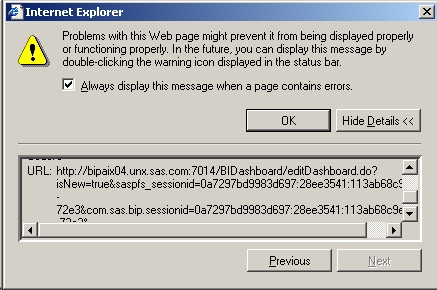
If you move an indicator from left to right or if you click OK at the bottom of the browser page, you might see an "Error on Page" JavaScript error dialog. If you double-click on the error icon to the left of the message, you might see the following JavaScript error:
Line: 189
Char: 3
Error: Object expected
Code: 0
URL: similar to the one from the picture below
To avoid the script error, place your cursor in the Dashboard name field and then press ENTER before moving an indicator or clicking OK.
Operating System and Release Information
| Product Family | Product | System | Product Release | SAS Release | ||
| Reported | Fixed* | Reported | Fixed* | |||
| SAS System | SAS BI Dashboard | 64-bit Enabled AIX | 3.1 | 9.1 TS1M3 SP4 | ||
| Microsoft® Windows® for x64 | 3.1 | 9.1 TS1M3 SP4 | ||||
| Microsoft Windows 2000 Advanced Server | 3.1 | 9.1 TS1M3 SP4 | ||||
| Microsoft Windows 2000 Datacenter Server | 3.1 | 9.1 TS1M3 SP4 | ||||
| Microsoft Windows 2000 Server | 3.1 | 9.1 TS1M3 SP4 | ||||
| Microsoft Windows 2000 Professional | 3.1 | 9.1 TS1M3 SP4 | ||||
| Microsoft Windows NT Workstation | 3.1 | 9.1 TS1M3 SP4 | ||||
| Microsoft Windows Server 2003 Datacenter Edition | 3.1 | 9.1 TS1M3 SP4 | ||||
| Microsoft Windows Server 2003 Enterprise Edition | 3.1 | 9.1 TS1M3 SP4 | ||||
| Microsoft Windows Server 2003 Standard Edition | 3.1 | 9.1 TS1M3 SP4 | ||||
| Microsoft Windows XP Professional | 3.1 | 9.1 TS1M3 SP4 | ||||
| Windows Vista | 3.1 | 9.1 TS1M3 SP4 | ||||
| Type: | Problem Note |
| Priority: | medium |
| Date Modified: | 2008-05-07 14:13:05 |
| Date Created: | 2008-01-24 02:10:55 |