Sample 26165: Generating Multiple Output Types at Once Using SAS/IntrNet
 |  |  |  |
An alternative approach to using ODS to generate Internet content by running the same program repeatedly, is to run such programs once and use multiple ODS statements in that single execution to generate all the different types or formats that might be desired, e.g., HTML, PDF, and RTF. Since the user’s browser might not be able to receive and format more than one of these types of formats at a time, alternative forms (e.g., PDF and RTF) can be generated and saved in a temporary file with links for the other forms of output.
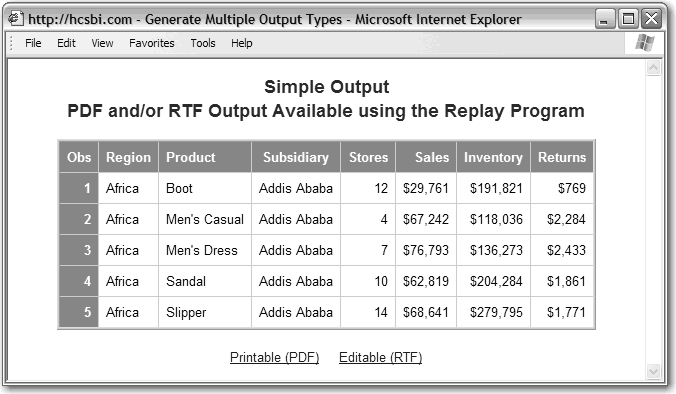
The following sample program demonstrates using the _tmpcat macro variable and the Replay program to address this common requirement for many Web-based reports: HTML-based versions for viewing on the screen with an option to generate PDF and RTF versions for printing or editing. See Figure 8.10.
Figure 8.10 HTML Output with Options for PDF or RTF Output
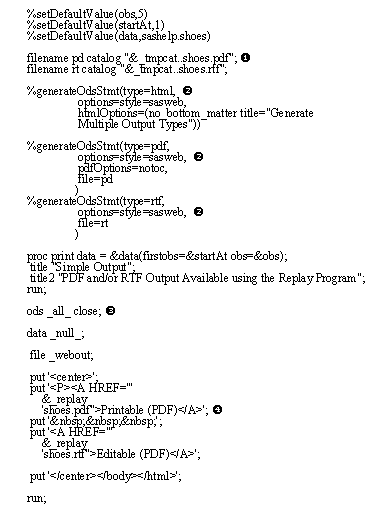
- Use the catalog access method to define filenames in the _tmpcat catalog for the PDF and RTF output.
- Generate multiple ODS statements: one for each content type desired. ODS will format the output as HTML, and direct it to _webout. ODS will also format the output as PDF and direct the output to a catalog entry. Finally, ODS will format the output as RTF and direct the output to a catalog entry. The program needs to be run only once. The PDF and RTF output is saved in the _tmpcat catalog (which causes the creation of a lightweight session).
- Run the report once and then close all the ODS output destinations.
- Generate links for the Replay program to return the PDF or RTF versions of the report. The NO_BOTTOM_MATTER option was used in the ODS HTML statement.
The _replay macro variable is used to generate the link, as it includes all the name/value pairs needed to generate a link for the Replay program, including all the fields to direct the request back to the same server. This is necessary since the _tmpcat catalog is available only to the specific server running the current request.
The value of _replay includes the value for the _tmpcat catalog; it is necessary only to append the entry name and type. _replay includes the & sign to separate the name/value pairs for the hyperlink and it is already quoted with a single quote (‘) so it can be used directly in a PUT statement.
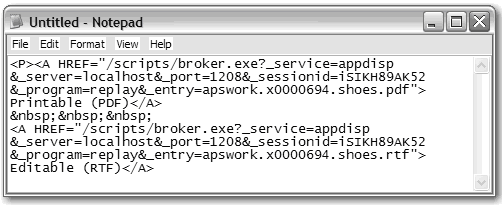
Upon examining the links (e.g., by selecting view source) that are generated to view the PDF and RTF output, you see that they contain session information (i.e., the URL contains values for _server, _port, and _sessionid). See Figure 8.11. Note that line feeds were added to the HTML source for readability. Writing content to the catalog referenced by the macro variable _tmpcat (referred to as the _tmpcat catalog) creates a lightweight session just as using ODS does. ODS also writes content to the _tmpcat catalog and then uses the replay link to surface that content when generating a page with mixed text and graphics. Selecting either of these links will produce the same output (except for the TITLE statement) shown in Figures 8.7 and 8.8. The difference here is that the program to create the report was only run once.
Figure 8.11 HTML Source Generated Using _replay Showing Session Information
The use of the _tmpcat catalog to create other components of the desired output (e.g., frame-based content, graphics, etc.) is a useful technique when the full overhead of sessions is not needed. Since using the _tmpcat catalog triggers a lightweight session, the Application Server deletes the catalog once the lightweight session expires. There is no need for the application to do this cleanup; unlike the situation if another storage location, e.g. a file system file, is used.
Note: The PDF is returned as an attachment since the Replay program generates the attachment header, by default, for PDF output. It is not possible to change or customize this behavior of the Replay program; it was implemented this way by SAS to deal with browser issues.
About the Author
Don Henderson is the Owner and Principal of Henderson Consulting Services, a SAS Affiliate Partner. Don has used SAS software since 1975, designing and developing business applications with a focus on data warehouse, business intelligence, and analytic applications. Don was one of the primary architects in the initial development and release of SAS/IntrNet software in 1996, and he was one of the original developers for the SAS/IntrNet Application Dispatcher. Don has presented numerous papers at SUGI and regional SAS user group meetings, and continues to be a great supporter of SAS and its products.
These sample files and code examples are provided by SAS Institute Inc. "as is" without warranty of any kind, either express or implied, including but not limited to the implied warranties of merchantability and fitness for a particular purpose. Recipients acknowledge and agree that SAS Institute shall not be liable for any damages whatsoever arising out of their use of this material. In addition, SAS Institute will provide no support for the materials contained herein.
These sample files and code examples are provided by SAS Institute Inc. "as is" without warranty of any kind, either express or implied, including but not limited to the implied warranties of merchantability and fitness for a particular purpose. Recipients acknowledge and agree that SAS Institute shall not be liable for any damages whatsoever arising out of their use of this material. In addition, SAS Institute will provide no support for the materials contained herein.
| Type: | Sample |
| Topic: | Internal Administration ==> BBU |
| Date Modified: | 2013-02-12 14:26:41 |
| Date Created: | 2007-07-14 03:02:57 |
Operating System and Release Information
| Product Family | Product | Host | Product Release | SAS Release | ||
| Starting | Ending | Starting | Ending | |||
| SAS System | SAS/IntrNet | z/OS | 9.2 | |||
| Microsoft® Windows® for 64-Bit Itanium-based Systems | 9.2 | |||||
| Microsoft Windows Server 2003 Datacenter 64-bit Edition | 9.2 | |||||
| Microsoft Windows Server 2003 Enterprise 64-bit Edition | 9.2 | |||||
| Microsoft Windows XP 64-bit Edition | 9.2 | |||||
| Microsoft® Windows® for x64 | 9.2 | |||||
| Microsoft Windows 8 Enterprise 32-bit | 9.2 | |||||
| Microsoft Windows 8 Enterprise x64 | 9.2 | |||||
| Microsoft Windows 8 Pro 32-bit | 9.2 | |||||
| Microsoft Windows 8 Pro x64 | 9.2 | |||||
| Microsoft Windows 8.1 Enterprise 32-bit | 9.2 | |||||
| Microsoft Windows 8.1 Enterprise x64 | 9.2 | |||||
| Microsoft Windows 8.1 Pro 32-bit | 9.2 | |||||
| Microsoft Windows 8.1 Pro x64 | 9.2 | |||||
| Microsoft Windows 10 | 9.2 | |||||
| Microsoft Windows 11 | 9.2 | |||||
| Microsoft Windows 95/98 | 9.2 | |||||
| Microsoft Windows 2000 Advanced Server | 9.2 | |||||
| Microsoft Windows 2000 Datacenter Server | 9.2 | |||||
| Microsoft Windows 2000 Server | 9.2 | |||||
| Microsoft Windows 2000 Professional | 9.2 | |||||
| Microsoft Windows NT Workstation | 9.2 | |||||
| Microsoft Windows Server 2003 Datacenter Edition | 9.2 | |||||
| Microsoft Windows Server 2003 Enterprise Edition | 9.2 | |||||
| Microsoft Windows Server 2003 Standard Edition | 9.2 | |||||
| Microsoft Windows Server 2003 for x64 | 9.2 | |||||
| Microsoft Windows Server 2008 | 9.2 | |||||
| Microsoft Windows Server 2008 R2 | 9.2 | |||||
| Microsoft Windows Server 2008 for x64 | 9.2 | |||||
| Microsoft Windows Server 2012 Datacenter | 9.2 | |||||
| Microsoft Windows Server 2012 R2 Datacenter | 9.2 | |||||
| Microsoft Windows Server 2012 R2 Std | 9.2 | |||||
| Microsoft Windows Server 2012 Std | 9.2 | |||||
| Microsoft Windows Server 2016 | 9.2 | |||||
| Microsoft Windows Server 2019 | 9.2 | |||||
| Microsoft Windows Server 2022 | 9.2 | |||||
| Microsoft Windows XP Professional | 9.2 | |||||
| Windows 7 Enterprise 32 bit | 9.2 | |||||
| Windows 7 Enterprise x64 | 9.2 | |||||
| Windows 7 Home Premium 32 bit | 9.2 | |||||
| Windows 7 Home Premium x64 | 9.2 | |||||
| Windows 7 Professional 32 bit | 9.2 | |||||
| Windows 7 Professional x64 | 9.2 | |||||
| Windows 7 Ultimate 32 bit | 9.2 | |||||
| Windows 7 Ultimate x64 | 9.2 | |||||
| Windows Millennium Edition (Me) | 9.2 | |||||
| Windows Vista | 9.2 | |||||
| Windows Vista for x64 | 9.2 | |||||
| 64-bit Enabled AIX | 9.2 | |||||
| 64-bit Enabled HP-UX | 9.2 | |||||
| 64-bit Enabled Solaris | 9.2 | |||||
| HP-UX IPF | 9.2 | |||||
| Linux | 9.2 | |||||
| Linux for x64 | 9.2 | |||||
| OpenVMS on HP Integrity | 9.2 | |||||
| Solaris for x64 | 9.2 | |||||