Sample 26103: How to Override the Table Cell Renderer of the JSP TableView
 |  |  |  |  |  |
Overview
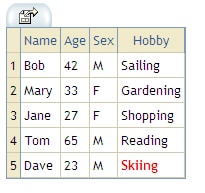
This sample demonstrates how to override the default table cell renderer in order to extend the functionality of the JSP TableView component in SAS® AppDev Studio. The sample enables the JSP TableView to highlight a cell if it matches a specific keyword. This functionality could be useful if you are searching for a particular keyword in a table.
The sample is based on the Model 2 Servlet template that is available in SAS AppDev Studio. For the simplicity of this example, we create our own static data model for the TableView. In most real world use cases, the user will connect to live data and not create their own data model. See Sample 25997 for more information about how to connect the TableView to live data.
Additional Documentation
- For a list of samples for common tasks, see SAS Note 32218.
- The SAS AppDev Studio Developer's Site contains detailed information that will assist you when developing Web applications with SAS AppDev Studio, including an API reference and the custom tag reference for the sas tagset.
These sample files and code examples are provided by SAS Institute Inc. "as is" without warranty of any kind, either express or implied, including but not limited to the implied warranties of merchantability and fitness for a particular purpose. Recipients acknowledge and agree that SAS Institute shall not be liable for any damages whatsoever arising out of their use of this material. In addition, SAS Institute will provide no support for the materials contained herein.
Instructions
- Build a new Web application project in SAS AppDev Studio by using the Model 2 Servlet template.
- The template will generate a servlet and a JSP file, which, by default, are named Model2ExampleControllerServlet.java and Model2ExampleViewer.jsp. Replace the contents of these files with the code below.
- Create a package called samples, and, in that class, create the HighlightKeywordTableCellRenderer java class by using the code provided below.
- Execute the servlet on the test Tomcat server.
Tip: For help with building a Web application project and testing a Web application, see SAS Note 32218.
Code for HighlightKeywordTableCellRenderer.java
package samples;


import java.io.IOException;
import java.io.PrintWriter;

import com.sas.actionprovider.ActionList;
import com.sas.servlet.tbeans.StyleInfo;
import com.sas.servlet.tbeans.tableview.AbstractBaseTableView;
import com.sas.servlet.tbeans.tableview.html.DefaultTableCellRenderer;

public class HighlightKeywordTableCellRenderer extends DefaultTableCellRenderer {

	private String keyword;

	private String styleClass;

	public HighlightKeywordTableCellRenderer(String keyword, String styleClass) {
		super();
		this.keyword = keyword == null ? "" : keyword;
		this.styleClass = styleClass;
	}

	public void write(PrintWriter out, AbstractBaseTableView tableview,
			Object value, String name, ActionList actions) throws IOException {
		if (null != value && keyword.equalsIgnoreCase(value.toString().trim())) {
			StyleInfo s = (StyleInfo) super.getStyleInfo().clone();
			s.setClassid(styleClass);
			super.setStyleInfo(s);
		}
		super.write(out, tableview, value, name, actions);
	}

}
|
Code for Model2ExampleViewer.jsp
<%@ taglib uri="http://www.sas.com/taglib/sas" prefix="sas" %>
<%@ page pageEncoding="UTF-8"%>

<html>
<head>
    <link href="styles/sasComponents.css" rel="STYLESHEET" type="text/css">

<!--  The style below is used by the table view to highlight cells -->
	<style type="text/css">
		td.keywordMatchCell{
			border-bottom: #CFCBB1 1px solid;
			border-right: #CFCBB1 1px solid;
			border-left: none;
			border-top: none;
			color: red;
			font: x-small 'trebuchet ms',Helvetica,sans-serif;
			font-weight: bold;
		}
	</style>

</head>
<body>

<sas:TableViewComposite ref="tableView"  scope="session" render="true">
		<sas:RelationalMenuBar />
</sas:TableViewComposite>


</body>
</html>
|
Code for Model2ExampleControllerServlet.java
Required changes
If you did not use the default values during the generation of the project, you might need to update the following values.
- The package for the servlet.
package servlets; - The servlet name.
public class Model2ExampleControllerServlet.java ... - The URL mapping for the action provider, which must match the servlet mapping for the servlet.
sas_actionProvider.setControllerURL(request.getContextPath()+ "/Model2Example"); - The jsp page that the servlet forwards to.
RequestDispatcher rd = getServletContext().getRequestDispatcher("/Model2ExampleViewer.jsp");
package servlets;

import java.io.IOException;

import javax.servlet.RequestDispatcher;
import javax.servlet.ServletException;
import javax.servlet.http.HttpServletRequest;
import javax.servlet.http.HttpServletResponse;
import javax.servlet.http.HttpSession;
import javax.swing.table.DefaultTableModel;
import javax.swing.table.TableModel;

import samples.HighlightKeywordTableCellRenderer;

import com.sas.actionprovider.HttpActionProvider;
import com.sas.servlet.tbeans.tableview.html.TableView;
import com.sas.servlet.tbeans.tableview.html.TableViewComposite;
import com.sas.servlet.tbeans.tableview.html.TableViewCompositeKeysInterface;
import com.sas.swing.models.SortableTableModelAdapter;

public class Model2ExampleControllerServlet extends
		javax.servlet.http.HttpServlet {
	// Declare a default version ID since parent class implements
	// java.io.Serializable
	private static final long serialVersionUID = 1L;

	/*
	 * doPost() Respond to the Post message.
	 */
	public void doPost(HttpServletRequest request, HttpServletResponse response)
			throws ServletException, IOException {
		// Note: Calling doGet to provide same behavior to POST and GET HTTP
		// methods.
		doGet(request, response);
	}

	/*
	 * doGet() Respond to the Get message.
	 */
	public void doGet(HttpServletRequest request, HttpServletResponse response)
			throws ServletException, IOException {
		// Note: Add User DO_GET code here
		HttpSession session = request.getSession();

		// Setup the ActionProvider
		HttpActionProvider actionProvider = null;
		synchronized (session) {
			if (session != null) {
				actionProvider = (HttpActionProvider) session
						.getAttribute("actionProvider");
			}
			// if ActionProvider is null, create one and put it on the session
			if (actionProvider == null) {
				actionProvider = new HttpActionProvider();
				actionProvider.setLocale(request.getLocale());
				actionProvider.setControllerURL(request.getContextPath()
						+ "/Model2Example");
				actionProvider.setName("actionProvider");
				// store object in its scope
				if (session != null)
					session.setAttribute("actionProvider", actionProvider);
			}
			// else execute the ActionProvider command
			else {
				actionProvider.executeCommand(request, response, response
						.getWriter());
			}
		}

		TableViewComposite tvc = null;
		synchronized (session) {
			if (session != null) {
				tvc = (TableViewComposite) session.getAttribute("tableView");
			}
			if (null == tvc) {
				tvc = new TableViewComposite();
				String columnNames[] = { "Name", "Age", "Sex", "Hobby" };
				String data1[] = { "Bob", "42", "M", "Sailing" };
				String data2[] = { "Mary", "33", "F", "Gardening" };
				String data3[] = { "Jane", "27", "F", "Shopping" };
				String data4[] = { "Tom", "65", "M", "Reading" };
				String data5[] = { "Dave", "23", "M", "Skiing" };
				Object data[][] = new Object[5][4];
				data[0] = data1;
				data[1] = data2;
				data[2] = data3;
				data[3] = data4;
				data[4] = data5;
				TableModel defaultTableModel = new DefaultTableModel(data,
						columnNames);
				SortableTableModelAdapter adapter = new SortableTableModelAdapter(
						defaultTableModel);
				tvc.setModel(adapter);

				// set the actionProvider on the table
				tvc.setActionProvider(actionProvider);
				session.setAttribute("tableView", tvc);

				// Add the custom renderer

				// We'll hardcode the search word, and the style we are going to
				// use to match
				String keywordStyleClass = "keywordMatchCell";
				String keywordToHighlight = "skiing";

				TableView tv = (TableView) tvc
						.getComponent(TableViewCompositeKeysInterface.TABLEVIEW_TABLEDATA);
				HighlightKeywordTableCellRenderer cellRenderer = new HighlightKeywordTableCellRenderer(
						keywordToHighlight, keywordStyleClass);
				tv.setDefaultRenderer(cellRenderer);

			}

		}

		RequestDispatcher rd = getServletContext().getRequestDispatcher(
				"/Model2ExampleViewer.jsp");
		rd.forward(request, response);

	}
}
|
These sample files and code examples are provided by SAS Institute Inc. "as is" without warranty of any kind, either express or implied, including but not limited to the implied warranties of merchantability and fitness for a particular purpose. Recipients acknowledge and agree that SAS Institute shall not be liable for any damages whatsoever arising out of their use of this material. In addition, SAS Institute will provide no support for the materials contained herein.
| Type: | Sample |
| Date Modified: | 2008-08-04 13:34:22 |
| Date Created: | 2007-01-17 03:03:09 |
Operating System and Release Information
| Product Family | Product | Host | Product Release | SAS Release | ||
| Starting | Ending | Starting | Ending | |||
| SAS System | SAS AppDev Studio | Microsoft® Windows® for x64 | 3.2 | 9.1 TS1M3 SP4 | ||
| Microsoft Windows 2000 Advanced Server | 3.2 | 9.1 TS1M3 SP4 | ||||
| Microsoft Windows 2000 Datacenter Server | 3.2 | 9.1 TS1M3 SP4 | ||||
| Microsoft Windows 2000 Server | 3.2 | 9.1 TS1M3 SP4 | ||||
| Microsoft Windows 2000 Professional | 3.2 | 9.1 TS1M3 SP4 | ||||
| Microsoft Windows NT Workstation | 3.2 | 9.1 TS1M3 SP4 | ||||
| Microsoft Windows Server 2003 Datacenter Edition | 3.2 | 9.1 TS1M3 SP4 | ||||
| Microsoft Windows Server 2003 Enterprise Edition | 3.2 | 9.1 TS1M3 SP4 | ||||
| Microsoft Windows Server 2003 Standard Edition | 3.2 | 9.1 TS1M3 SP4 | ||||
| Microsoft Windows XP Professional | 3.2 | 9.1 TS1M3 SP4 | ||||
| Windows Vista | 3.2 | 9.1 TS1M3 SP4 | ||||