Sample 26029: How to Create a JSP ComboBoxView
 |  |  |  |  |  |
Overview
The ComboBoxView is a TransformationBeanTM that generates the appropriate HTML 4.0 and JavaScript for creating a ComboBoxView. The ComboBoxView is a menu that supports one selection from a drop-down list of items. The drop-down list can contain text, images, or both together.
Here are the steps for creating a simple ComboBoxView:
- Create a ComboBoxModel.
- Create a ComboBoxView.
- Set the model on the ComboBoxView.
- Set the setEditable() method to true.
- Set the renderUsingIFrame() method to true.
- Render the ComboBoxView.
This sample shows how to create and render a JSP ComboBoxView. The Full Code tab contains the full code for the default ComboBoxView, and also the customizations below.
The best practice for a JSP Web application is a JSP architecture that uses servlets and .jsp files in order to dynamically deliver content. JSP, Model 2 uses the Model-View-Controller paradigm. For simplicity, this sample does not use the JSP Model 2 approach.
Customizations
This example contains the following customizations:
A default ComboBoxView looks like the following:

Changing style classes
You might want to change the styles of the components in the ComboBoxView in order to get a different look.To change the styles, you should perform these steps:
- Add the following styles in the <head> section of your JSP file:
- Edit your ComboBoxView tag to set a new style name. Add the following line inside the tag:
<style>
	   .myStyle {background: yellow; border:none; width:60px;}
	</style>
|
<sas:StyleMapKey key="comboboxview_label_div_xp" classid="myStyle"/>
|
The resulting ComboBoxView tag should look like this:
	<sas:ComboBoxView id="cb1" model="model">
        	<sas:StyleMapKey key="comboboxview_label_div_xp" classid="myStyle"/>
    	</sas:ComboBoxView>
|
Your new ComboBoxView will look like the following when you select an item in the list:

Adding the ComboBoxView to a form
You will probably want to perform some action when the user submits the items in the ComboBoxView. To implement that, you will need to add your ComboBoxView to a form and write some code that will run when the Submit button is clicked.To add your CheckBoxList to a form and print out information about the selections when the user clicks the push button to submit the form, follow these steps:
- Put your ComboBoxView inside of a form and set the action for the form to call pushButtonSubmit.jsp. The resulting JSP code would look like the following.
- Create a new file called pushButtonSubmit.jsp in your Web application directory. Paste the following code into your new JSP file.
<sas:Form id="form1" name="form1" method="get" action="pushButtonSubmit.jsp" >
   <center>
	<sas:ComboBoxView id="cb1" model="model">
    </sas:ComboBoxView>
	 <br>
	 <sas:PushButton id="pushButton1" text="PushButton" />
	</center>
</sas:Form>
|
<html>
   <head>
      <title>Submit PushButton Processing</title>
   </head>
   <body>
<%

   java.util.Enumeration params = request.getParameterNames();
   while(params.hasMoreElements())
   {
       String property = (String)params.nextElement();
       out.println("<p>The request attributes are: '" + property + "'</p>");
       String[] cmbObj2 = (String[])request.getParameterValues(property);
       for(int i=0; i < cmbObj2.length; i++)
           out.println("<p>The object was: '" + cmbObj2[i] + "'</p>");
   }

%>
   </body>
</html>
|
Your ComboBoxView will look like this:
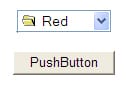
When you click the push button, you will get a page that looks like this:

Additional Documentation
- For a list of samples for common tasks, see SAS Note 32218.
- The SAS AppDev Studio Developer's Site contains detailed information that will assist you when developing Web applications with SAS AppDev Studio, including an API reference and the custom tag reference for the sas tagset.
These sample files and code examples are provided by SAS Institute Inc. "as is" without warranty of any kind, either express or implied, including but not limited to the implied warranties of merchantability and fitness for a particular purpose. Recipients acknowledge and agree that SAS Institute shall not be liable for any damages whatsoever arising out of their use of this material. In addition, SAS Institute will provide no support for the materials contained herein.
Instructions
- Build a new Web application project in SAS AppDev Studio. No Web application template is necessary.
- Create new JSP pages using the code below.
- Execute the JSP page on the test Tomcat server.
Tip: For help with building a Web application project and testing a Web application, see SAS Note 32218.
Code for default ComboBoxView
<%@ taglib uri="http://www.sas.com/taglib/sas" prefix="sas" %>
<%@ page pageEncoding="UTF-8"%>
<%@page import="javax.swing.DefaultComboBoxModel"%>
<%@page import="com.sas.servlet.tbeans.models.JavaScriptNode"%>
<html>
<head>
    <link href="styles/sasComponents.css" rel="STYLESHEET" type="text/css">

</head>
<body>

<%
	//create a DefaultListModel
	DefaultComboBoxModel model = new DefaultComboBoxModel();

	//Create the Nodes
	JavaScriptNode node1 =
		new JavaScriptNode();
	node1.setText("Red");
	node1.setValue("r");
	node1.setImage("folderOpen.gif");

	JavaScriptNode node2 =
		new JavaScriptNode();
	node2.setText("Blue");
	node2.setValue("b");
	node2.setImage("folderOpen.gif");

	JavaScriptNode node3 =
		new JavaScriptNode();
	node3.setText("Green");
	node3.setValue("g");
	node3.setImage("folderOpen.gif");

	JavaScriptNode node4 =
		new JavaScriptNode();
	node4.setText("Aqua");
	node4.setValue("a");
	node4.setImage("folderOpen.gif");

	JavaScriptNode node5 =
		new JavaScriptNode();
	node5.setText("Purple");
	node5.setValue("p");
	node5.setImage("folderOpen.gif");

	model.addElement(node1);
	model.addElement(node2);
	model.addElement(node3);
	model.addElement(node4);
	model.addElement(node5);
	//Set it on the session
	if (session != null){
		session.setAttribute("model", model);
	}
%>

	<sas:ComboBoxView id="cb1" model="model">
    </sas:ComboBoxView>

</body>
</html>
|
Code for customization - Customizing the Style by Changing Style Classes
<%@ taglib uri="http://www.sas.com/taglib/sas" prefix="sas" %>
<%@ page pageEncoding="UTF-8"%>
<%@page import="javax.swing.DefaultComboBoxModel"%>
<%@page import="com.sas.servlet.tbeans.models.JavaScriptNode"%>
<html>
<head>
    <link href="styles/sasComponents.css" rel="STYLESHEET" type="text/css">

	<style>
	   .myStyle {background: yellow; border:none; width:60px;}
	</style>
</head>
<body>

<%
	//create a DefaultListModel
	DefaultComboBoxModel model = new DefaultComboBoxModel();

	//Create the Nodes
	JavaScriptNode node1 =
		new JavaScriptNode();
	node1.setText("Red");
	node1.setValue("r");
	node1.setImage("folderOpen.gif");

	JavaScriptNode node2 =
		new JavaScriptNode();
	node2.setText("Blue");
	node2.setValue("b");
	node2.setImage("folderOpen.gif");

	JavaScriptNode node3 =
		new JavaScriptNode();
	node3.setText("Green");
	node3.setValue("g");
	node3.setImage("folderOpen.gif");

	JavaScriptNode node4 =
		new JavaScriptNode();
	node4.setText("Aqua");
	node4.setValue("a");
	node4.setImage("folderOpen.gif");

	JavaScriptNode node5 =
		new JavaScriptNode();
	node5.setText("Purple");
	node5.setValue("p");
	node5.setImage("folderOpen.gif");

	model.addElement(node1);
	model.addElement(node2);
	model.addElement(node3);
	model.addElement(node4);
	model.addElement(node5);
	//Set it on the session
	if (session != null){
		session.setAttribute("model", model);
	}
%>

	<sas:ComboBoxView id="cb1" model="model">
        	<sas:StyleMapKey key="comboboxview_label_div_xp" classid="myStyle"/>
    	</sas:ComboBoxView>

</body>
</html>
|
Code for customization - Adding the ComboBoxView to a Form
Note: To use this page, you must also create the pushButtonSubmit.jsp file from the code located after this code.
<%@ taglib uri="http://www.sas.com/taglib/sas" prefix="sas" %>
<%@ page pageEncoding="UTF-8"%>
<%@page import="javax.swing.DefaultComboBoxModel"%>
<%@page import="com.sas.servlet.tbeans.models.JavaScriptNode"%>
<html>
<head>
    <link href="styles/sasComponents.css" rel="STYLESHEET" type="text/css">

</head>
<body>

<%
	//create a DefaultListModel
	DefaultComboBoxModel model = new DefaultComboBoxModel();

	//Create the Nodes
	JavaScriptNode node1 =
		new JavaScriptNode();
	node1.setText("Red");
	node1.setValue("r");
	node1.setImage("folderOpen.gif");

	JavaScriptNode node2 =
		new JavaScriptNode();
	node2.setText("Blue");
	node2.setValue("b");
	node2.setImage("folderOpen.gif");

	JavaScriptNode node3 =
		new JavaScriptNode();
	node3.setText("Green");
	node3.setValue("g");
	node3.setImage("folderOpen.gif");

	JavaScriptNode node4 =
		new JavaScriptNode();
	node4.setText("Aqua");
	node4.setValue("a");
	node4.setImage("folderOpen.gif");

	JavaScriptNode node5 =
		new JavaScriptNode();
	node5.setText("Purple");
	node5.setValue("p");
	node5.setImage("folderOpen.gif");

	model.addElement(node1);
	model.addElement(node2);
	model.addElement(node3);
	model.addElement(node4);
	model.addElement(node5);
	//Set it on the session
	if (session != null){
		session.setAttribute("model", model);
	}
%>

<sas:Form id="form1" name="form1" method="get" action="pushButtonSubmit.jsp" >
   <center>
	<sas:ComboBoxView id="cb1" model="model">
    </sas:ComboBoxView>
	 <br>
	 <sas:PushButton id="pushButton1" text="PushButton" />
	</center>
</sas:Form>

</body>
</html>
|
Code for pushButtonSubmit.jsp
<html>
<head>
<title>Submit PushButton Processing</title>
</head>

<body>

<%
	java.util.Enumeration params = request.getParameterNames();
	while(params.hasMoreElements()) {
		String property = (String)params.nextElement();
		out.println("<p>The request attributes are: '" + property + "'</p>");
		String[] cmbObj2 = (String[])request.getParameterValues(property);

		for(int i=0; i < cmbObj2.length; i++)
			out.println("<p>The object was: '" + cmbObj2[i] + "'</p>");
		}
%>

</body>
</html>
|
These sample files and code examples are provided by SAS Institute Inc. "as is" without warranty of any kind, either express or implied, including but not limited to the implied warranties of merchantability and fitness for a particular purpose. Recipients acknowledge and agree that SAS Institute shall not be liable for any damages whatsoever arising out of their use of this material. In addition, SAS Institute will provide no support for the materials contained herein.
Default ComboBoxView
Changing style classes
Adding the ComboBoxView to a form
| Type: | Sample |
| Date Modified: | 2008-08-29 12:27:30 |
| Date Created: | 2006-02-14 10:46:21 |
Operating System and Release Information
| Product Family | Product | Host | Product Release | SAS Release | ||
| Starting | Ending | Starting | Ending | |||
| SAS System | SAS AppDev Studio | Microsoft Windows Server 2003 Enterprise Edition | 3.2 | 9.1 TS1M3 SP4 | ||
| Microsoft Windows Server 2003 Datacenter Edition | 3.2 | 9.1 TS1M3 SP4 | ||||
| Microsoft Windows NT Workstation | 3.2 | 9.1 TS1M3 SP4 | ||||
| Microsoft Windows 2000 Professional | 3.2 | 9.1 TS1M3 SP4 | ||||
| Microsoft Windows 2000 Server | 3.2 | 9.1 TS1M3 SP4 | ||||
| Microsoft Windows 2000 Datacenter Server | 3.2 | 9.1 TS1M3 SP4 | ||||
| Microsoft Windows 2000 Advanced Server | 3.2 | 9.1 TS1M3 SP4 | ||||
| Microsoft® Windows® for x64 | 3.2 | 9.1 TS1M3 SP4 | ||||
| Microsoft Windows Server 2003 Standard Edition | 3.2 | 9.1 TS1M3 SP4 | ||||
| Microsoft Windows XP Professional | 3.2 | 9.1 TS1M3 SP4 | ||||
| Windows Vista | 3.2 | 9.1 TS1M3 SP4 | ||||