Sample 26023: How to Create a Swing DualTreeSelector
 |  |  |  |  |  |
Overview
The DualTreeSelector uses two tree views that enable you to move single or multiple items between the tree views and submit the selected item(s) that are on the target tree view. This sample shows how to create a Swing DualTreeSelector.
Here are the steps for creating a simple DualTreeSelector:
- Create a TreeModel.
- Create a DualTreeSelector.
- Set the model on the DualTreeSelector.
The resulting code would look something like this:
DefaultTreeModel sourceModel = new DefaultTreeModel();
...
add nodes to your TreeModel
...
DualTreeSelector dualTreeSelector = new DualTreeSelector();
DualTreeSelector.setModel(sourceModel);
The code shown on the Full Code tab will create a TreeModel and display a default DualTreeSelector with that model. It contains the customizations shown below, but they are commented out. You can remove the comment delimiters that surround the customization code in order to see that customization in your Java application.
Customizations
This sample shows the following customizations:- Setting root node visibility
- Designating a specific node as the target of a move
- Setting parent nodes to be non-movable
A default DualTreeSelector looks like the following after an item is selected:

Setting root node visibility
By default, the root node of the source and target trees are visible. To hide the root nodes, add the following lines of code after you create the DualTreeSelector:
dualTreeSelector.setSourceRootVisible(false);
dualTreeSelector.setTargetRootVisible(false);
You will see the root nodes disappear:

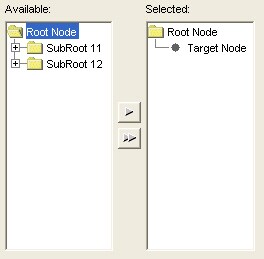
Designating a specific node as the target of a move
Moving a node from the source tree to the target tree usually involves moving it to the same parenting structure. By using this customization, your application can have the items moved to a specific node in the target tree. You can either get a node from the target tree's model or you can predefine items to be populated in the target tree.
To create and set a new target tree model, add the following lines of code BEFORE the line of code that reads:
dualTreeSelector.setTargetModel(treeModel2);
DefaultMutableTreeNode targetNode = new DefaultMutableTreeNode("Target Node");

treeModel2.insertNodeInto(targetNode, rootNode2, 0);

dualTreeSelector.setSourceTargetNode(targetNode)You will see your target node show up in the target (or selected) tree. When you select a node from the source tree, this is where that node will show up in the target tree.
Setting parent nodes to be non-movable
Tree nodes that are parent nodes can be manipulated so that they cannot be moved to the target tree. By default, parent nodes can be moved to the target tree along with their child nodes. Sometimes your application needs to restrict the movement of parent nodes. To disable the movement of parent nodes, add the following line of code after you create the DualTreeSelector:
dualTreeSelector.setParentNodesMoveable(false);
You will see that only children, and not parent nodes, will show up in the target tree:

Additional Documentation
- For a list of samples for common tasks, see SAS Note 32218.
- The SAS AppDev Studio Developer's Site contains detailed information that will assist you when developing Web applications with SAS AppDev Studio, including an API reference and the custom tag reference for the sas tagset.
These sample files and code examples are provided by SAS Institute Inc. "as is" without warranty of any kind, either express or implied, including but not limited to the implied warranties of merchantability and fitness for a particular purpose. Recipients acknowledge and agree that SAS Institute shall not be liable for any damages whatsoever arising out of their use of this material. In addition, SAS Institute will provide no support for the materials contained herein.
Instructions
- Build a new SAS Java Project in SAS AppDev Studio. No template is required for this sample
- Create a new java class called DualTreeSelectorApp, using samples as the package.
- Run the class as a SAS Java Application
Tip: For help with building a SAS Java Project, see SAS Note 32218.
Code for DualTreeSelectorApp.java
package samples;

import java.awt.BorderLayout;
import java.awt.Container;

import javax.swing.JFrame;
import javax.swing.JLabel;
import javax.swing.UIManager;
import javax.swing.tree.DefaultMutableTreeNode;
import javax.swing.tree.DefaultTreeModel;

import com.sas.swing.visuals.dualselector.DualTreeSelector;

public class DualTreeSelectorApp
{
	protected DualTreeSelector dualTreeSelector;

    public static void main(String[] args)
	{
        //set swing look and feel with system look and feel
        try {
            UIManager.setLookAndFeel(UIManager.getSystemLookAndFeelClassName());
        }
        catch (Exception e) {
            e.printStackTrace();
        }

		DualTreeSelectorApp simpleApp = new DualTreeSelectorApp();
		simpleApp.createFrame(args).setVisible(true);
	}

	// create a frame and add the table view to it
	public JFrame createFrame(String [] args)
	{
		JFrame frame = new JFrame(this.getClass().getName());

		Container contentPane = frame.getContentPane();
		contentPane.setLayout(new BorderLayout(20,20));

		//create a dual tree selector
		dualTreeSelector = new DualTreeSelector();

		// Create the tree node structure for the source tree
		DefaultMutableTreeNode rootNode1 = new DefaultMutableTreeNode("Root Node");

		DefaultMutableTreeNode subRoot11 = new DefaultMutableTreeNode("SubRoot 11");
		DefaultMutableTreeNode leaf111 = new DefaultMutableTreeNode("Leaf 111");
		DefaultMutableTreeNode leaf112 = new DefaultMutableTreeNode("Leaf 112");
		rootNode1.add(subRoot11);
		subRoot11.add(leaf111);
		subRoot11.add(leaf112);

		DefaultMutableTreeNode subRoot12 = new DefaultMutableTreeNode("SubRoot 12");
		DefaultMutableTreeNode leaf121 = new DefaultMutableTreeNode("Leaf 121");
		DefaultMutableTreeNode leaf122 = new DefaultMutableTreeNode("Leaf 122");
		rootNode1.add(subRoot12);
		subRoot12.add(leaf121);
		subRoot12.add(leaf122);

		DefaultMutableTreeNode subRoot21 = new DefaultMutableTreeNode("SubRoot 21");
		DefaultMutableTreeNode leaf211 = new DefaultMutableTreeNode("Leaf 211");
		DefaultMutableTreeNode leaf212 = new DefaultMutableTreeNode("Leaf 212");
		subRoot11.add(subRoot21);
		subRoot21.add(leaf211);
		subRoot21.add(leaf212);

		//Create and set the new source tree model
		DefaultTreeModel treeModel1 = new DefaultTreeModel(rootNode1);
		dualTreeSelector.setModel(treeModel1);

		//Create and set a new target tree model to show an empty target tree
		DefaultMutableTreeNode rootNode2 = new DefaultMutableTreeNode("Root Node");
		DefaultTreeModel treeModel2 = new DefaultTreeModel(rootNode2);

		//CUSTOMIZATION: Designating specific node as the target of a move
		//Uncomment the next three lines to see this customization in your java app
		//DefaultMutableTreeNode targetNode = new DefaultMutableTreeNode("Target Node");
		//treeModel2.insertNodeInto(targetNode, rootNode2, 0);
		//dualTreeSelector.setSourceTargetNode(targetNode);

		dualTreeSelector.setTargetModel(treeModel2);

		//CUSTOMIZATION: Setting root node visibility
		//By default, root nodes are visible
		//Here's how to hide them
		//Uncomment the next two lines to see this customization in your java app
		//dualTreeSelector.setSourceRootVisible(false);
		//dualTreeSelector.setTargetRootVisible(false);

		//CUSTOMIZATION: Restricting movement of parent nodes
		//By default, parent nodes can be moved to the target tree
		//Here's how to restrict parent nodes from being moved
		//Uncomment the next line to see this customization in your java app
		//dualTreeSelector.setParentNodesMoveable(false);

		//add the selector to the center of the content pane
		contentPane.add(dualTreeSelector, BorderLayout.CENTER);

		//add some dummy labels to the layout
		//this will add some white space around the selector
		//this can be removed if you don't want the white space
		contentPane.add(new JLabel(), BorderLayout.NORTH);
		contentPane.add(new JLabel(), BorderLayout.SOUTH);
		contentPane.add(new JLabel(), BorderLayout.EAST);
		contentPane.add(new JLabel(), BorderLayout.WEST);

		frame.setDefaultCloseOperation(JFrame.EXIT_ON_CLOSE);
		frame.pack();

		return frame;
	}
}
|
These sample files and code examples are provided by SAS Institute Inc. "as is" without warranty of any kind, either express or implied, including but not limited to the implied warranties of merchantability and fitness for a particular purpose. Recipients acknowledge and agree that SAS Institute shall not be liable for any damages whatsoever arising out of their use of this material. In addition, SAS Institute will provide no support for the materials contained herein.

| Type: | Sample |
| Date Modified: | 2008-08-06 16:19:10 |
| Date Created: | 2006-02-09 15:06:30 |
Operating System and Release Information
| Product Family | Product | Host | Product Release | SAS Release | ||
| Starting | Ending | Starting | Ending | |||
| SAS System | SAS AppDev Studio | Microsoft Windows 2000 Datacenter Server | 3.2 | 9.1 TS1M3 SP4 | ||
| Microsoft Windows 2000 Advanced Server | 3.2 | 9.1 TS1M3 SP4 | ||||
| Microsoft® Windows® for x64 | 3.2 | 9.1 TS1M3 SP4 | ||||
| Microsoft Windows 2000 Server | 3.2 | 9.1 TS1M3 SP4 | ||||
| Microsoft Windows Server 2003 Datacenter Edition | 3.2 | 9.1 TS1M3 SP4 | ||||
| Microsoft Windows NT Workstation | 3.2 | 9.1 TS1M3 SP4 | ||||
| Microsoft Windows Server 2003 Enterprise Edition | 3.2 | 9.1 TS1M3 SP4 | ||||
| Microsoft Windows 2000 Professional | 3.2 | 9.1 TS1M3 SP4 | ||||
| Microsoft Windows Server 2003 Standard Edition | 3.2 | 9.1 TS1M3 SP4 | ||||
| Microsoft Windows XP Professional | 3.2 | 9.1 TS1M3 SP4 | ||||
| Windows Vista | 3.2 | 9.1 TS1M3 SP4 | ||||