Sample 26004: How to Create a Simple Swing OLAPTableView
 |  |  |  |  |  |
Overview
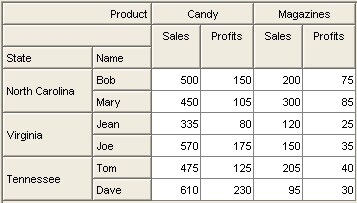
The OLAPTableView is a Swing component that extends from TableView and allows OLAP (Online Analytical Processing) data to be viewed and manipulated in tabular form.
The Java class in this sample creates and displays a simple OLAP table view. For simplicity, this sample uses its own static data model for the OLAPTableView. In most real-world use cases, users will connect to live data and not create their own data model. For more information about how to connect the OLAPTableView to live data, see Sample 26005.
Here are the steps for creating a simple OLAPTableView:
- Create an OLAPDataSet.
- Create an OLAPTableModelAdapter with the OLAPDataSet.
- Create an OLAPTableView with the adapter.
The resulting code would look something like this:
...
Create a result set for the OLAPDataSet
...
OLAPDataSet model = new OLAPDataSet(resultSet);
OLAPTableModelAdapter adapter = new OLAPTableModelAdapter(model);
OLAPTableView tableView1 = new OLAPTableView(adapter);
|
The code shown on the Full Code tab will create an OLAPDataSet and display a default OLAPTableView with that model.
Additional Documentation
- For a list of samples for common tasks, see SAS Note 32218.
- The SAS AppDev Studio Developer's Site contains detailed information that will assist you when developing Web applications with SAS AppDev Studio.
These sample files and code examples are provided by SAS Institute Inc. "as is" without warranty of any kind, either express or implied, including but not limited to the implied warranties of merchantability and fitness for a particular purpose. Recipients acknowledge and agree that SAS Institute shall not be liable for any damages whatsoever arising out of their use of this material. In addition, SAS Institute will provide no support for the materials contained herein.
Instructions
- Build a new SAS Java Project in SAS AppDev Studio. No template is required for this sample
- Create a new java class called OLAPTableViewExampleApp, using samples as the package.
- Run the class as a SAS Java Application
Tip: For help with building a SAS Java Project, see SAS Note 32218.
Code for OLAPTableViewExampleApp.java
package samples;

import java.awt.BorderLayout;
import java.awt.Container;

import javax.swing.JFrame;
import javax.swing.JScrollPane;
import javax.swing.UIManager;

import com.sas.storage.olap.AxisInterface;
import com.sas.storage.olap.OLAPException;
import com.sas.storage.olap.TupleElementInterface;
import com.sas.storage.olap.TupleInterface;
import com.sas.storage.olap.embedded.Axis;
import com.sas.storage.olap.embedded.OLAPDataSet;
import com.sas.storage.olap.embedded.ResultSet;
import com.sas.storage.olap.embedded.ResultSetMetadata;
import com.sas.storage.olap.embedded.Tuple;
import com.sas.storage.olap.embedded.TupleElement;
import com.sas.swing.models.OLAPTableModelAdapter;
import com.sas.swing.visuals.olaptableview.OLAPTableView;

public class OLAPTableViewExampleApp {
	protected OLAPTableView olapTable;

	public static void main(String[] args) {
		// set swing look and feel with system look and feel
		try {
			UIManager.setLookAndFeel(UIManager.getSystemLookAndFeelClassName());
		} catch (Exception e) {
			e.printStackTrace();
		}

		OLAPTableViewExampleApp simpleApp = new OLAPTableViewExampleApp();
		simpleApp.createFrame(args).setVisible(true);
	}

	public JFrame createFrame(String[] args) {
		JFrame frame = new JFrame(this.getClass().getName());

		Container contentPane = frame.getContentPane();
		contentPane.setLayout(new BorderLayout());

		// for simplicity, create a static data model
		// in real world use cases, usually the user will connect to live data
		// instead of creating their own data model
		OLAPDataSet defaultOLAPTableModel = null;
		try {
			TupleInterface tuple1 = new Tuple(new TupleElementInterface[] {
					new TupleElement("Candy"), new TupleElement("Sales") });
			TupleInterface tuple2 = new Tuple(new TupleElementInterface[] {
					new TupleElement("Candy"), new TupleElement("Profits") });
			TupleInterface tuple3 = new Tuple(new TupleElementInterface[] {
					new TupleElement("Magazines"), new TupleElement("Sales") });
			TupleInterface tuple4 = new Tuple(
					new TupleElementInterface[] {
							new TupleElement("Magazines"),
							new TupleElement("Profits") });

			TupleInterface tuple5 = new Tuple(
					new TupleElementInterface[] {
							new TupleElement("North Carolina"),
							new TupleElement("Bob") });
			TupleInterface tuple6 = new Tuple(new TupleElementInterface[] {
					new TupleElement("North Carolina"),
					new TupleElement("Mary") });
			TupleInterface tuple7 = new Tuple(new TupleElementInterface[] {
					new TupleElement("Virginia"), new TupleElement("Jean") });
			TupleInterface tuple8 = new Tuple(new TupleElementInterface[] {
					new TupleElement("Virginia"), new TupleElement("Joe") });
			TupleInterface tuple9 = new Tuple(new TupleElementInterface[] {
					new TupleElement("Tennessee"), new TupleElement("Tom") });
			TupleInterface tuple10 = new Tuple(new TupleElementInterface[] {
					new TupleElement("Tennessee"), new TupleElement("Dave") });

			Axis columnAxis = new Axis(AxisInterface.COLUMNS_AXIS, null,
					new TupleInterface[] { tuple1, tuple2, tuple3, tuple4 });
			columnAxis.setAxisHeaders(new String[] { "Product", " " });
			Axis rowAxis = new Axis(AxisInterface.ROWS_AXIS, null,
					new TupleInterface[] { tuple5, tuple6, tuple7, tuple8,
							tuple9, tuple10 });
			rowAxis.setAxisHeaders(new String[] { "State", "Name" });
			AxisInterface[] axes = { columnAxis, rowAxis };

			// create an instance of result set metadata with the axes
			ResultSetMetadata resultSetMetadata = new ResultSetMetadata(axes);
			ResultSet resultSet = new ResultSet();
			resultSet.setResultSetMetadata(resultSetMetadata);
			Object[] values = new Object[] { "500", "150", "200", "75", "450",
					"105", "300", "85", "335", "80", "120", "25", "570", "175",
					"150", "35", "475", "125", "205", "40", "610", "230", "95",
					"30" };
			resultSet.setCells(0, 23, values);

			// create a new olap table model with the resultSet we just created
			defaultOLAPTableModel = new OLAPDataSet(resultSet);
		} catch (OLAPException e) {
			e.printStackTrace();
		}

		// create a new OLAPTableModelAdapter with the model we just created
		OLAPTableModelAdapter adapter = new OLAPTableModelAdapter(
				defaultOLAPTableModel);
		// create a new OLAPTableView with the adapter containing our model
		olapTable = new OLAPTableView(adapter);

		// create a scroll pane with the OLAPTableView
		JScrollPane scrollPane = new JScrollPane(olapTable);
		// add the scroll pane to the content pane
		contentPane.add(scrollPane, BorderLayout.CENTER);
		contentPane.setSize(500, 250);

		frame.setDefaultCloseOperation(JFrame.EXIT_ON_CLOSE);
		frame.pack();

		return frame;
	}
}
|
These sample files and code examples are provided by SAS Institute Inc. "as is" without warranty of any kind, either express or implied, including but not limited to the implied warranties of merchantability and fitness for a particular purpose. Recipients acknowledge and agree that SAS Institute shall not be liable for any damages whatsoever arising out of their use of this material. In addition, SAS Institute will provide no support for the materials contained herein.
| Type: | Sample |
| Date Modified: | 2008-07-10 11:23:53 |
| Date Created: | 2006-01-10 15:55:08 |
Operating System and Release Information
| Product Family | Product | Host | Product Release | SAS Release | ||
| Starting | Ending | Starting | Ending | |||
| SAS System | SAS AppDev Studio | Microsoft Windows XP Professional | 3.2 | 9.1 TS1M3 SP4 | ||
| Microsoft Windows Server 2003 Standard Edition | 3.2 | 9.1 TS1M3 SP4 | ||||
| Microsoft Windows Server 2003 Enterprise Edition | 3.2 | 9.1 TS1M3 SP4 | ||||
| Microsoft Windows Server 2003 Datacenter Edition | 3.2 | 9.1 TS1M3 SP4 | ||||
| Microsoft Windows NT Workstation | 3.2 | 9.1 TS1M3 SP4 | ||||
| Microsoft Windows 2000 Professional | 3.2 | 9.1 TS1M3 SP4 | ||||
| Microsoft Windows 2000 Server | 3.2 | 9.1 TS1M3 SP4 | ||||
| Microsoft Windows 2000 Datacenter Server | 3.2 | 9.1 TS1M3 SP4 | ||||
| Microsoft Windows 2000 Advanced Server | 3.2 | 9.1 TS1M3 SP4 | ||||
| Microsoft® Windows® for x64 | 3.2 | 9.1 TS1M3 SP4 | ||||
| Windows Vista | 3.2 | 9.1 TS1M3 SP4 | ||||