Sample 24906: Annotate cities on a world map with PROC GMAP
This sample program uses PROC GMAP with the Annotate facility to place a label and symbol at city locations on a world map.
These sample files and code examples are provided by SAS Institute
Inc. "as is" without warranty of any kind, either express or implied, including
but not limited to the implied warranties of merchantability and fitness for a
particular purpose. Recipients acknowledge and agree that SAS Institute shall
not be liable for any damages whatsoever arising out of their use of this material.
In addition, SAS Institute will provide no support for the materials contained herein.
The following program will generate a map of the world with the names of some world cities annotated onto the map. In addition, a star is annotated at the city location and the color of the star represents the value of a variable in the data set.
A FOOTNOTE statement is used to create a legend for the values represented by the stars.
The graphics output in the Results tab was produced using SAS® 9.2. Submitting
the sample code with releases of SAS prior to SAS 9.2 might produce different results.
 /* Set the graphics environment */
goptions reset=all cback=white border htitle=12pt htext=10pt;

 /* Create a data set with the longitude, latitude values */
 /* for some of the world cities.                         */
 /* Create a variable, NUM, to represent some value.      */
 /* In this case, NUM is assigned an arbitrary number.    */
data cities;
  length city $20;
  input x y num city $20.;

  /* Convert degrees to radians */
  x=atan(1)/45 * x;
  y=atan(1)/45 * y;
  datalines;
-116.433 39.917 75 Beijing
-8.517 12 24 Lagos
-9.983 53.55 19 Hamburg
74.083 4.6 78 Bogota
78.79892 35.783411 150 Cary
-77.2 28.583 123 New Delhi
-133.883 -23.8 143 Alice Springs
113.5167 53.567 48 Edmonton
58.48 -34.58 220 Buenos Aires
-92.95 56 390 Krasnoyarsk
;
run;

 /* Use the unprojected values from */
 /* the world map                   */
data world(rename=(long=x lat=y));
   set maps.world(drop=x y);
run;

 /* Combine the cities data set    */
 /* with the unprojected world map */
data combo;
  set world cities;
run;

 /* Project the combined data set using */
 /* the experimental GALL projection    */
proc gproject data=combo out=proj project=gall;
  id cont id;
run;
quit;

 /* Separate the projected data set  */
 /* into a map and annotate data set */
data map anno;
  set proj;
  if city='' then output map;
  else output anno;
run;

 /* Create an annotate data set to place a star */
 /* and name at the city locations.             */
data anno;
  length color $ 8 text $ 20 style $ 25;
  set anno;
  retain xsys ysys '2' function 'label' when 'a';

  size=1.5;

  /* Place a star */
  style='special';
  text='M';

  /* Change the color for the star based on the value of NUM */
  select;
    when (num <= 50) color='red';
    when (num > 50 and num <= 100) color='blue';
    when (num > 100 and num <= 200) color='purple';
    otherwise color='green';
  end;
  output;

  /* Create an observation to place the city name on the map */
  style="'Albany AMT'";
  position='2';
  text=city;
  color='black';
  size=1.5;
  output;
run;

 /* Define the patterns for the map areas */
pattern1 v=me r=99;

 /* Add a title to the map */
title1 'Annotate World Cities';

 /* Define a footnote to be used as a legend */
 /* for the stars for the NUM value          */
footnote1 box=1
   f='Albany AMT'  c=black   h=1.2 'Value of NUM  '
   f=special c=red     h=1.2 'M' f='Albany AMT'  c=black h=1.2 ' Less than 50  '
   f=special c=blue    h=1.2 'M' f='Albany AMT'  c=black h=1.2 ' 50 to 100  '
   f=special c=purple  h=1.2 'M' f='Albany AMT'  c=black h=1.2 ' 101 to 200  '
   f=special c=green   h=1.2 'M' f='Albany AMT'  c=black h=1.2 ' Greater than 200';

 /* Generate a map of the world with city labels */
proc gmap data=map map=map;
  id cont id;
  choro id  / anno=anno nolegend coutline=grayaa;
run;
quit;
These sample files and code examples are provided by SAS Institute
Inc. "as is" without warranty of any kind, either express or implied, including
but not limited to the implied warranties of merchantability and fitness for a
particular purpose. Recipients acknowledge and agree that SAS Institute shall
not be liable for any damages whatsoever arising out of their use of this material.
In addition, SAS Institute will provide no support for the materials contained herein.
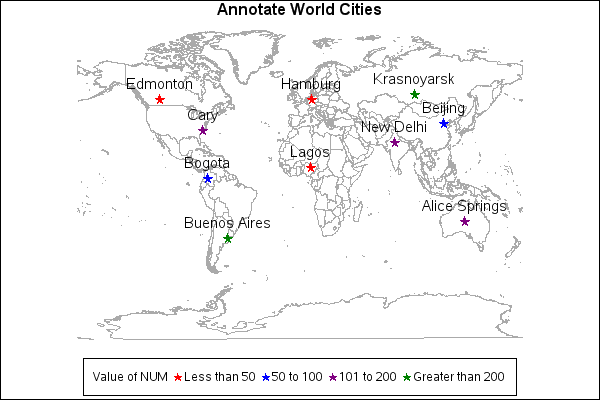
This sample program uses PROC GMAP with the Annotate facility to place a label and symbol at city locations on a world map.
| Type: | Sample |
| Topic: | SAS Reference ==> Procedures ==> GMAP
Query and Reporting ==> Creating Reports ==> Graphical ==> Graph Elements ==> Annotation
|
| Date Modified: | 2005-08-31 03:03:09 |
| Date Created: | 2004-11-11 11:07:58 |
Operating System and Release Information
| SAS System | SAS/GRAPH | All | n/a | n/a |


