Sample 24857: Control the thickness of interpolation lines for BOX, STD, HILO and AREA plots with PROC GPLOT
This sample uses PROC GPLOT with the WIDTH option on a SYMBOL statement to increase the thickness of interpolation lines generated with BOX, STD, HILO, and AREA plots.
These sample files and code examples are provided by SAS Institute
Inc. "as is" without warranty of any kind, either express or implied, including
but not limited to the implied warranties of merchantability and fitness for a
particular purpose. Recipients acknowledge and agree that SAS Institute shall
not be liable for any damages whatsoever arising out of their use of this material.
In addition, SAS Institute will provide no support for the materials contained herein.
This sample uses PROC GPLOT with the WIDTH option on a SYMBOL statement to increase the thickness of interpolation lines generated with BOX, STD, HILO, and AREA plots.
The graphics output in the Results tab was produced using SAS® 9.2. Submitting the sample code with releases of SAS prior to SAS 9.2 might produce different results.
 /* Set the graphics environment */
goptions reset=all cback=white border htitle=12pt htext=10pt;

 /* Create the input data set A */
data a;
   input XVAR YVAR;
   datalines;
1 10
1 20
1 25
2 13
2 18
2 15
3 19
3 33
3 24
4 14
4 18
4 28
5 11
5 21
5 24
;
run;

 /* Specify WIDTH= on a SYMBOL statement */
symbol1 interpol=std1j color=vibg width=8;

 /* Specify AXIS statement */
axis1 offset=(2,2)pct;

 /* Add a title to the graph */
title1 'Using the WIDTH option with the STD1J interpolation';

 /* Create the graph */
proc gplot data=a;
   plot yvar*xvar / haxis=axis1;
run;
quit;
These sample files and code examples are provided by SAS Institute
Inc. "as is" without warranty of any kind, either express or implied, including
but not limited to the implied warranties of merchantability and fitness for a
particular purpose. Recipients acknowledge and agree that SAS Institute shall
not be liable for any damages whatsoever arising out of their use of this material.
In addition, SAS Institute will provide no support for the materials contained herein.
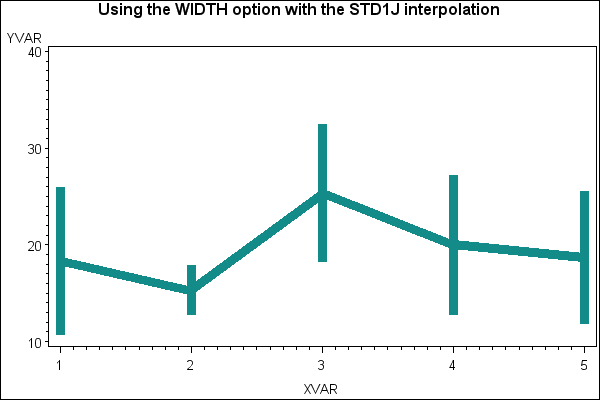
This sample uses PROC GPLOT with the WIDTH option on a SYMBOL statement to increase the thickness of interpolation lines generated with BOX, STD, HILO, and AREA plots.
| Type: | Sample |
| Topic: | SAS Reference ==> Procedures ==> GPLOT
Query and Reporting ==> Creating Reports ==> Graphical ==> Graph Elements ==> Symbols/Interpolation
Query and Reporting ==> Creating Reports ==> Graphical ==> Graph Types ==> Plots ==> Other Plots
|
| Date Modified: | 2005-08-24 16:06:23 |
| Date Created: | 2004-11-11 11:07:51 |
Operating System and Release Information
| SAS System | SAS/GRAPH | z/OS | 9.1 TS1M0 | |
| Microsoft® Windows® for 64-Bit Itanium-based Systems | 9.1 TS1M0 | |
| Microsoft Windows Server 2003 Datacenter 64-bit Edition | 9.1 TS1M0 | |
| Microsoft Windows Server 2003 Enterprise 64-bit Edition | 9.1 TS1M0 | |
| Microsoft Windows 2000 Advanced Server | 9.1 TS1M0 | |
| Microsoft Windows 2000 Datacenter Server | 9.1 TS1M0 | |
| Microsoft Windows 2000 Server | 9.1 TS1M0 | |
| Microsoft Windows 2000 Professional | 9.1 TS1M0 | |
| Microsoft Windows NT Workstation | 9.1 TS1M0 | |
| Microsoft Windows Server 2003 Datacenter Edition | 9.1 TS1M0 | |
| Microsoft Windows Server 2003 Enterprise Edition | 9.1 TS1M0 | |
| Microsoft Windows Server 2003 Standard Edition | 9.1 TS1M0 | |
| Microsoft Windows XP Professional | 9.1 TS1M0 | |
| 64-bit Enabled AIX | 9.1 TS1M0 | |
| 64-bit Enabled HP-UX | 9.1 TS1M0 | |
| 64-bit Enabled Solaris | 9.1 TS1M0 | |
| HP-UX IPF | 9.1 TS1M0 | |
| Linux | 9.1 TS1M0 | |
| OpenVMS Alpha | 9.1 TS1M0 | |
| Tru64 UNIX | 9.1 TS1M0 | |


