 |
|
| SAS/IntrNet 9.2: Xplore Sample Web Application |
Overview
The Xplore interface consists of two HTML frames.
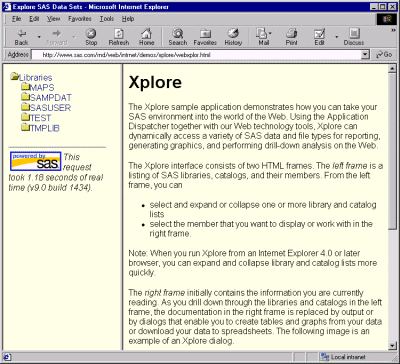
The left frame is a listing of SAS libraries, catalogs, and their members. From the left frame, you can
- expand or collapse one or more library and catalog lists
- select the member that you want to display or work with in the right frame.
Note: When you run Xplore from an Internet Explorer 4.0 or later Web browser, you can expand and collapse library and catalog lists more quickly.
The right frame initially contains overview information about the Xplore application. As you drill down through the libraries and catalogs in the left frame, the documentation in the right frame is replaced by output or by dialog boxes that enable you to
- specify which variables you want to include and display
- specify the order in which to display variables in a table
- download data to a local spreadsheet application
- drill down on data sets that are created by PROC SUMMARY
- view thin-client graphics that chart data sets that are created by PROC SUMMARY
- display contents of a SAS/EIS application database
- display most catalog entries.
|
|
Copyright © 2007 by SAS Institute Inc., Cary, NC, USA. All rights reserved.