
| Reading and Writing Data |
Using the GUI to Write a SAS Data Set
In addition to reading data sets, you can use the Stat Studio GUI to write SAS data sets. This section presumes that you have opened a data table as described in the previous section.
Saving Data to the Client
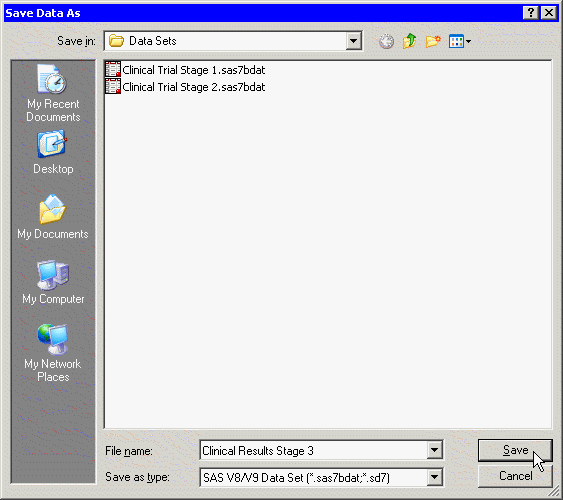
To use the GUI to save data from a data table (or more precisely, from the DataObject underlying the data table) to a SAS data set on the client:
- Activate the data table by clicking on its title bar.
- Select File
 Save As File from the main menu. The
dialog box in Figure 2.3 appears.
Save As File from the main menu. The
dialog box in Figure 2.3 appears.
- Navigate to the Windows directory in which you want to save the data set.
- Type a valid Windows filename in the File name field.
- Click Save.
|
Figure 2.3: Saving to a Client Data Set
The recommended Windows directory in which to save your data is the
personal files directory shown in Table 2.1.
If you have many data sets, you can
organize the data by making
subdirectories of this directory. Stat Studio provides easy navigation
for loading files in this directory. Furthermore,
the section "Opening Client Data Sets" explains that this directory is
automatically searched when you use a program to create a DataObject
from a data set.
Saving Data to a SAS Library
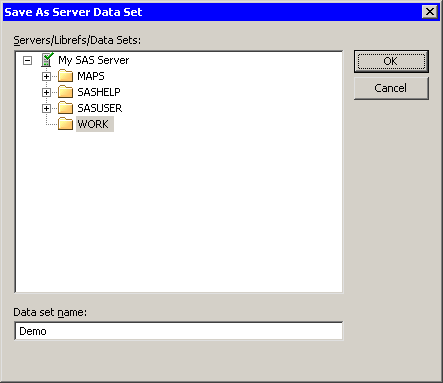
To use the GUI to save data from a data table (or more precisely, from the DataObject underlying the data table) to a SAS data set in a library on the server:
- Activate the data table by clicking on its title bar.
- Select File Save As Server Data Set from the main
menu. The dialog box in Figure 2.4 appears.
- Click on a node to see the available libraries for a server. If SAS is running on your PC, the server name is My SAS Server.
- Click on the node for a library. Each Stat Studio workspace has its own private WORK library, but other libraries (such as SASUSER) are shared across all Stat Studio workspaces.
- Type a valid SAS data set name in the Data set name field.
- Click OK.
|
Figure 2.4: Saving to a SAS Library
Copyright © 2008 by SAS Institute Inc., Cary, NC, USA. All rights reserved.