Overview
SAP stores performance
data as statistics files on stand-alone SAP servers. The SAS IT Resource
Management Adapter for SAP provides code to read these statistics
files and transform them into a ready-to-use format. The files are
then exported to SAS IT Resource Management. Figure 1.1 illustrates
this process.
Note: References to the SAS IT
Resource Management client in this document pertain to the use of
SAS Data Integration Studio with ITRM plug-ins. These plug-ins are
not specifically required for the SAS IT Resource Management Adapter
for SAP tasks and jobs. In other words, you can use either the SAS
Data Integration Studio client or the SAS IT Resource Management client
to perform the tasks and work with the jobs that are referenced in
this document.
A typical SAP installation
uses more than one SAP server and several SAP instances. The SAS IT
Resource Management Adapter for SAP provides the capability to choose
and customize SAP instances and to monitor their performance.
In addition, a business
warehouse server can be part of an SAP installation. Its performance
can be analyzed using the underlying SAP server performance data.
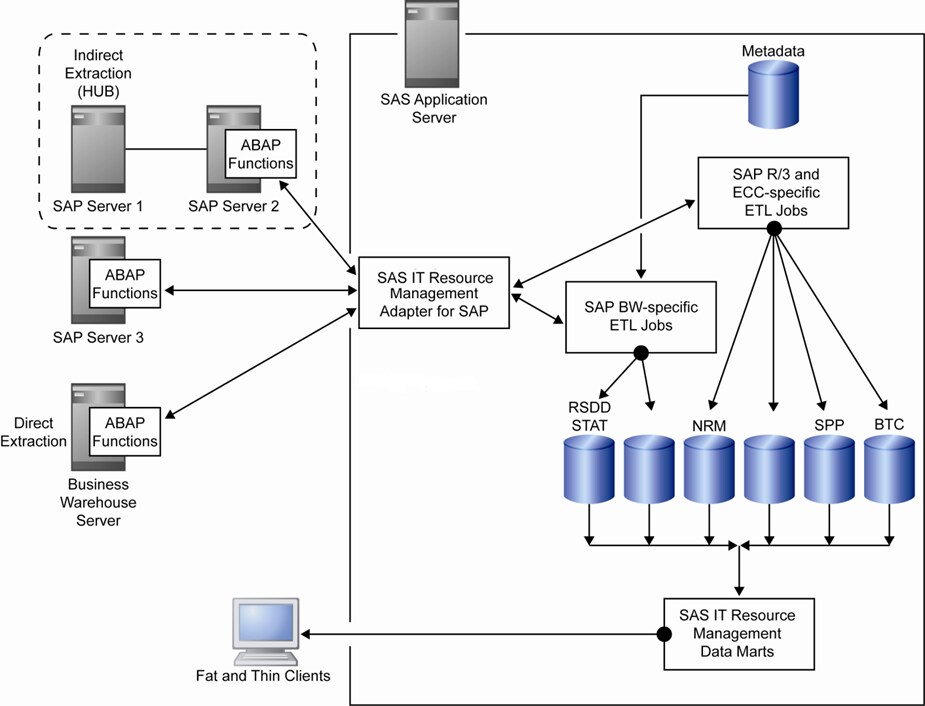
The SAS IT Resource
Management Adapter for SAP provides ready-to-use ETL jobs in SAS IT
Resource Management. The ETL jobs read performance data from source
SAP systems and transform the data into standard raw data tables that
are given as input to the SAS IT Resource Management solution. These
jobs are built on the SAS Data Surveyor and can communicate with any
SAP R/3 system.
The SAS IT Resource
Management Adapter for SAS uses the SAS Data Surveyor for SAP to extract
SAP performance data. The process involves transparent table extracts,
Business Application Programming Interface (BAPI) calls, and calls
to remote-enabled Advanced Business Application Programming (ABAP)
functions that SAS provides.
Based on whether your
business needs to extract performance data from a single server or
multiple servers, you can customize the ETL jobs. The architecture
of SAS IT Resource Management components provides the environment
for the ETL jobs. Therefore, you can use SAS IT Resource Management
to view and edit your ETL jobs as needed.