Transformations

Libref Collector

The Libref Collector transformation is the new transformation that is developed in this release of SAS IT Resource Management Adapter. The transformation collects SAP library values in a data set.
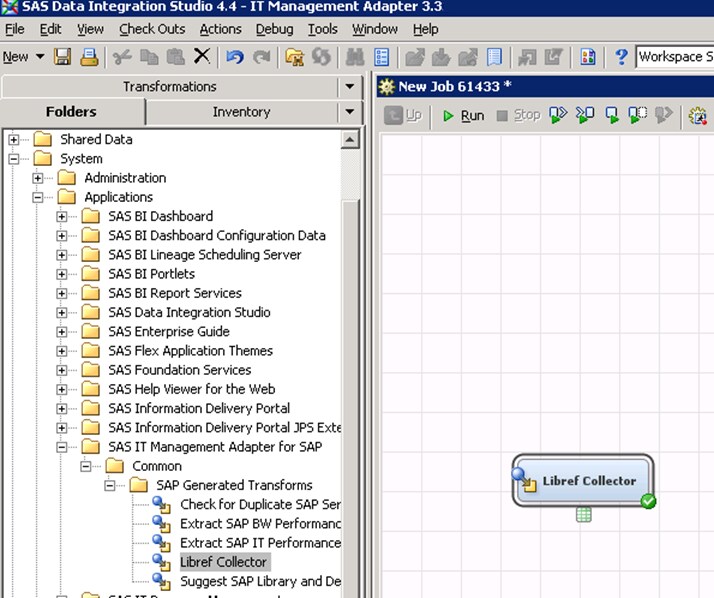
In the previous release, there was a Java component named Libref Collector in 9.1.3, plugged into the SAS Data Integration Studio. This plug-in was used to collect the SAP library values. In this release, the Libref Collector transformation with SAS code replaces the Libref Collectorplug-in.
Libref Collector Transformation
The Libref Collector transformation extracts the details of all the SAP libraries registered in the SAS Metadata Server. Also, you can customize the job that contains this transformation, as per your requirements.

Extract SAP Business Warehouse (BW) Performance Statistics

The transformation extracts performance statistics tables from the SAP BW, using a delta control mechanism. Extraction time stamps are logged in a delta control table by SAP host instance and extracted SAP BW table. Successive extractions retrieve only records with a time stamp larger than the previous extract minus one hour, and append the extracted records to the output tables. The rationale for one-hour overlap is to ensure that even the long running jobs are caught. This might result in duplicate records. However, any duplicate records are removed by the loading steps into the SAS IT Resource Management IT data marts.
The transformation has two input tables:
  • the BW Delta Control table
  • the list of SAP systems to extract data from
The BW Delta Control table is defined as input table, but it is also updated by the transformation. The table fills details about BW tables and extraction conditions so that the next extraction of data from a particular table starts from that time onwards from SAP.
The transformation has 1 11 output tables. All output tables are located in the same library. The transformation has the following options to extract data from SAP BW systems.
Parameters Used in the Transformation
Parameter Name
Macro Variable
Valid Values and Description
MODE
_MODE
INIT: Initialize the BW Delta Control Table and overwrite output tables.
APPEND: Append new records to output tables according to time stamps from Delta Control Table.
OVERWRITE: Replace output tables with new records according to time stamps from Delta Control Table.
Default is APPEND.
The transformation calls the SAS SCL program sashelp.r3itadp.read_bw_stats.scl. this program loops through the input table. The transformation also performs the following functions:
  • Lists the SAP systems for data extraction.
  • Assigns an SAP LIBNAME to each SAP system.
  • Calls the macro %readBwStats to extract the statistic tables.

Suggest SAP Library and Destination Parameters

The Suggest SAP Library and Destination Parameters transformation has to be used in a DATA step. The transformation also has to be used in input and output statements. The transformation has three input tables and one output table. The following table describes the three input tables used by this transformation.
Input Tables Used by the Suggest SAP Library and Destination Parameters Transformation
Prompt
Description
Place table RFCDES here
Table of Destinations in the SAP system for Remote Function Call. A sample schema of this table is distributed with the installation. It can also be registered using Source Designer for SAP from the table RFCDES on the SAP system.
Place table SAPWLSERV here
Table of active SAP servers. A sample schema of this table is distributed with the installation. It can also be registered using Source Designer for SAP from the table SAPWLSERV on the SAP system. This table needs to be updated with all active SAP servers from which we are extracting data via the hub server for indirect extraction.
Place table ADMIN.SAP Server Libraries here
List of SAP servers to extract performance data from. This table should have been created with the first initialization job.

Extract SAP IT Performance Statistics

The transformation calls the SAS SCL program sashelp.r3itadp.read_r3_stats.scl involving RFC function modules to extract the data from SAP. The log files are read from SAP for particular RFC destination assigned by the SAP Library, beginning date and end date. Table 5.4 gives more information about the RFC destination, beginning date and end date.
Once extraction is complete, administration tables Last_extract_information and EXTRACTION_RECORD are filled by date and time stamps. The EXTRACTION_RECORD table contains the information about when the last extraction takes place. The table also contains date stamps against the current extraction start times and end times. Therefore, the next extraction will take the starting date from this table itself.
Extraction Condition for Function Module
Condition
Description
DEST
Optional. Specifies the name of an SAP destination (that was setup using SM59) for indirect extraction.
If DEST is set and its value is NONE, then it stands for direct extraction from the SAP server.
If the value of DEST is different from NONE, then it stands for other SAP servers RFC-connected to the hub server. This means it stands for the indirect extraction method.
BDAT AND EDAT
The job looks for a previous run date in the table LAST_EXTRACT_INFO. If a previous run date is found, then the job takes it as the begin date. If no previous run date is found in the table, then it takes the previous night midnight as the begin time. The end date is current date plus one.