SAS Data Integration Studio
SAS Data Integration
Studio provides a graphical user interface and process flow to ease
the creation and deployment of jobs that manage data.
It supports the following
goals:
-
reducing development time by enabling the rapid generation of data warehouses, data marts, and data streams
-
controlling the costs of data integration by supporting collaboration, code reuse, and common metadata
-
increasing returns on existing IT investments by providing multi-platform scalability and interoperability
-
creating process flows that are reusable, easily modified, and support embedded data quality processing. The flows are self-documenting and support data lineage analysis.
Data integration in
SAS Data Integration Studio uses job flows. You can pull data into
these jobs and modify it with transformations, user-written code,
and wizards. Then you can store it in output tables that you can use
for tasks such as analysis and reporting.
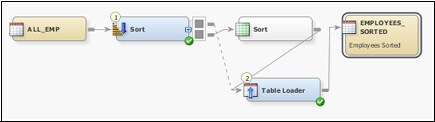
Note that this job flow
contains a default temporary output table and a table loader. Job
flows are created on the Diagram tab. This
tab features tools that enable you to start and restart jobs. You
can also resize job flows, save images of flows, and perform other
tasks that help you build and maintain the flows.
The Transformations
tree groups the transformations available in SAS Data Integration
Studio into folders. Several of these folders contain transformations
that are useful for data integration tasks. For example, the Control
folder contains transformations that help you work with conditional
and loop processing. The SQL folder contains the Join transformation,
which can run queries from a full-featured SQL wizard. It also contains
specialized interfaces that work with specific SQL statements such
as the Delete and Execute transformations.
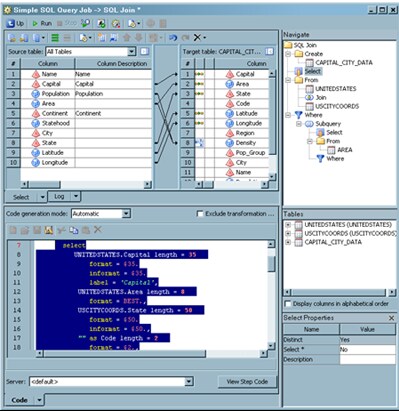
You can use the sections
in the Designer tab to map source columns
to target columns. You can also navigate within the query, set code
generation options, review tables and columns, and review SQL Join
properties.
Most data integration
transformations are found in the Data folder.
Data transformations
include the following:
-
Append
-
Compare Tables
-
Data Validation
-
Extract
-
Rank
-
Sort
-
Transpose
-
User-Written Code
SAS Data Integration
Studio supports the following data management tasks:
-
job flow processing with features that include checkpoints, restarting jobs, batch deployment, and status handling
-
job versioning, data lineage, and impact analysis
-
importing and exporting metadata for individual objects or sets of related objects. You can work with two types of metadata. The first is SAS metadata in SAS Package format. The second is relational metadata such as metadata for libraries, tables, columns, indexes, and keys. This metadata must be in formats that can be accessed with a SAS Metadata Bridge.
-
job management tasks such as submission, reviewing, and debugging
-
job deployment and redeployment tasks. You can deploy jobs from a command line, using a scheduler, and as a stored process.
-
running job documentation reports
-
running DataFlux Data Management Platform jobs and processes such as profiles and standardization schemes
Copyright © SAS Institute Inc. All rights reserved.