Problem Note 69517: SAS® Visual Analytics crosstab objects might duplicate pages when you print to PDF
 |  |  |  |
You might encounter an issue in which the last column in the crosstab is duplicated and reprinted in the generated PDF output when you complete steps similar to the following:
- Try to print a SAS Visual Analytics report that contains a crosstab object to a PDF file.
- In the Print to PDF dialog box, select the Expand clipped and non-visable content option and click Print.
This pattern of the last column in the crosstab being duplicated and reprinted is repeated throughout the document. See the example below.
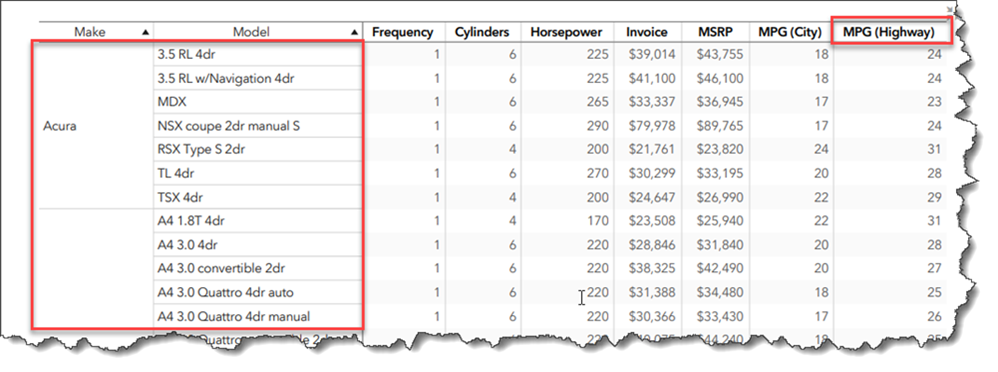
Note that the last column (MPG (Highway) has been duplicated:
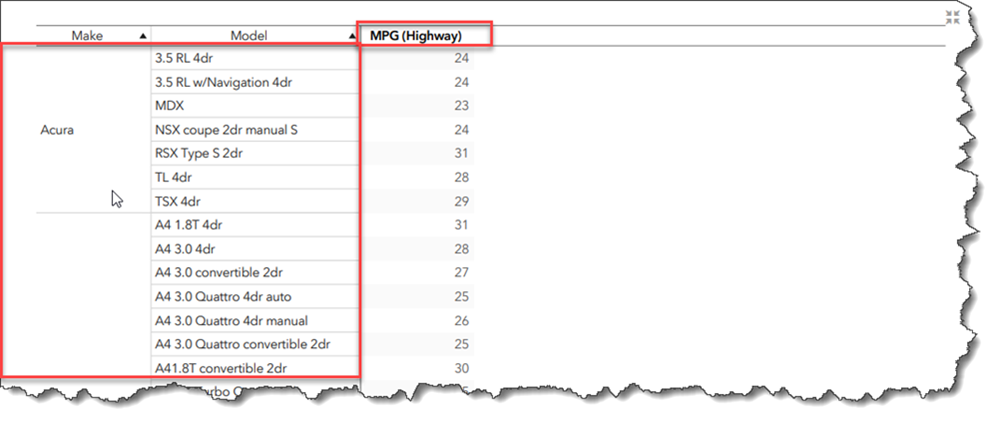
To work around this issue, go into Edit mode for the report. On the Options pane of the crosstab object, clear the Fit columns to width check box.
Operating System and Release Information
| Product Family | Product | System | Product Release | SAS Release | ||
| Reported | Fixed* | Reported | Fixed* | |||
| SAS System | SAS Visual Analytics | Linux for x64 | 7.5 | 8.3 | 9.4 TS1M6 | Viya |
| Microsoft® Windows® for x64 | 7.5 | 8.3 | 9.4 TS1M6 | Viya | ||
| Type: | Problem Note |
| Priority: | high |
| Date Modified: | 2022-08-30 16:07:55 |
| Date Created: | 2022-08-30 08:59:09 |