Problem Note 68767: Opening a SAS® program in a new session shows the wrong session language on the taskbar icon
 |  |  |  |
Sometimes when you open a SAS® 9.4 (English) session, the icon on the Microsoft Windows taskbar might show that a different session language is running, as shown here:
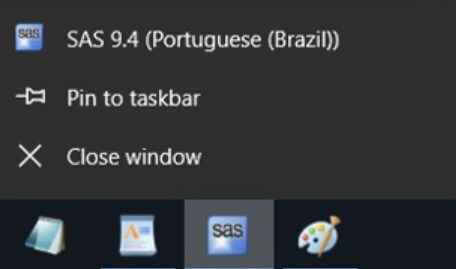
There are two workarounds.
Workaround 1
- Open the Windows Start menu.
- Right-click the SAS 9.4 (English) shortcut ► More ► Select "Open file location".
- Again right-click the SAS 9.4 (English) shortcut and go to Send to ► Desktop (create shortcut).
- On the desktop, right-click the newly created SAS 9.4 (English) shortcut and go to Properties.
- On the Shortcut tab, select the Target line and remove the -CONFIG information so only the following line is present:
"C:\Program Files\SASHome\SASFoundation\9.4\sas.exe"
- Select OK.
Workaround 2
- Open a Windows command line and navigate to your <SASROOT!> directory. Here is an example: C:\Program FIles\SASHome\SASFoundation\9.4.
- Run the following command, using the correct CONFIG path for the language that you want to use:
sas.exe -CONFIG "C:\Program Files\SASHome\SASFoundation\9.4\nls\en\sasv9.cfg"
Operating System and Release Information
| Product Family | Product | System | Product Release | SAS Release | ||
| Reported | Fixed* | Reported | Fixed* | |||
| SAS System | Base SAS | Microsoft® Windows® for x64 | 9.4_M5 | 9.4 TS1M5 | ||
| Microsoft Windows 8 Enterprise 32-bit | 9.4_M5 | 9.4 TS1M5 | ||||
| Microsoft Windows 8 Enterprise x64 | 9.4_M5 | 9.4 TS1M5 | ||||
| Microsoft Windows 8 Pro 32-bit | 9.4_M5 | 9.4 TS1M5 | ||||
| Microsoft Windows 8 Pro x64 | 9.4_M5 | 9.4 TS1M5 | ||||
| Microsoft Windows 8.1 Enterprise 32-bit | 9.4_M5 | 9.4 TS1M5 | ||||
| Microsoft Windows 8.1 Enterprise x64 | 9.4_M5 | 9.4 TS1M5 | ||||
| Microsoft Windows 8.1 Pro 32-bit | 9.4_M5 | 9.4 TS1M5 | ||||
| Microsoft Windows 8.1 Pro x64 | 9.4_M5 | 9.4 TS1M5 | ||||
| Microsoft Windows 10 | 9.4_M5 | 9.4 TS1M5 | ||||
| Microsoft Windows Server 2008 | 9.4_M5 | 9.4 TS1M5 | ||||
| Microsoft Windows Server 2008 R2 | 9.4_M5 | 9.4 TS1M5 | ||||
| Microsoft Windows Server 2008 for x64 | 9.4_M5 | 9.4 TS1M5 | ||||
| Microsoft Windows Server 2012 Datacenter | 9.4_M5 | 9.4 TS1M5 | ||||
| Microsoft Windows Server 2012 R2 Datacenter | 9.4_M5 | 9.4 TS1M5 | ||||
| Microsoft Windows Server 2012 R2 Std | 9.4_M5 | 9.4 TS1M5 | ||||
| Microsoft Windows Server 2012 Std | 9.4_M5 | 9.4 TS1M5 | ||||
| Microsoft Windows Server 2016 | 9.4_M5 | 9.4 TS1M5 | ||||
| Windows 7 Enterprise 32 bit | 9.4_M5 | 9.4 TS1M5 | ||||
| Windows 7 Enterprise x64 | 9.4_M5 | 9.4 TS1M5 | ||||
| Windows 7 Home Premium 32 bit | 9.4_M5 | 9.4 TS1M5 | ||||
| Windows 7 Home Premium x64 | 9.4_M5 | 9.4 TS1M5 | ||||
| Windows 7 Professional 32 bit | 9.4_M5 | 9.4 TS1M5 | ||||
| Windows 7 Professional x64 | 9.4_M5 | 9.4 TS1M5 | ||||
| Windows 7 Ultimate 32 bit | 9.4_M5 | 9.4 TS1M5 | ||||
| Windows 7 Ultimate x64 | 9.4_M5 | 9.4 TS1M5 | ||||
| Type: | Problem Note |
| Priority: | medium |
| Date Modified: | 2022-05-12 07:33:43 |
| Date Created: | 2022-01-11 17:29:01 |