Problem Note 68569: Executing multiple program codes in SAS® Studio on SAS® Viya® might produce incorrect information on the Log tabs
 |  |  |  |
In SAS Studio on SAS Viya, Log tabs might contain incorrect information if you execute multiple program codes.
For example, you encounter this issue when you complete steps similar to the following:
- Create and open four or more program codes in SAS Studio.
- Execute the program codes one by one without waiting until they end running. For example, select program_0 and click the RUN icon. While program_0 is still running, switch to program_1 and click the RUN icon, and so on.
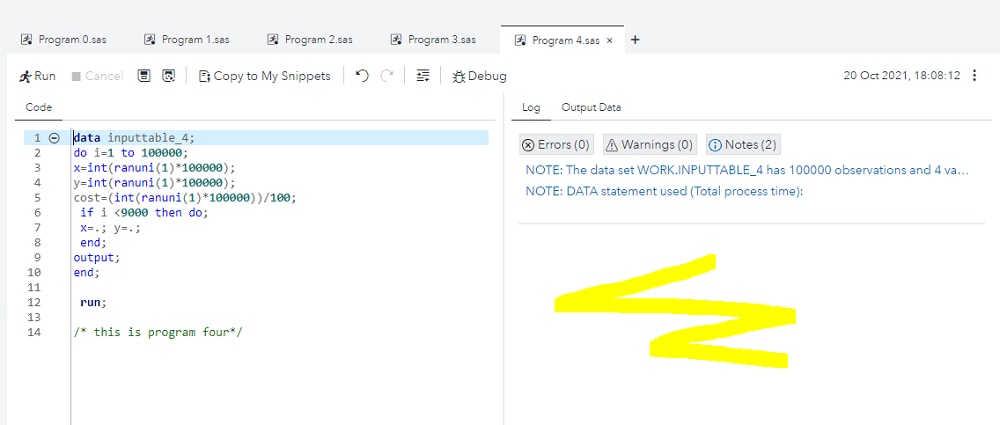
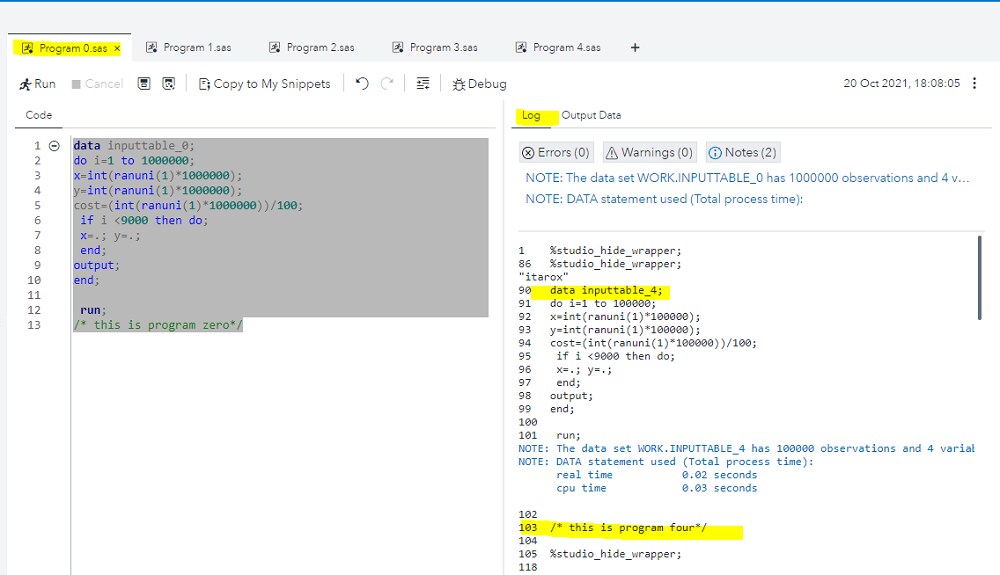
- When all program codes have been executed, check the Log tabs for each of them. Some of the logs might be empty, and the content of the empty log might be located in another program's log tab. The following image shows the problem with this example: Program_1, Program_2, Program_3 and Program_4 have been executed. Log tab for Program_4 is empty.
The content of the program_4 log is on the Log tab for program_0:
To circumvent this behavior, you can use one of the following workarounds:
- Execute your program codes one by one and wait until the previous one ends before executing the second one, and so on.
- If the first workaround is not suitable for any reason, then execute your program codes in batch mode.
- Alternately, when the problem occurs and the Log tab is empty, you can use the download option from the three-dot menu to download the correct log.
Operating System and Release Information
| Product Family | Product | System | Product Release | SAS Release | ||
| Reported | Fixed* | Reported | Fixed* | |||
| SAS System | SAS Studio for Viya | Linux for x64 | 5.2 | Viya | ||
| Type: | Problem Note |
| Priority: | high |
| Date Modified: | 2021-11-03 13:18:56 |
| Date Created: | 2021-11-03 09:44:09 |