Usage Note 68463: Steps to purge duplicates from multiple tables within the data mart in SAS® Environment Manager
 |  |  |  |
Data mart tables in SAS Environment Manager might sometimes have duplicate records that need to be purged. This SAS Note outlines steps to run the built-in purge_dups.sas program against certain data sets within the SAS Environment Manager EMI framework.
There are only two data sets that could be affected by duplicate records: ARTIFACT.AUDITTRANSACTIONS and ARTIFACT.ARTIFACTUSAGEDETAILS. The .sas7bdat files are found at the following path:
Warnings to consider before running the purge_dups.sas program
The purge_dups.sas program uses a SORT procedure and essentially creates a copy of the data set that is being purged. Because of how the program works, ensure that you have enough space to accommodate a copy of the data set that you want to remove duplicates from.
Running the purge_dups.sas program against the audit_transactions.sas7bdat file
By default, the purge_dups.sas program is set to run against the audit_transactions.sas7bdat file. However, you should check that the program has the right set parameters.
To do that, use a text editor to open the purge_dups.sas program, located in SAS-configuration-directory/Lev1/Web/SASEnvironmentManager/emi-framework/SASJobs/, and check the following details:
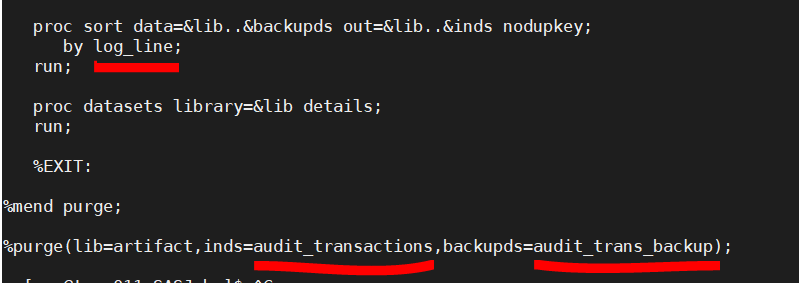
- Line 76 should show the following: by log_line;
- Line 86 should show the following: %purge(lib=artifact,inds=audit_transactions,backupds=audit_trans_backup);
Here is an example:
Running the purge_dups.sas program against the artifactusagedetails.sas7bdat file
To purge duplicates for the artifactusagedetails.sas7bdat file, you need to modify the same purge_dups.sas program, located in SAS-configuration-directory/Lev1/Web/SASEnvironmentManager/emi-framework/SASJobs/, as follows:
- Line 76 should show the following: by usageId;
- Line 86 should show the following: %purge(lib=artifact,inds=artifactusagedetails,backupds=artusdet_backup);
Here is an example:

Purging duplicates on UNIX systems
To run the program on a UNIX system, navigate to the SAS-configuration-directory/Levn/Web/SASEnvironmentManager/emi-framework/ directory and issue the following command:
Note: Replace the italicized parts of the command with the correct information for your environment.
Purging duplicates on PC systems
For PC systems, you must modify the purge_dups.sas program for the appropriate data set. To run the program, navigate to the SAS-configuration-directory\Levn\Web\SASEnvironmentManager\emi-framework directory via the command line and issue the following command:
Note: Replace the italicized parts of the command with the correct information for your environment
You should see the output return with a SUCCESSFUL status, as shown here:

If you encounter issues any issues while purging duplicates, contact SAS Technical Support.
Operating System and Release Information
| Product Family | Product | System | SAS Release | |
| Reported | Fixed* | |||
| SAS System | SAS Environment Manager Enablement Kit Server | Microsoft® Windows® for x64 | ||
| 64-bit Enabled AIX | ||||
| 64-bit Enabled Solaris | ||||
| HP-UX IPF | ||||
| Linux for x64 | ||||
| Solaris for x64 | ||||
| Type: | Usage Note |
| Priority: |
| Date Modified: | 2022-04-28 14:52:38 |
| Date Created: | 2021-10-01 14:47:01 |