Usage Note 41454: Setting the default SAS® Management Console storage folder in SAS® Enterprise Miner(tm) 6.2
 |  |  |  |
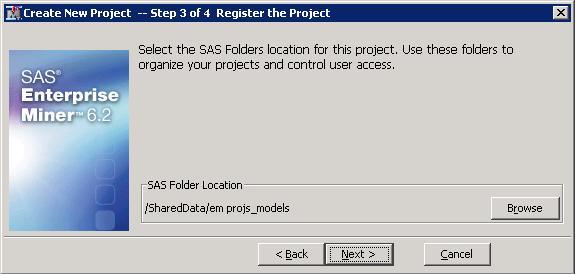
To set the default SAS metadata storage location for SAS Enterprise Miner projects, follow these steps.
- Log on to SAS Management Console as the unrestricted user (sasadm@saspw)
Go to Application Management ► Enterprise Miner ► Projects ► right-click on the Workspace Server ► Properties ► Options tab.
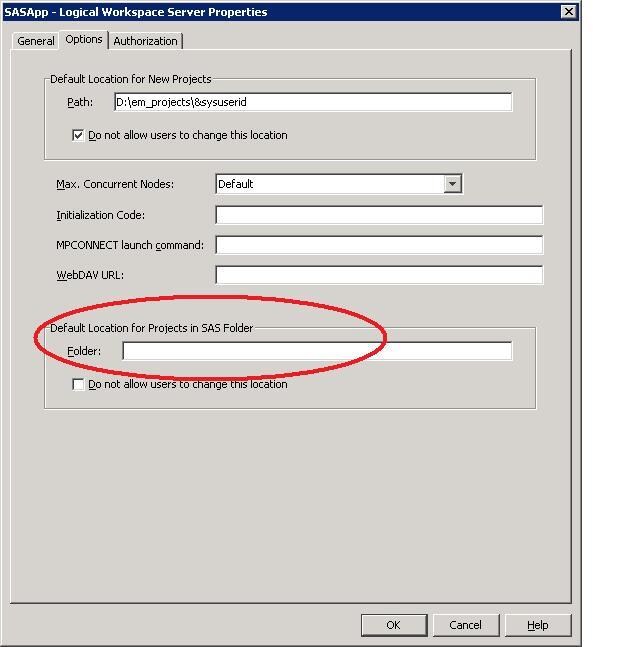
Fill in the path where you want the projects to be stored.
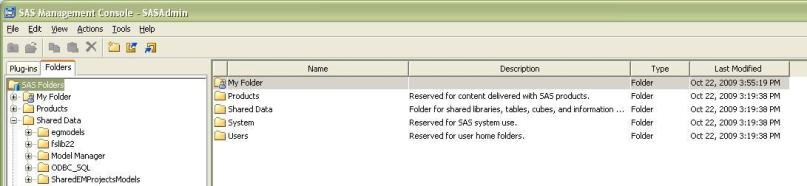
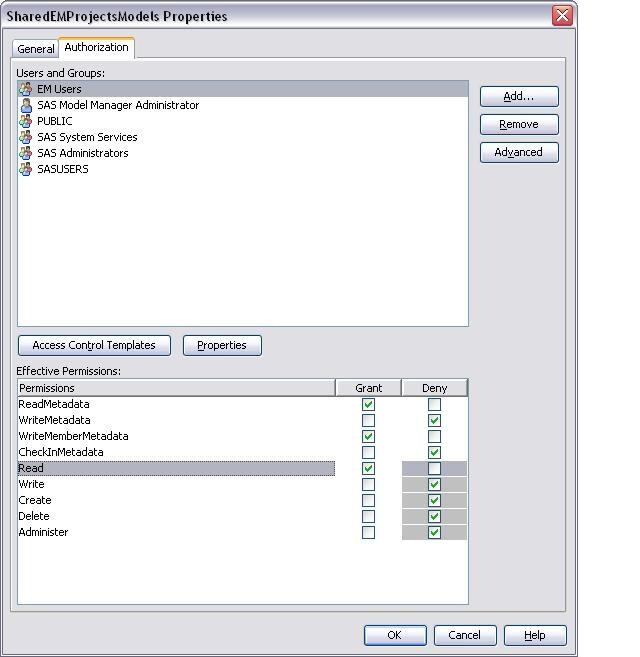
Note: You need to create a project storage location, if it does not already exist. You need to give SAS Enterprise Miner users ReadMetaData and WriteMemberMetaData permissions on this folder. To create a folder, click on the Folders tab and go to "Shared Data" folder. Right-click on the Shared Data folder and choose New Folder.
After the new folder is created, right-click on the new folder and choose Properties. As mentioned above, you need to give SAS Enterprise Miner users ReadMetaData, WriteMemberMetaData and Read permissions on this folder.
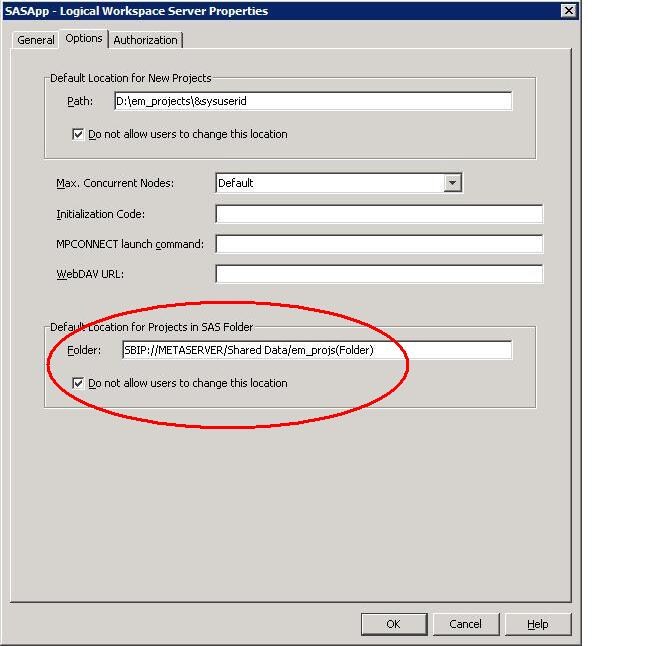
Note how the Shared Data path is defined. The "SBIP://METASERVER" portion is required for this to work properly. You must also include "(Folder)" at the end.
Re-start SAS® Analytics Platform server to invoke the changes.
- Windows: Start ► Run ► Services.msc ► SAS [PlanName-Lev1] Analytics Platform Server. Right-click and select Restart.
- UNIX: cd to Lev1/AnalyticsPlatform. Enter AnalyticsPlatform.sh stop and then enter AnalyticsPlatform.sh start.
Log on to SAS Enterprise Miner and the Default Metadata path is defined.
Operating System and Release Information
| Product Family | Product | System | Product Release | SAS Release | ||
| Reported | Fixed* | Reported | Fixed* | |||
| SAS System | SAS Enterprise Miner | Microsoft® Windows® for 64-Bit Itanium-based Systems | 6.2 | 9.2 TS2M3 | ||
| Microsoft Windows Server 2003 Datacenter 64-bit Edition | 6.2 | 9.2 TS2M3 | ||||
| Microsoft Windows Server 2003 Enterprise 64-bit Edition | 6.2 | 9.2 TS2M3 | ||||
| Microsoft Windows XP 64-bit Edition | 6.2 | 9.2 TS2M3 | ||||
| Microsoft® Windows® for x64 | 6.2 | 9.2 TS2M3 | ||||
| Microsoft Windows Server 2003 Datacenter Edition | 6.2 | 9.2 TS2M3 | ||||
| Microsoft Windows Server 2003 Enterprise Edition | 6.2 | 9.2 TS2M3 | ||||
| Microsoft Windows Server 2003 Standard Edition | 6.2 | 9.2 TS2M3 | ||||
| Microsoft Windows Server 2003 for x64 | 6.2 | 9.2 TS2M3 | ||||
| Microsoft Windows Server 2008 | 6.2 | 9.2 TS2M3 | ||||
| Microsoft Windows Server 2008 for x64 | 6.2 | 9.2 TS2M3 | ||||
| Microsoft Windows XP Professional | 6.2 | 9.2 TS2M3 | ||||
| Windows 7 Enterprise 32 bit | 6.2 | 9.2 TS2M3 | ||||
| Windows 7 Enterprise x64 | 6.2 | 9.2 TS2M3 | ||||
| Windows 7 Home Premium 32 bit | 6.2 | 9.2 TS2M3 | ||||
| Windows 7 Home Premium x64 | 6.2 | 9.2 TS2M3 | ||||
| Windows 7 Professional 32 bit | 6.2 | 9.2 TS2M3 | ||||
| Windows 7 Professional x64 | 6.2 | 9.2 TS2M3 | ||||
| Windows 7 Ultimate 32 bit | 6.2 | 9.2 TS2M3 | ||||
| Windows 7 Ultimate x64 | 6.2 | 9.2 TS2M3 | ||||
| Windows Vista | 6.2 | 9.2 TS2M3 | ||||
| Windows Vista for x64 | 6.2 | 9.2 TS2M3 | ||||
| 64-bit Enabled AIX | 6.2 | 9.2 TS2M3 | ||||
| 64-bit Enabled HP-UX | 6.2 | 9.2 TS2M3 | ||||
| 64-bit Enabled Solaris | 6.2 | 9.2 TS2M3 | ||||
| HP-UX IPF | 6.2 | 9.2 TS2M3 | ||||
| Linux | 6.2 | 9.2 TS2M3 | ||||
| Linux for x64 | 6.2 | 9.2 TS2M3 | ||||
| Solaris for x64 | 6.2 | 9.2 TS2M3 | ||||
| Type: | Usage Note |
| Priority: |
| Date Modified: | 2011-03-07 16:04:38 |
| Date Created: | 2010-10-29 11:19:42 |