Sample 36921: Using the SAS® Add-In for Microsoft Office to publish documents that can be accessed from the SAS® Information Delivery Portal
 |  |  |  |
Overview
The SAS Add-In for Microsoft office enables users to publish content to a SAS metadata folder. If that folder is configured for WebDAV content mapping, and the mapped location is available to SAS Information Delivery Portal, then the published files can be viewed from the Portal. This sample, which is organized according to software version, contains the step-by-step instructions for configuring a folder for WebDAV mapping, publishing from the SAS Add-In for Microsoft Office, and accessing the content via the Portal.
Before you begin
Depending on which version of the software you are running, review the key points in one of the following lists. Then, click the associated link to go straight to the instructions for your software.
- SAS Information Delivery Portal 4.2 or 4.3, SAS Add-In For Microsoft Office 4.2 or 4.3, and SAS 9.2 with SAS Content Server
- The Portal uses the SAS Content Server.
- The Portal can view content published to the
/repository/default/sasdav/folder. - The Portal cannot view content published to SAS Folders, which is mapped to
repository/default/sasfolders. - Only one folder can be configured for WebDAV content mapping. If you want to publish to multiple folders, then create the additional folders beneath the WebDAV folder.
- SAS Information Delivery Portal 2.0, SAS Add-In for Microsoft Office 2.1, SAS 9.1.3, with Xythos
- The Portal can view published content only if Xythos is used for WebDAV.
- The Portal can view content published to the
/sasdav/folder. - The Portal cannot view content published to the
/sasdav/wrsfolder. Specifically, the Portal cannot view content published under the BIP Tree, which is mapped to/sasdav/wrs.
SAS Information Delivery Portal 4.2 or 4.3, SAS Add-In For Microsoft Office 4.2 or 4.3, and SAS 9.2 with SAS Content Server
Creating a metadata folder with WebDAV content mapping
- Open SAS Management Console, and log in as an unrestricted user.
- Right-click on SAS Folders and select New Folder.
- Enter Office Publishing as the name (or choose your own name), and click Next.
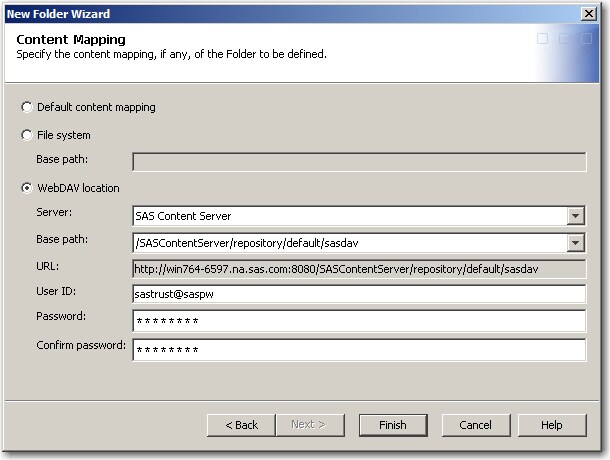
- Select WebDAV location. For the server, select SAS Content Server. For the base path, select
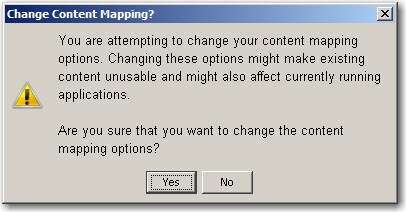
/SASContentServer/repository/default/sasdav. For the user ID and password, use the login for the SAS Trusted User. Click Finish. - In the content warning window, click Yes. The warning indicates that the subfolder named Office Publishing uses a different content mapping than the other subfolders beneath SAS Folders.
- Right-click on the Office Publishing folder, select Properties, and, on the Authorization tab, grant both ReadMetadata and WriteMetadata permissions to users who are allowed to publish to the Office Publishing folder. Click OK.
Publishing content from SAS Add-in for Microsoft Office to the WebDav folder
Note: These screen shots were taken with Office 2007. If you are using a different version, your menus might also be different.
- Open any Office product with the SAS Add-In for Microsoft Office. For this sample, Excel is used.
- Open data into the spreadsheet.
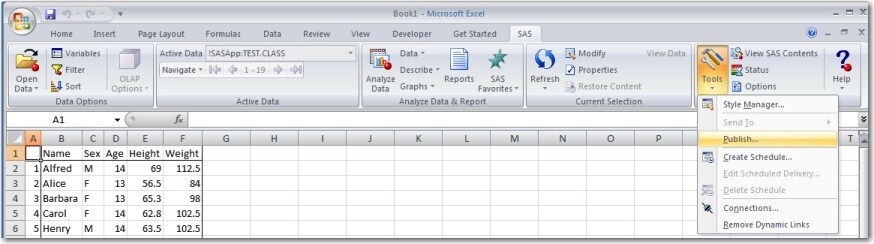
- On the SAS ribbon, select Tools ► Publish if you are using SAS Add-In for Microsoft Office 4.2. If you are using version 4.3, the menu item has been renamed to Tools ► Save to SAS Folders
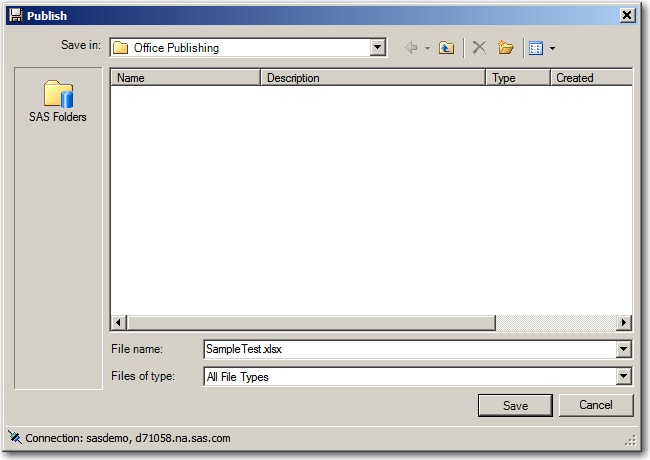
- For the folder, select the Office Publishing folder created earlier. Enter the full name of the file that you want to publish, including the correct file extension. A file extension is required in order for the Portal to recognize the file.
- Click Save. A permissions dialog box appears that enables you to set permissions on the individual file. However, because SAS recommends that you set permissions at the folder level in SAS Management Console, you do not have to assign permissions here. If no permissions are selected, the default permissions for the folder are used. Click OK to finish publishing the document.

Viewing published content from the Portal
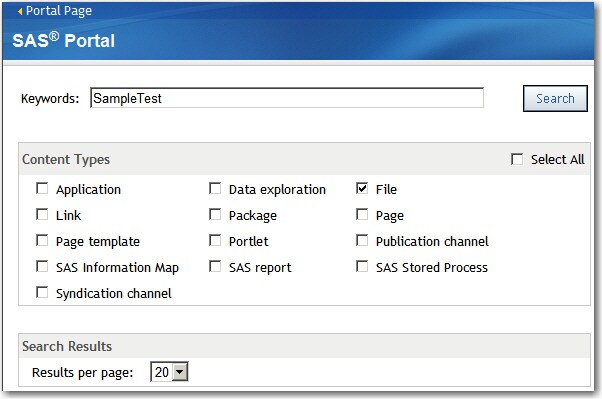
- To view the published document, log in to the SAS Information Delivery Portal, and select the Search menu. Type the name of the file and select File as the content type.
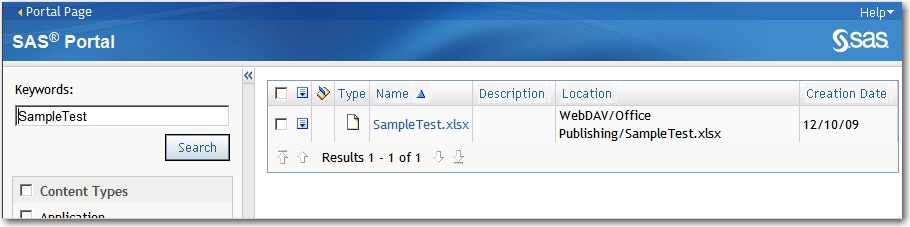
- The file is listed in the search results. Click the link to open the file into the appropriate Office program.
Tip: In addition to accessing published content from search results, published files can added or accessed from portlets. For more information, see the online help included within the Portal.
SAS Information Delivery Portal 2.0, SAS Add-In for Microsoft Office 2.1, SAS 9.1.3, with Xythos
Creating a metadata folder with WebDAV content mapping
- Log in to Xythos Administrative Console. The URL will be similar to http://server:8300/xythosadmin.
- Create a new subdirectory under
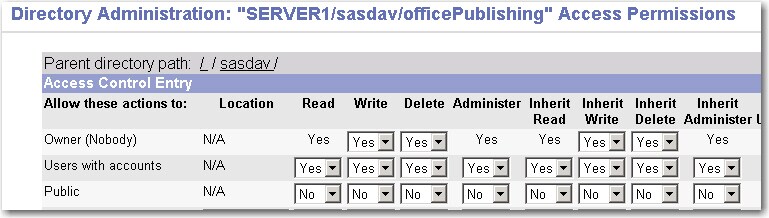
sasdav, and call it officePublishing (or some other name). - Edit the permissions of the officePublishing directory to make sure that only the appropriate users have both read and write access to this folder. SAS recommends that you grant all permissions to the Users with accounts group.
- Open SAS Management Console and log in as an unrestricted user.
- Expand the Server Manager plug-in, right-click on the HTTP Dav Server, and select Properties.
-
Click the Options tab in the Properties dialog box and create a new base path for
/sasdav/officePublishing. Be sure to select the Supports WebDAV option. - Click OK until you exit all of the dialog boxes.
- Right-click on the BI Manager plug-in, and select New Folder.
- Enter Office Publishing as the name (or choose your own name), and click Next.
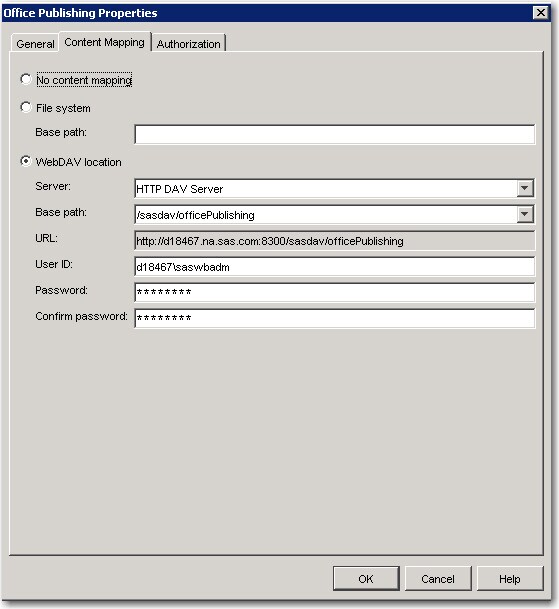
- Select WebDAV location. Select the server and base path created earlier. For the user ID and password, use the login for the SAS Web Administrator. Click OK.



Publishing content from SAS Add-in for Microsoft Office to the WebDav folder
Note: These screen shots were taken with Office 2003. If you are using a different version, your menus might also be different.
- Open any Office product with the SAS Add-In for Microsoft Office. For this sample, Excel is used.
- Open data into the spreadsheet.
- From the SAS menu, select Tools ► Publish.
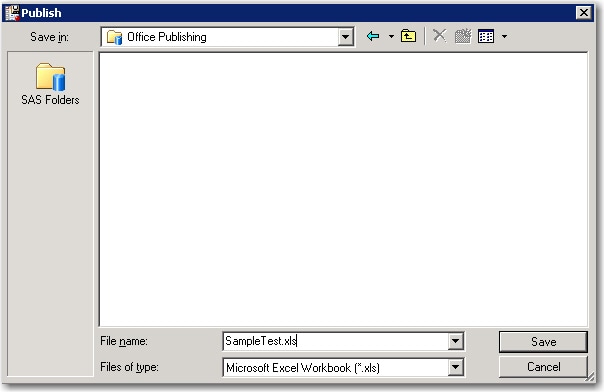
- For the folder, select the Office Publishing folder created earlier. Enter the full name of the file that you want to publish, including the correct file extension. A file extension is required in order for the Portal to recognize the file.
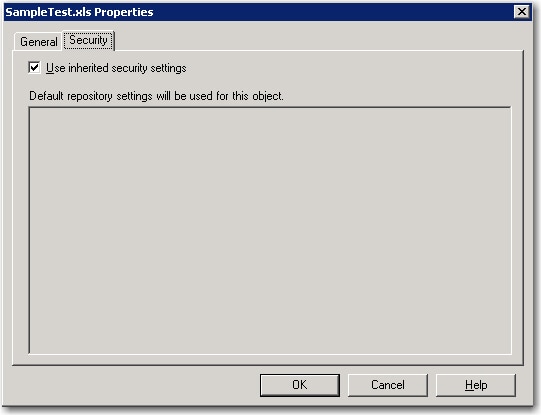
- Click Save. A permissions dialog box appears that enables you to set permissions on the individual file. Select the Use inherit security settings option to use the permissions set at the folder level. Click OK to finish publishing the document.

Viewing published content from the Portal
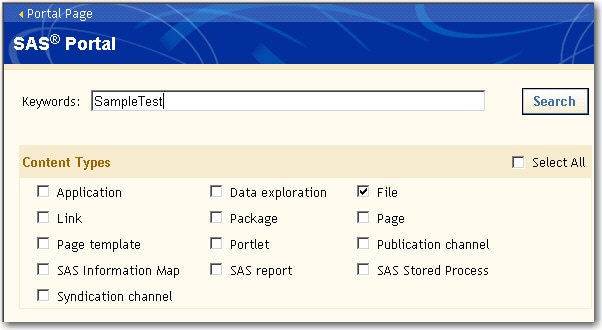
- To view the published document, log in to the SAS Information Delivery Portal, and select the Search menu. Type the name of the file and select File as the content type.
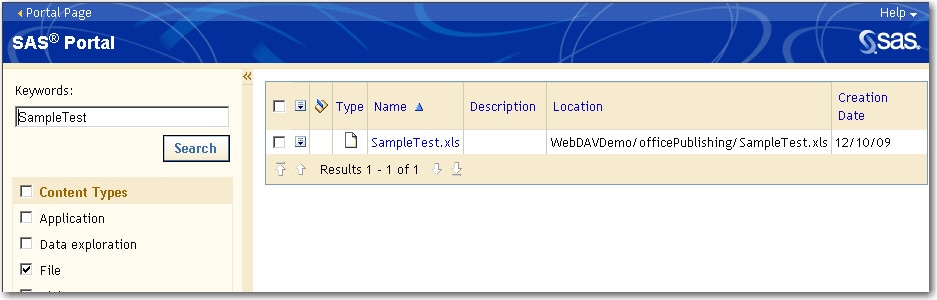
- The file is listed in the search results. Click the link to open the file into the appropriate Office program.
Tip: In addition to accessing published content from search results, published files can added or accessed from portlets. For more information, see the online help included within the Portal.
Additional Documentation
For more information about the SAS Information Delivery Portal, see the SAS Information Delivery Portal documentation page.
For more information about the SAS Add-In for Microsoft Office, see the SAS Add-In for Microsoft Office documentation page.
For more information about SAS Management Console, see the SAS Management Console documentation page.
These sample files and code examples are provided by SAS Institute Inc. "as is" without warranty of any kind, either express or implied, including but not limited to the implied warranties of merchantability and fitness for a particular purpose. Recipients acknowledge and agree that SAS Institute shall not be liable for any damages whatsoever arising out of their use of this material. In addition, SAS Institute will provide no support for the materials contained herein.
These sample files and code examples are provided by SAS Institute Inc. "as is" without warranty of any kind, either express or implied, including but not limited to the implied warranties of merchantability and fitness for a particular purpose. Recipients acknowledge and agree that SAS Institute shall not be liable for any damages whatsoever arising out of their use of this material. In addition, SAS Institute will provide no support for the materials contained herein.
| Type: | Sample |
| Topic: | Third Party ==> Products ==> Microsoft Office Query and Reporting ==> Report Distribution |
| Date Modified: | 2009-12-10 16:26:54 |
| Date Created: | 2009-08-18 16:42:57 |
Operating System and Release Information
| Product Family | Product | Host | Product Release | SAS Release | ||
| Starting | Ending | Starting | Ending | |||
| SAS System | SAS Add-in for Microsoft Office | Microsoft Windows 2000 Advanced Server | 2.1 | 9.1 TS1M3 SP4 | ||
| Microsoft Windows 2000 Datacenter Server | 2.1 | 9.1 TS1M3 SP4 | ||||
| Microsoft Windows 2000 Server | 2.1 | 9.1 TS1M3 SP4 | ||||
| Microsoft Windows 2000 Professional | 2.1 | 9.1 TS1M3 SP4 | ||||
| Microsoft Windows NT Workstation | 2.1 | 9.1 TS1M3 SP4 | ||||
| Microsoft Windows Server 2003 Datacenter Edition | 2.1 | 9.1 TS1M3 SP4 | ||||
| Microsoft Windows Server 2003 Enterprise Edition | 2.1 | 9.1 TS1M3 SP4 | ||||
| Microsoft Windows Server 2003 Standard Edition | 2.1 | 9.1 TS1M3 SP4 | ||||
| Microsoft Windows XP Professional | 2.1 | 9.1 TS1M3 SP4 | ||||
| Windows Vista | 2.1 | 9.1 TS1M3 SP4 | ||||
| SAS System | SAS Information Delivery Portal | Microsoft Windows 2000 Advanced Server | 2.0 | 9.1 TS1M3 SP4 | ||
| Microsoft Windows 2000 Datacenter Server | 2.0 | 9.1 TS1M3 SP4 | ||||
| Microsoft Windows 2000 Server | 2.0 | 9.1 TS1M3 SP4 | ||||
| Microsoft Windows 2000 Professional | 2.0 | 9.1 TS1M3 SP4 | ||||
| Microsoft Windows NT Workstation | 2.0 | 9.1 TS1M3 SP4 | ||||
| Microsoft Windows Server 2003 Datacenter Edition | 2.0 | 9.1 TS1M3 SP4 | ||||
| Microsoft Windows Server 2003 Enterprise Edition | 2.0 | 9.1 TS1M3 SP4 | ||||
| Microsoft Windows Server 2003 Standard Edition | 2.0 | 9.1 TS1M3 SP4 | ||||
| Microsoft Windows XP Professional | 2.0 | 9.1 TS1M3 SP4 | ||||
| Windows Vista | 2.0 | 9.1 TS1M3 SP4 | ||||
| 64-bit Enabled AIX | 2.0 | 9.1 TS1M3 SP4 | ||||
| 64-bit Enabled Solaris | 2.0 | 9.1 TS1M3 SP4 | ||||
| HP-UX IPF | 2.0 | 9.1 TS1M3 SP4 | ||||