Installation Note 33681: Creating custom or add-on installations for SAS® Foundation products in the SAS® 9.2 licensed product set using a SAS Software Depot for client users
 |  |  |  |
When you install SAS 9.2, the SAS® Deployment Wizard displays SAS Foundation in the list of available products to install. If you select SAS Foundation, you must install all SAS Foundation products for which you have licenses; you cannot install a subset of those products. See SAS Note 15827, "Examples of SAS products in 'Foundation Only' Service Packs," for a list of SAS Foundation products.
If you do not need to install all the SAS Foundation products, you can create a SAS Software Depot for client users. When you create a depot for client users, you can create a custom set of SAS 9.2 Foundation solutions or add-on products to place in the depot. The SAS® Deployment Wizard User's Guide provides instructions for creating a SAS Software Depot for client users.
Note: You can create SAS Software Depots for client users only with basic orders. If you have a planning order, you will not be able to create a depot for clients and will need to contact SAS Technical Support for assistance.
To create a custom set of your licensed products to install via a SAS Software Depot for client users:
- In your SAS Software Depot, start setup.exe.
- When the Select Deployment Task dialog box appears, select Create a new SAS Software Depot, and click Next.
- When the Select SAS Software Order dialog box appears, select the SAS software order for which you want to create the depot, and click Next.
- When the Select SAS Software Depot Option dialog box appears,
select Client Users.
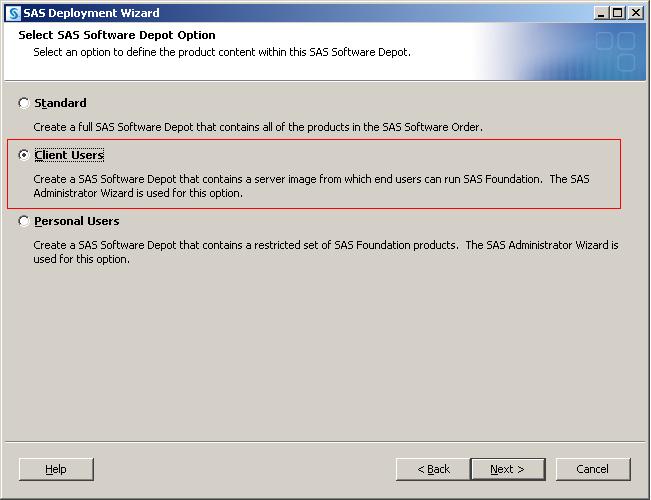
This option enables you to start the process of selecting products to install.
- Specify your SAS installation data file, and click Next.
- Enter a new folder name for your custom SAS Software Depot.
- If you are prompted to create the folder, click Yes, and then click Next.
- Inspect the Final Review screen, and click Start.
- When the SAS Administrator Wizard appears, click Next.
- Select the languages desired, and click Next.
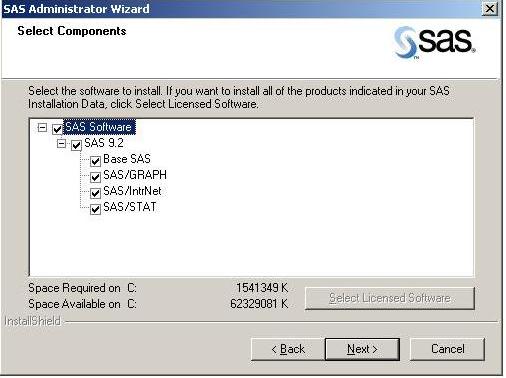
- When the Select Components dialog box appears, select or clear the applicable product sets, and then click Next.
- After the client image is created, you can install the products on your machine.
The ability to install a subset of SAS Foundation products without having to create a separate software depot is planned for a future release of SAS.
Operating System and Release Information
| Product Family | Product | System | SAS Release | |
| Reported | Fixed* | |||
| SAS System | Base SAS | Microsoft® Windows® for 64-Bit Itanium-based Systems | 9.2 TS1M0 | |
| Microsoft Windows Server 2003 Datacenter 64-bit Edition | 9.2 TS1M0 | |||
| Microsoft Windows Server 2003 Enterprise 64-bit Edition | 9.2 TS1M0 | |||
| Microsoft® Windows® for x64 | 9.2 TS1M0 | |||
| Microsoft Windows Server 2003 Datacenter Edition | 9.2 TS1M0 | |||
| Microsoft Windows Server 2003 Enterprise Edition | 9.2 TS1M0 | |||
| Microsoft Windows Server 2003 Standard Edition | 9.2 TS1M0 | |||
| Microsoft Windows XP Professional | 9.2 TS1M0 | |||
| Windows Vista | 9.2 TS1M0 | |||
| Type: | Installation Note |
| Priority: | medium |
| Date Modified: | 2010-01-18 09:48:09 |
| Date Created: | 2008-10-17 09:09:24 |