Usage Note 32800: A scheduled scan for the SAS® BI Lineage Plug-in to SAS® Management Console does not appear in the list of scheduled objects
 |  |  |  |
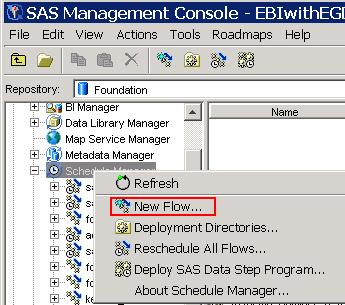
A newly scheduled SAS BI Lineage scan does not automatically appear in the list of scheduled objects. After scheduling a SAS BI Lineage scan, you must right-click on the Schedule Manager and select New Flow. The scheduled scan will then appear in the list of scheduled objects.
Operating System and Release Information
| Product Family | Product | System | SAS Release | |
| Reported | Fixed* | |||
| SAS System | SAS Management Console | Microsoft Windows NT Workstation | 9.1 TS1M3 SP4 | |
| Microsoft Windows 2000 Professional | 9.1 TS1M3 SP4 | |||
| Microsoft Windows 2000 Server | 9.1 TS1M3 SP4 | |||
| Microsoft Windows 2000 Datacenter Server | 9.1 TS1M3 SP4 | |||
| Microsoft Windows 2000 Advanced Server | 9.1 TS1M3 SP4 | |||
| Microsoft® Windows® for x64 | 9.1 TS1M3 SP4 | |||
| Microsoft Windows XP 64-bit Edition | 9.1 TS1M3 SP4 | |||
| Microsoft Windows Server 2003 Enterprise 64-bit Edition | 9.1 TS1M3 SP4 | |||
| Microsoft Windows Server 2003 Datacenter 64-bit Edition | 9.1 TS1M3 SP4 | |||
| Microsoft® Windows® for 64-Bit Itanium-based Systems | 9.1 TS1M3 SP4 | |||
| Microsoft Windows Server 2003 Datacenter Edition | 9.1 TS1M3 SP4 | |||
| Microsoft Windows Server 2003 Enterprise Edition | 9.1 TS1M3 SP4 | |||
| Microsoft Windows Server 2003 Standard Edition | 9.1 TS1M3 SP4 | |||
| Microsoft Windows XP Professional | 9.1 TS1M3 SP4 | |||
| 64-bit Enabled AIX | 9.1 TS1M3 SP4 | |||
| 64-bit Enabled HP-UX | 9.1 TS1M3 SP4 | |||
| 64-bit Enabled Solaris | 9.1 TS1M3 SP4 | |||
| HP-UX IPF | 9.1 TS1M3 SP4 | |||
| Linux | 9.1 TS1M3 SP4 | |||
| Linux on Itanium | 9.1 TS1M3 SP4 | |||
| Type: | Usage Note |
| Priority: | |
| Topic: | Software Components ==> SMC Plug-in Data Management ==> Administration ==> Impact Analysis System Administration ==> Scheduling |
| Date Modified: | 2008-07-29 10:56:23 |
| Date Created: | 2008-07-28 14:01:10 |