
Chapter Contents

Previous

Next
|
Chapter Contents |
Previous |
Next |
| SAS/C C++ Development System User's Guide, Release 6.50 |
The fundamental concepts of I/O in C++ are those of streams, insertion, and extraction. An input stream is a source of characters; that is, it is an object from which characters can be obtained (extracted). An output stream is a sink for characters; that is, it is an object to which characters can be directed (inserted). (It is also possible to have bidirectional streams, which can both produce and consume characters.) This section explains the basics of performing C++ I/O. For more details, refer to your C++ programming manual.
This section covers the following components of C++ I/O:
Insertion is the operation
of sending characters to a stream, expressed by the overloaded insertion operator
<<
. Thus, the following statement sends the character
'x'
to the stream
cout
:
cout << `x'; |
>>
. The following expression (where
ch
has type
char
) obtains a single character from the stream
cin
and stores it in
ch
.
cin >> ch; |
'1'
,
'2'
, and
'3'
are inserted into the stream
cout
, after which characters are
extracted from
cin
, interpreted as an integer, and the result
is assigned to
i
:
int i = 123; cout << i; cin >> i; |
class fraction
{
   int numer;
   unsigned denom;
   friend ostream& operator <<(ostream& os,
                               fraction& f)
   {
      return os << f.numer << `/' << f.denom;
   };
};
|
These statements define an insertion operator for a user-defined
fraction
class, which can be used as conveniently and easily as insertion
of characters or
ints
.
The definition of C++ stream I/O makes use of the concepts of the get pointer and the put pointer. The get pointer for a stream indicates the position in the stream from which characters are extracted. Similarly, the put pointer for a stream indicates the position in the stream where characters are inserted. Use of the insertion or extraction operator on a stream causes the appropriate pointer to move. Note that these are abstract pointers, referencing positions in the abstract sequence of characters associated with the stream, not C++ pointers addressing specific memory locations.
You can use member functions of the various stream classes to move the
get or put pointer without performing an extraction or insertion. For example,
the
fstream::seekoff()
member function moves the get and put pointers
for an
fstream
.
The exact behavior of the get and put pointers for a stream depends
on the type of stream. For example, for
fstream
objects, the get and put
pointers are tied together. That is, any operation that moves one always moves
the other. For
strstream
objects, the pointers are independent.
That is, either pointer can be moved without affecting
the other.
The get and put pointers reference positions between the characters of the stream, not the characters themselves. For example, consider the following sequence of characters as a stream, with the positions of the get and put pointers as marked in Illustration of Get and Put Pointers :
Illustration of Get and Put Pointers
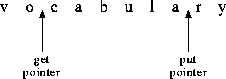
In this example, the next character extracted from the stream is '
c
', and the next character inserted into the stream replaces the '
r
'.
This section
covers the basics of using streams, including explaining which streams are
provided by the streams library, how the different streams classes are related,
which member functions are available for use with streams, and how to create
your own streams.
The streams library provides four different kinds of streams:
strstreamfstreamstdiostreambsamstreamstdiostream
objects should be used in programs that use the C standard I/O package
as well as C++, to avoid interference between the two forms of
I/O; on some implementations,
fstreams
provide better performance
than
stdiostreams
when interaction with C I/O is not an issue.
Other types of streams can be defined by derivation from the base classes
iostream
and
streambuf
. See Stream class hierarchy for more information on the relationships
between these classes.
Every C++ program begins execution with four defined streams:
To use these streams, you must include the header file
iostream.h
.
Additional streams can be created by the program as necessary. For more
in- formation, see Creating streams
.
All the
different stream classes are derived from two common base classes:
ios
and
streambuf
.
class ios
is a base class for the classes
istream
(an input stream),
ostream
(an output stream) and
iostream
(a
bidirectional stream). You are more likely to use these classes as base classes
than to use class
ios
directly. The
streambuf
class is a class that
implements buffering for streams and controls the flushing of a full output
buffer or the refilling of an empty input buffer.
Four sets of stream classes are provided in the standard streams library:
fstream
,
strstream
,
stdiostream
, and
bsamstream
. Corresponding to each of these stream classes
is a buffer class:
filebuf
,
strstreambuf
,
stdiobuf
,
and
bsambuf
, implementing a form of buffering appropriate to each stream.
Note that the stream classes are not derived
from the buffering classes; rather, a stream object has an associated buffering
object of the appropriate kind (for instance, an
fstream
object has an associated
filebuf
), which can be accessed directly if necessary using the
rdbuf()
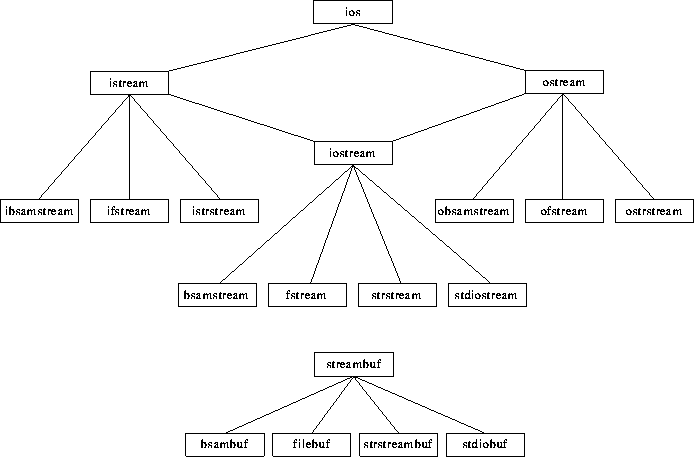
member function. Relationship between Stream Classes
shows the inheritance relationships between the various classes.
Relationship between Stream Classes
In addition to providing the insertion and extraction operations, the stream classes define a number of other member functions that can be more convenient than using insertion and extra ction directly. All these functions are discussed in some detail in the class descriptions later in this chapter. The following list briefly describes a few of the most useful member functions.
get()
and
getline()\n
') is encountered, possibly with a limit to the number of characters
to be extracted.
The
get()
and
getline()
functions behave similarly, except that
getline()
extracts the final delimiter and
get()
does
not.
read()read()
is intended for use with binary data, whereas
get()
and
getline()
are usually more appropriate with text data.putback()write()flush()flush()
may
not cause any characters to be immediately written, depending on the characteristics
of the file.tie()cin
stream is automatically tied to
cout
, which
means that
cout
's buffer is flushed before
characters are extracted from
cin
. If, as is usually the case,
cin
and
cout
are both terminal files, this assures that
you see any buffered output messages before having to enter a response. Similarly,
the
cerr
stream is tied to
cout
, so that if an error message
is generated to
cerr
, any buffered output characters are written
first.seekg()
and
seekp()Note: Positioning of files is very different on 370 systems than on
many other systems. See 370 I/O Considerations
for some details. ![[cautend]](../common/images/cautend.gif)
tellg()
and
tellp()tellg()
and
tellp()
are
used to determine the read or write position for a stream. As with the seeking
functions, the results of these functions are system-dependent. See 370 I/O Considerations for
details.Streams are normally
created by declaring them or by use of the
new
operator. Creating an
fstream
or
stdiostream
entails opening the external file that is to be the source
or sink of characters. Creating
a
strstream
entails specifying the area of storage that will serve
as the source or sink of characters. For
fstream
, a stream constructor can
be used to create a stream associated with a particular file, similar to the
way the
fopen
function is used in C.
For instance, the following declaration creates an output
fstream
object,
dict
, associated with the CMS file named DICT DATA:
ofstream dict("cms:dict data");
|
When you
create an
fstream
(or a
stdiostream
), you must usually provide a filename
and an open mode. The open mode specifies the way in which the file is to
be accessed. For an
ifstream
, the
default open mode is
ios::in
, specifying input only; for an
ofstream
, the default open mode is
ios::out
, specifying output only.
See 370 I/O Considerations
for information on additional arguments that can be supplied
and for additional information on the form of filenames.
If you declare an
fstream
without specifying any arguments, a default
constructor is called that creates an unopened
fstream
. An unopened stream can
be opened by use of the member function
open()
, which accepts the same arguments
as the constructor.
When you
create a
strstream
, you must usually provide an area of memory and a length. Insertions
to the stream store into the area of memory; extractions return successive
characters from the area. When the array is full, no more characters can be
inserted; when all characters have been extracted,
the
ios::eof
flag is set for the stream. For an
istrstream
, the length argument to the constructor is optional; if you omit it, the
end of the storage area is determined by scanning for an end-of-string delimiter
('
\0
').
For a
strstream
that permits output, you can create a dynamic stream by
using a constructor with no arguments. In this case, memory is allocated dynamically
to hold inserted characters. When all characters have been inserted, you can
use the member function
str()
to "freeze" the stream. This prevents further
insertions into the stream
and returns the address of the area where previously inserted characters have
been stored.
When a program
inserts or extracts values other than single characters, such as integers
or floating-point data, a number of different formatting options are available.
For instance, some applications might want to have an inserted
unsigned int
transmitted in decimal, while for other applications hexadecimal might be
more appropriate. A similar issue is whether white
space should be skipped on input before storing or interpreting characters
from a stream. The member function
setf()
is provided to allow program
control of such options. For instance, the following expression sets the default
for the stream
cout
to hexadecimal, so that integral values written
to
cout
will ordinarily
be transmitted in hexadecimal:
cout.setf(ios:hex, ios:basefield) |
width()fill()precision() Use of the
setf()
,
width()
, and similar member functions
is very convenient if the same specifications are used for a large number
of inserted items. If the formatting frequently changes, it is more convenient
to use a manipulator. A manipulator is an object that can be
an operand to the << or >> operator, but which modifies the state of
the stream, rather than actually inserting or extracting any data. For instance,
the manipulators
hex
and
dec
can be used to request hexadecimal
or decimal printing of integral values. Thus, the following sequence can be
used
to write out the value of
i
in decimal and the value of
x[i]
in hexadecimal:
cout << "i = " << dec << i << ", x[i] = " << hex << x[i]; |
ws |
skips white space on input. |
flush |
flushes a stream's buffer. |
endl |
inserts a newline character and then flushes the stream's buffer. |
ends |
inserts an end-of-string character (
'\0'
). |
Associated with each stream
is a set of flags indicating the I/O state of the stream. For example, the
flag
ios::eofbit
indicates that no more characters can be extracted from
a stream, and the flag
ios::failbit
indicates that some previous request failed. The I/O
state flags can be tested by member functions; for example,
cin.eof()
tests whether more characters can be extracted from the standard input stream.
The I/O state flags can be individually manipulated by using the
clear()
member
function; for example,
cout.clear(0)
clears all the I/O state flags for the stream
cout
.
For convenience, the
!
operator and the conversion to
void*
operator allow concise testing
of a stream for any error. These operators allow you to use statements such
as the following, which writes the results of the function
nextline
to
the standard output stream until an error occurs:
while(cout) cout << nextline(); |
while(cout << nextline()); |
while(cin >> datum) process(datum); |
|
Chapter Contents |
Previous |
Next |
 Top of Page |

Copyright © Tue Feb 10 12:11:23 EST 1998 by SAS Institute Inc., Cary, NC, USA. All rights reserved.