logo Getting Started with SAS Enterprise Guide Main menubacknext
    

Create a Program and Link It to the Query Builder

  1. Select Filethen Newthen Program. An empty program window opens in the workspace.

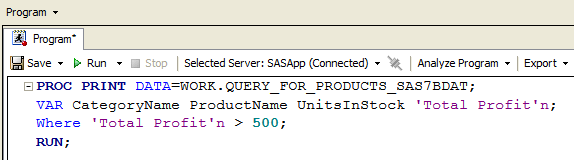
  2. Type or copy and paste the following program in the program window:

    PROC PRINT DATA=WORK.QUERY_FOR_PRODUCTS_SAS7BDAT;
    VAR CategoryName ProductName UnitsInStock 'Total Profit'n;
    Where 'Total Profit'n > 500;
    RUN;


Program window
Click to view the full window.


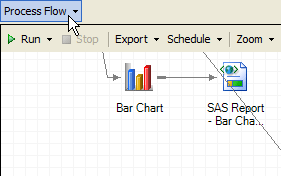
  1. Because the program uses the data set that is created by the Query Builder, you must link the program to the data set from the Query Builder so that it runs only after the data set has been created. Select Process Flow from the recently viewed items menu in the upper left corner of the workspace to return to the process flow for the project.

Recently viewed items menu button
Click to view the full window.


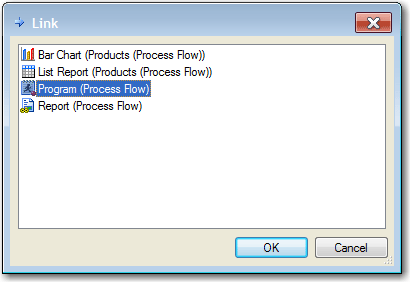
  1. In the Process Flow window, right-click the QUERY_FOR_Products.sas7bdat data object and select Link QUERY_FOR_Products.sas7bdat to. The Link window opens.


  2. Link window


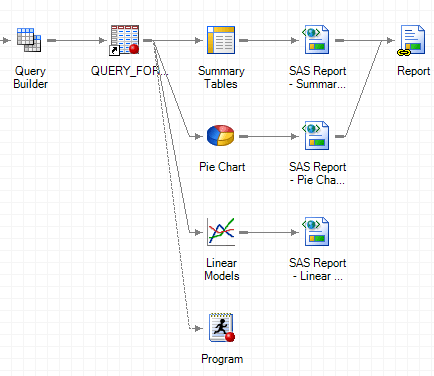
  3. In the Link window, select Program, and then click OK. The program and the QUERY_FOR_Products.sas7bdat data set are now connected by a dotted line. The program runs only after the data set is created.


Process Flow window with the program and Query Builder linked
Click to view the full window.


Next you create a note about the program and link it to the program object in the process flow.


Main menubacknext