Understanding Process Flows
What Is a Process Flow?
You must be working in the Visual Programming perspective to work with process flows. For more information
about the Visual Programming perspective, see Understanding Perspectives.
A process flow consists of one or more objects. Each object is represented by a node in the process flow. The process flow shows the relationship between two or more
objects, such as a SAS program, a task, a query, and so on.
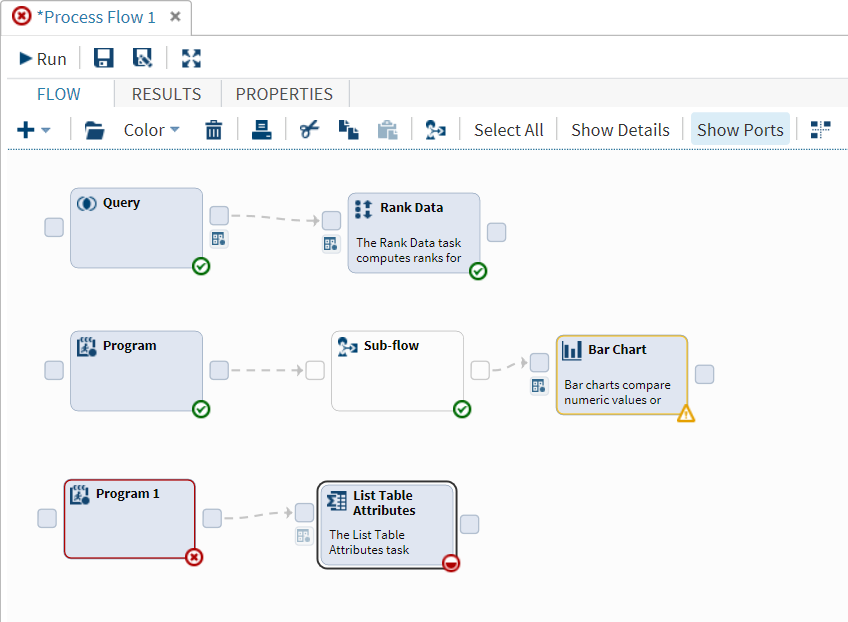
This sample process flow contains three branches.
-
In the first branch, a query is created for the Sashelp.Classfit data set. As a result of this query, only observations where Sex=M are included in the output data set (called Webwork.Query). The Rank Data task ranks the Height and Weight values by Age.
-
In the second branch, you write a SAS program that generates an output data set. After this program runs, a subflow that contains more program and task nodes runs. Then, SAS Studio tries to run the Bar Chart node. However, this task generates a warning.
-
In the third branch, the SAS program generates an error. The information for the List Table Attributes node is incomplete. SAS Studio cannot run the process flow until you provide the required data.

What Are Ports?
In a process flow, you can have two types of ports:
control ports
In the process flow, these types of ports appear as  . You use these ports to specify the order in which nodes run in the process flow.
For more information,
see Linking Nodes in a Process Flow.
. You use these ports to specify the order in which nodes run in the process flow.
For more information,
see Linking Nodes in a Process Flow.
. You use these ports to specify the order in which nodes run in the process flow.
For more information,
see Linking Nodes in a Process Flow.In the process flow, these types of ports appear as  .
.
.
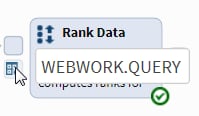
When you run a task, you must specify an input data source. You specify the input data source in the task interface. From the process flow, you can determine the name of the input
data source by positioning your mouse pointer
over the input data port. To view the data source on a separate tab, double-click .
.
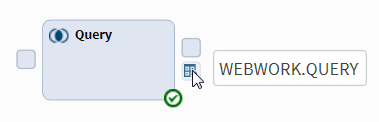
Some nodes, such as queries, might have an output data source. You can use the output data port to determine the name of the output data source. To view the data source, double-click
.
.
By default, ports are displayed in the process flow. To turn off the ports, click
Show
Ports.
Understanding the Status of Each Node
When you run a process flow, some nodes might run successfully, and others might not.
To see the status of each node, how long it took to run the node, and whether any
output data was created, click the Results tab.
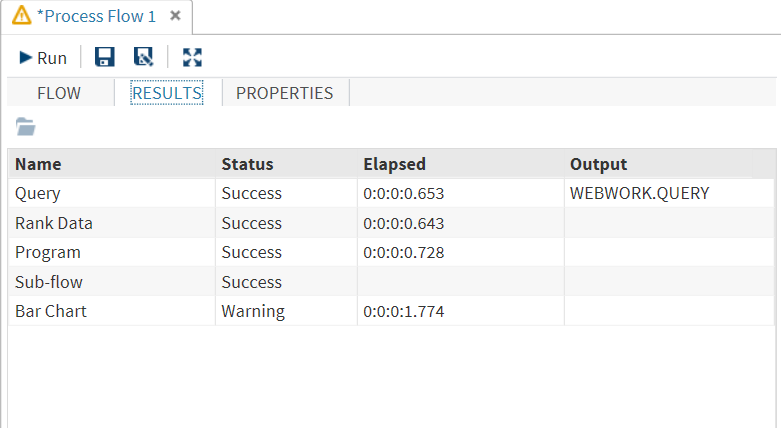
You can use these icons to determine the status of each node in the process flow:
|
Icon
|
Description
|
 |
specifies that more information is needed before SAS Studio can run the node. For
example, if you see this icon on a task node, you must specify values for the
required options in the task. This icon can also appear on an empty subflow node after
SAS Studio tries to run it.
|
 |
specifies that the node is in the queue to run.
|
 |
specifies that the code for the node was submitted successfully. No warnings or errors
were returned.
|
 |
specifies that the code for the node generated a warning. Review the log for that
node for more information.
|
 |
specifies that the code for the node generated an error. Review the log for that node
for more information.
|
Customizing a Process Flow
You can customize your process flow in these ways.
-
To specify a color for a node or a group of nodes, select the nodes and click Color. From the drop-down list, select the color that you want to use.
-
By default, you can arrange objects in the process flow any way you like. However, your process flow might become confusing if it contains many objects. Click
 for SAS Studio to arrange the objects in your process flow. When arranging the nodes,
SAS Studio considers any dependencies and the order in which the nodes were added
to the process flow.
for SAS Studio to arrange the objects in your process flow. When arranging the nodes,
SAS Studio considers any dependencies and the order in which the nodes were added
to the process flow.
Viewing the Properties of a Process Flow
To view the properties of the current process flow, click the Properties tab. From the properties, you can specify the priority of execution of the nodes.
The process flow runs the nodes in the order in which the nodes are added to the
process flow. If node 1 is dependent on another node 2, node 2 must run completely
before node 1 will run.
You can also run the nodes in parallel, which means that multiple workspace servers are used to run the nodes. As a result, the nodes might not share a common
Work library.
Copyright © SAS Institute Inc. All rights reserved.