Example: User-Defined Lattice (Butterfly Chart)
About the User-Defined Lattice Example
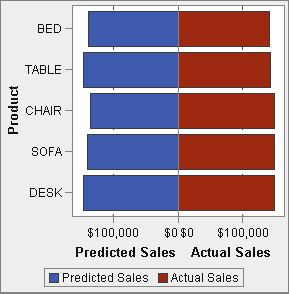
This example uses a butterfly chart to show the actual sales compared to the predicted sales for a line of retail products.
The butterfly chart is useful for comparing two unique values. In this chart, the
two values are arranged on each side of the Y axis.
Example User-Defined Lattice
Build the Graph Object for the User-Defined Lattice Example
Tip
As a shortcut, you can select
a butterfly chart from the graph gallery.
-
-
Drag and drop a second bar chart from the Graph Elements pane onto the left edge of the canvas. This action creates a new column for the second bar chart.
-
Share the category roles. On the Role Definitions tab, click
 next to the Category for either bar chart. Select Create Shared Role With Another
Role and then select the other category role.
The Add Shared Role window is displayed.Click OK.
next to the Category for either bar chart. Select Create Shared Role With Another
Role and then select the other category role.
The Add Shared Role window is displayed.Click OK. -
Change both bar charts to a horizontal layout.
-
Select a bar chart.
-
On the Properties tab, click next to Direction, and select Horizontal.
-
Repeat the previous two steps for the other bar chart.
-
-
Specify a uniform column and row axis.
-
Select the full graph. (Custom Graph should be displayed on the Properties tab).
-
On the Properties tab, click next to Y axis range (left axis only),
and select Same within each row.
-
On the Properties tab, click next to X axis range, and
select Same for all cells.
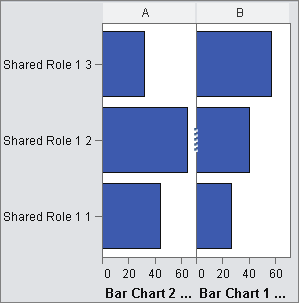
The bar charts should resemble the following:
-
-
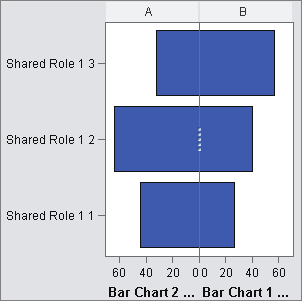
Reverse the order of the X (Measure) axis for the left bar chart.
-
Click the horizontal axis for the left bar chart.
-
-
Change the color of the right bar chart to distinguish it from the left bar chart.
-
Select the right bar chart.
-
On the Properties tab, click next to Fill color, and
select Data color 3. The right bar chart changes to a different color. In the default theme, the color
is deep red.
-
-
Display the grid lines for the X axes.
-
Click the horizontal axis for the left bar chart.
-
On the Properties tab, select Show grid lines.
-
Repeat the previous two steps for the right bar chart.
-
-
Save the graph object. See Save a Custom Graph Object So It Appears in the Designer.
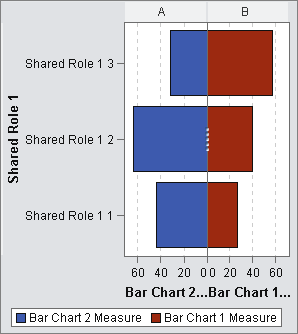
The final graph object,
complete with the legend, resembles the following:
Copyright © SAS Institute Inc. All Rights Reserved.
Last updated: January 8, 2019