ACL Manager
Overview of ACL Manager
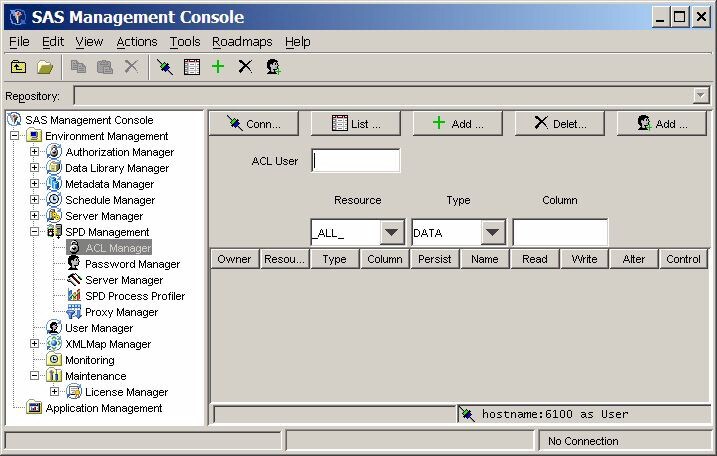
Click the ACL Manager
folder in the SAS Management Console window
to manage ACL resources. The ACL Manager panel resembles the following
display.
You must connect to
an SPD Server host machine before you can use the SPD Management utilities. For information about
connecting to an SPD Server host, see Connect to an SPD Server.
List ACL Resources
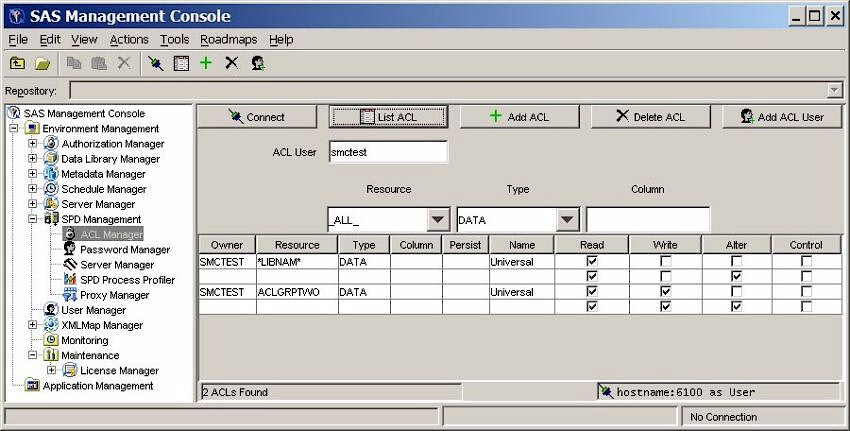
To display the ACL resources
that have been defined, click List ACL in
the ACL Manager panel of the SAS Management Console window.
The ACL Manager display
contains the following components:
Owner
resource owner. You
cannot change this field directly. To change a resource owner, delete
the resource, and then add a new one.
Resource
resource name. You
cannot change this field directly. To change a resource name, delete
the resource, and then add a new one.
Type
type of resource (for
example, DATA, CATALOG, VIEW, or MDDB). You cannot change this field
directly. To change the type of a resource, delete the current resource,
and then add a new one.
Column
column name, if the
resource is limited by a column constraint. You cannot change the
column name directly. To change the column name, delete the existing
resource and then add a new one.
Persist
a Boolean flag. When
this value is set to Yes, the
ACL resource definition continues to exist if the referenced resource
is deleted. If the Persist setting is blank,
the ACL resource definition is deleted when the referenced resource
is deleted.
Name
name of a user or group
to which the Read, Write, Alter, and Control permissions are applied
for this resource. Universal is the default
setting for all unnamed groups or users.
Read
if this check box is
selected, the user or group has permission to read this resource.
Write
if this check box is
selected, the user or group has permission to write to this resource.
Alter
if this check box is
selected, the user or group has permission to alter this resource.
Control
if this check box is
selected, the user or group has permission to modify the permissions
of other users and groups that are associated with this resource.
Add an ACL Resource
To add an ACL resource,
click Add ACL in the ACL Manager panel of
the SAS Management Console window.
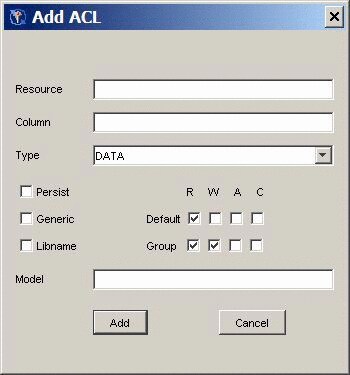
Specify the following
values in the Add ACL window.
Resource
name of the resource
that you are adding..
Column
column restrictions
for the resource that you are adding. If there are no restrictions,
leave this field blank.
Type
type of the resource
(for example, DATA, CATALOG, VIEW, or MDDB).
Persist
a Boolean flag. If
you select this check box, the ACL resource definition continues to
exist if the referenced resource is deleted. If you do not select
this check box, the ACL resource definition is deleted when the referenced
resource is deleted.
Generic
select this check box
if the resource name is a generic name.
LIBNAME
select this check box
if the resource is a LIBNAME resource.
R, W, A, C
select the appropriate
default and group permissions to grant Read, Write, Alter, and Control
permission to the resource.
Model
specify the name of
an existing ACL resource to use as a model for this ACL resource.
Add a User or Group to an ACL Resource
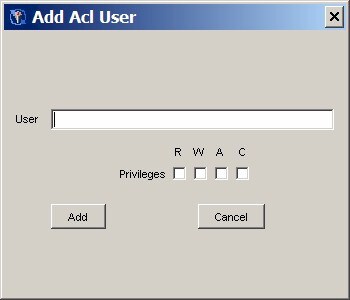
To add a user or group
to an ACL resource, click Add ACL User in
the ACL Manager panel. In the Add Acl User window,
enter the user or group name in the User field.
Select the boxes that correspond to the default Read, Write, Alter,
and Control permissions that you want to grant. Then click Add.
The user is added and
the ACL listing is automatically updated. You cannot delete an individual
user or group from an ACL resource. To delete a user, you must delete
the entire ACL resource, and then add it, omitting that user.
Change Resource Permissions
Each ACL resource has
at least one set of permissions called universal permissions. Universal
permissions are the default permissions for the ACL resource if no
other permissions are applied. If any group names or user names have
permissions for the ACL resource, they are displayed.
Each set of permissions
has four attributes: Read, Write, Alter, and Control. To enable a
default and group permission for each resource, select the appropriate
check box.
Copyright © SAS Institute Inc. All rights reserved.