Performance Tools
Why Use a Performance Monitor?
Windows
performance monitors are useful for tuning and diagnosing problems
in your application or computer system. The monitors include System
Monitor under supported Windows operating systems. By correlating
the information from SAS counters with other operating environment
counters, you can more easily troubleshoot performance problems.
For example, suppose that your SAS job appears not to be running. Perhaps the job
is performing a long and complicated DATA step that generates a very large data set
on a network drive. You can be certain that the job is still running by monitoring the I/O Read and Write Bytes/Sec for the process counter
for the SAS process.
Performance Counters and Objects
A counter is a piece of information that the system monitors. Performance objects
represent individual processes, sections of shared memory, and physical devices, such as Memory and LogicalDisk. Counters are grouped by objects.
For example, the Memory object contains counters such as Available Bytes, Committed Bytes, and Page Faults per sec.
The Processor object has counters such as %Processor Time and %User Time.
By observing various
system counters and application-defined counters, you can determine
performance problems. You can search for problems in your system and
isolate them to areas such as hardware, system software, or your application.
Starting the Windows Performance Monitors
When you enter
perfmon in
the Search dialog box from the Start menu,
you open the Performance window.
Note: To use the performance counters
for 32-bit versions of SAS on a Windows x64 system, invoke the 32-bit
version of PerfMon after the 32-bit version of SAS has been invoked.
To invoke the 32-bit version of PerfMon, access Windows Explorer and
open the folder
c:\Windows\SysWOW64 that
contains the 32-bit applications. In this folder, you see the 32-bit
version of PerfMon. You can access the 32-bit versions of SAS performance
counters by launchingperfmon.exe or perfmon.msc.
SAS Counters in the Performance and System Monitors
SAS includes the following application-defined counters in the SAS object:
Virtual Alloc'ed Memory
specifies the amount of committed virtual memory that SAS allocates through the VirtualAlloc()
API.
Disk ReadFile Bytes Read Total
specifies the total
number of bytes that SAS reads from disk files through the ReadFile()
API.
Disk ReadFile Bytes Read/Sec
specifies the number
of bytes that SAS reads per second from disk files through the ReadFile()
API.
Disk WriteFile Bytes Written Total
specifies the total
number of bytes that SAS writes to disk files through the WriteFile()
API.
Disk WriteFile Bytes Written/Sec
specifies the number
of bytes that SAS writes per second to disk files through the WriteFile()
API.
Disk SetFilePointer/Sec
specifies the number
of times per second that SAS successfully calls the SetFilePointer()
API on disk files.
Memlib/Memcache Current Usage K
specifies in bytes
the amount of Extended Server Memory that is currently in use.
Memlib/Memcache Peak Usage K
specifies in bytes
the maximum amount of Extended Server Memory that is used in the current
SAS session.
Selecting SAS Counters to Monitor
Use the following
procedures to monitor SAS counters in your respective operating environment:
|
Using Windows
|
|---|
|
The performance monitor
immediately collects and displays information about the counters that
you selected.
Multiple SAS counters can be monitored. You can see multiple instances monitored,
where each instance is a separate SAS process. SAS instances are listed in the form
SAS PID number. The PID number is the process identifier of the SAS session. You can see
a list of all processes by using the Task Manager.
Examples of Monitoring the DATA Step, PROC SORT, and PROC SQL
Configuring the Performance Monitors
Configure the Performance Monitor and the System Monitor
for all examples as follows:
-
Invoke SAS and the Performance Monitor or the System Monitor.
-
Open the Add Chart window or the Add Counters window and select the SAS object.
-
Click on the downward arrow to expand the selection.
-
Add these SAS counters by selecting the counter and then selecting ADD>>:
-
Disk ReadFile Bytes Read/Sec
-
Disk WriteFile Bytes Written/Sec
-
Disk SetFilePointer/Sec
-
-
Click OK to close the Counters dialog box.
-
Select the Process object.
-
Add these Process counters:
-
%Processor Time
-
%User Time
-
%Privileged Time
-
-
Click Done or Close.
Examining the Performance between the DATA and PROC SORT Steps
To see the difference in performance between the DATA
step and the PROC step, submit this code:
options fullstimer;
  /* Create a test data set with some random data. */
DATA a (drop=s);
   do i = 1 to 500000;
      x = ranuni(i);
      y = x*2;
      z = exp(x*y);
      output;
   end;
   /* The sleep helps to delineate the subsequent  */
   /* sort in the Performance Monitor graph        */
   s = sleep(15);
run;
PROC sort data = a noduplicates;
   by z y x i;
run;
After
you submit this code, the Performance Monitor or System Monitor generates
results similar to those results in Performance of the DATA Step and the PROC SORT Step . You might have to adjust the scale factor of the different
counters.
Performance of the DATA Step and the PROC SORT Step
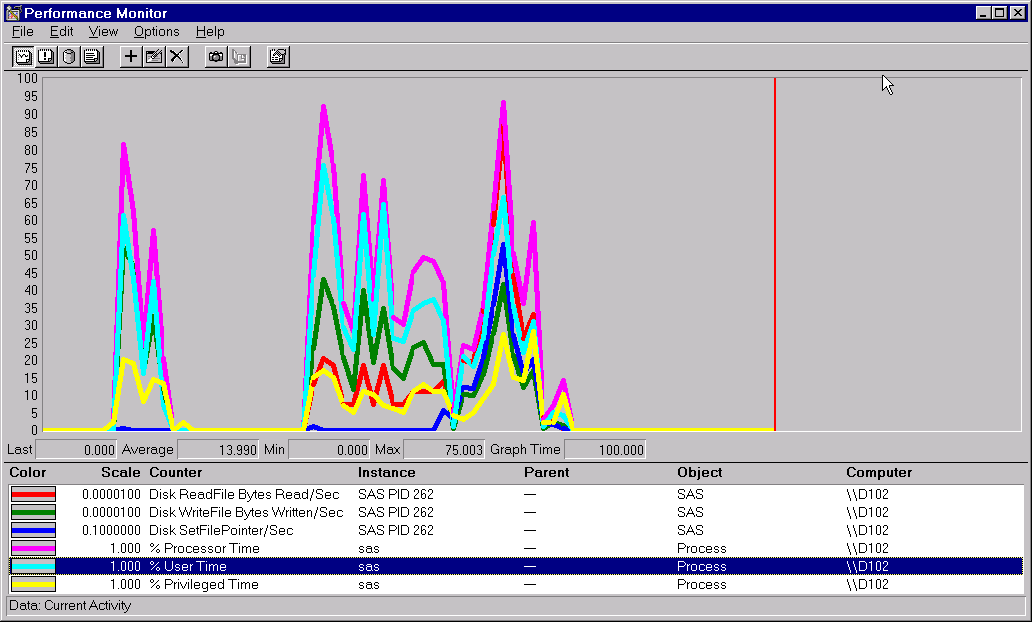
The DATA step in the
display shows that there is very little activity from Disk ReadFile
Bytes Read/Sec or Disk SetFilePointer/Sec. Notice that in the subsequent
PROC SORT output there is much more activity from these two counters. The
output indicates that the data set is being read (Disk Readfile Bytes Read/Sec)
in order to be sorted, and that a certain amount of random I/O is
performed by the sort (Disk SetFilePointer/Sec).
The pause in the activity
is caused by the SLEEP function that follows the DATA step. The Disk
WriteFile Bytes Written/Sec counter is active in both the DATA step
and in the PROC SORT step.
Finally, you can correlate the counters from the Process object with the user and
system CPU times in your SAS log.
Examining a PROC SQL Query
To examine the performance of
a PROC SQL query with an index, submit the following code:
-
Submit the code in Step 1 and Step 2. Step 2 creates an index.
/* Step 1 */ /* Create a test data set with some random data. */ /* Do this twice - once with Step 2 and once */ /* without Step 2. */ libname sample 'c:\'; DATA sample.a; do i = 1 to 500000; x = ranuni(i); y = x*ranuni(i); z = exp(y); output; end; run; /* Step 2 */ /* Create a simple index on variable x. */ /* Submit this step once. */ PROC DATASETS library = sample; modify a; index create x; quit; -
-
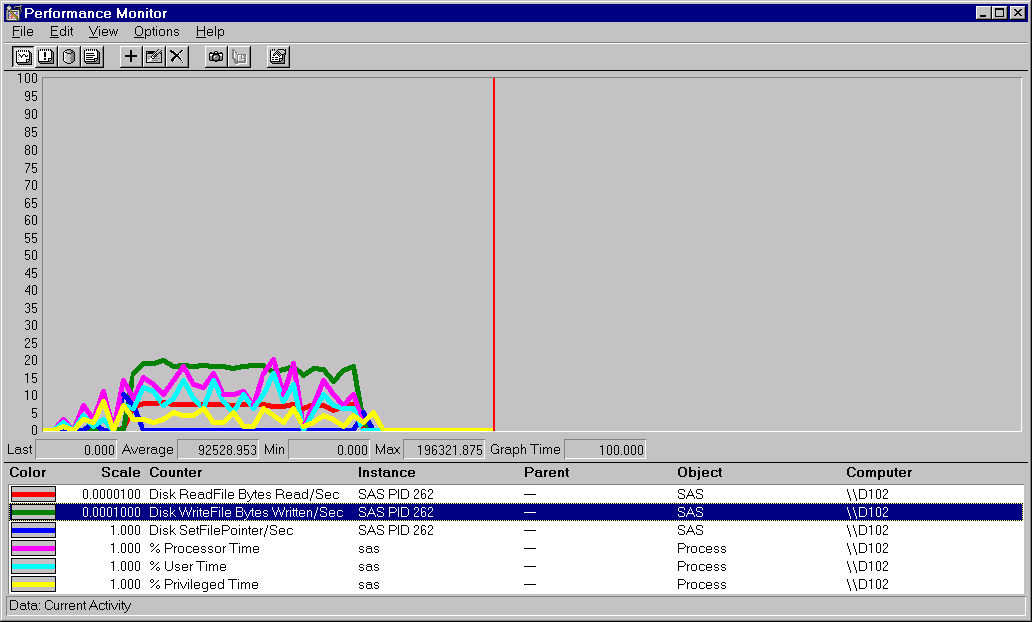
Submit the code in Step 3 to see a graph such as Performance of PROC SQL Query with an Index .
      /* Step 3                                        */
   /* Perform a query on the data.  Do this twice - */
   /* once with an index and once without an index  */
   /* The query should select about 50% of the      */
   /* observations in the data set.                 */

PROC SQL;
   create table sample.yz as
   select y,z
      from sample.a
      where x > 0.5;
   quit;
To perform a PROC SQL
query without an index:
-
Resubmit Step 1.
-
Clear the graph.
-
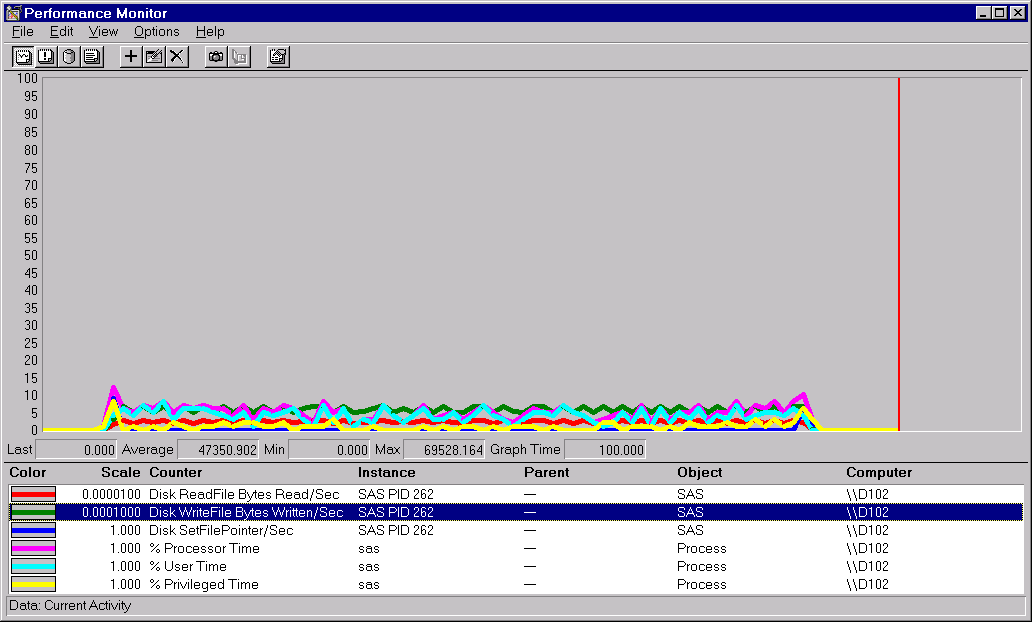
Resubmit Step 3 to see a graph such as Performance of PROC SQL Query without an Index .
Performance of PROC SQL Query with an Index
Performance of PROC SQL Query without an Index
In
Performance of PROC SQL Query without an Index ,
the counters averaged under 10% on the scale, whereas in Performance of PROC SQL Query with an Index , several of the counters averaged more than 10%, and the
Disk WriteFile Bytes Written/Sec counter rose more than 25%. A higher
value for these counters implies good overall throughput for the operation.
Note
that to make a valid comparison with the Performance Monitor graph
or with the System Monitor graph, you must ensure that the counters
are using the same scale. You can confirm the counters by observing
the absolute values. The Average value for Disk WriteFile Bytes Written/Sec
in Performance of PROC SQL Query with an Index
was 92528.953. Contrast this value with the same counter in Performance of PROC SQL Query without an Index , in which the Average value was 47350.902. For this operation,
bytes were written almost twice as fast when the data set was indexed.
Copyright © SAS Institute Inc. All Rights Reserved.