Replacing Extended ASCII Characters in a SAS Data Set
The %CSTUTILFINDFIXEXTDASCIICHARS Macro
The %CSTUTILFINDFIXEXTDASCIICHARS
macro performs these tasks:
-
identify extended ASCII characters in column values in a SAS data set
-
create a SAS data set that contains the extended ASCII characters and their replacement characters
-
generate code to replace the extended ASCII characters with acceptable characters
Extended ASCII characters
occur most often when a SAS data set is populated by reading a Microsoft
Excel spreadsheet or Word document that contains characters such as
curly quotation marks and double quotation marks.
You can modify the generated
code or submit it as is.
Note: The code generated by this
macro replaces the extended ASCII characters in the SAS data set,
not the macro itself.
This macro uses a SAS
format in the macro code to map replacement characters to the extended
ASCII characters. SAS provides a default format for mapping to common
extended ASCII characters. You should review the mappings, change
them, or create new mappings.
Note: This macro does not handle
double-byte character set (DBCS) data.
In addition to the SAS
format in the macro code, this macro accepts an external SAS format
that you create. This external SAS format enables you to create different
ASCII mappings for different studies or standards without having to
change the global mappings in the macro code. For more
information, see Example: Using an External SAS Format.
This macro creates a
SAS data set (specified by the _cstOutputDS parameter) that contains
the extended ASCII characters and the characters with which to replace
them. An extended ASCII character that does not have a replacement
character is indicated by a question mark (?) (or the value specified
by the _cstExtFmtOtherValue parameter) in the _cstRemapNote column.
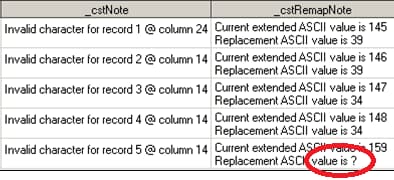
The ? provides a visual cue that a valid value is needed to replace
an extended ASCII character.
The following display
shows an example of the visual cue:
Visual Cue That a Valid Value Is Needed
Note: You must map replacement
characters in either the SAS format in the macro code or in an external
SAS format, and then resubmit the macro to ensure that all extended
ASCII characters are replaced.
Data sets that are created
by generated code are written to the output directory specified by
the _cstWriteToLib parameter. The default output directory is WORK.
Data set labels and the sort order of the original data sets are maintained.
Note: You must manage the output
directory because files can be overwritten by subsequent submissions
of the generated code.
Example: Mapped Extended ASCII Characters
The following example
demonstrates identifying the extended ASCII characters in the stringchars
column of the data set testdata.ext_ascii. The replacement characters
are part of the default format mapping provided by SAS.
%cstutilfindfixextdasciichars(
   _cstDSName=testdata.ext_ascii,
   _cstColumnName=stringchars,
   _cstGeneratedCodeFile=c:/fixascii/findextendedascii.sas);
Here are the meanings
of the parameters:
-
_cstDSName is the data set to examine.
-
_cstColumnName is the column to examine.
-
_cstGeneratedCodeFile is the SAS code file to generate.
The following display
shows the data set before the extended ASCII characters ` , ’
, “ , and ” (ASCII values 145 through 148) are replaced:
testdata.ext_ascii Data Set Before Replacing the Extended ASCII
Characters

The %CSTUTILFINDFIXEXTDASCIICHARS
macro creates the work._cstProblems data set (the default) that contains
the extended ASCII characters and their replacement characters. The
following display shows selected columns that illustrate the content
of the work._cstProblems data set:
work._cstProblems Data Set

The _cstNote column
identifies the record number and the column position of the record
value of the extended ASCII character. The _cstRemapNote column specifies
the extended ASCII character and its replacement value.
All of the records
in testdata.ext_ascii that contain extended ASCII characters have
replacement values. As a result, the macro is submitted and the following
SAS code is generated in the findextendedascii.sas file:
%macro _cstFixASCII;
********************************************;
**********  Initialize libraries  **********;
********************************************;

libname TESTDATA "c:\fixascii";

***********************************************************************************;
**********  Updating data set testdata.ext_ascii                         **********;
***********************************************************************************;
%let _cstDSLabel=%cstutilgetattribute(_cstDataSetName=testdata.ext_ascii,
                                      _cstAttribute=LABEL);
%let _cstDSSortVars=%cstutilgetattribute(_cstDataSetName=testdata.ext_ascii,
                                         _cstAttribute=SORTEDBY);


data work.ext_ascii %if %length(&_cstDSLabel)>0 %then (label="&_cstDSLabel"); %else;;
  set testdata.ext_ascii ;
    if _n_= 1 then do;
      stringchars=tranwrd(stringchars,byte(145),byte(39));
    end;
    if _n_= 2 then do;
      stringchars=tranwrd(stringchars,byte(146),byte(39));
    end;
    if _n_= 3 then do;
      stringchars=tranwrd(stringchars,byte(147),byte(34));
    end;
    if _n_= 4 then do;
      stringchars=tranwrd(stringchars,byte(148),byte(34));
    end;
run;

%if %length(&_cstDSSortVars)>0 %then
%do;
  proc sort data=work.ext_ascii;
    by &_cstDSSortVars
  run;
%end;

%mend;

%_cstFixASCII;
All four extended ASCII
characters are included in this generated code. A combination of the
BYTE and TRANWRD functions is used to convert the extended ASCII characters
to replacement characters. The %CSTUTILGETATTRIBUTE macro retrieves
the sort order and the label of the original data set. If they exist,
these values are used when the output data set is created to maintain
the original metadata associated with the original files. Otherwise,
the original label and sort order are lost.
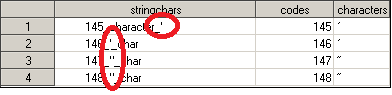
The following display
shows the data set after replacing the extended ASCII characters:
work.ext_ascii Data Set After Replacing the Extended ASCII
Characters
Example: Unmapped Extended ASCII Characters
The following example
demonstrates identifying the extended ASCII characters in the stringchars
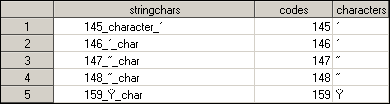
column of the testdata.ext_ascii2 data set. In addition to the extended
ASCII characters in the previous example ( ` ,’ , “
, and ”), the data set includes Ÿ (ASCII value 159).
testdata.ext_ascii2 Data Set
To identify the extended
ASCII characters that must be replaced, the following parameters are
specified in the %CSTUTILFINDFIXEXTDASCIICHARS macro:
%cstutilfindfixextdasciichars(
   _cstDSName=testdata.ext_ascii2,
   _cstColumnName=stringchars,
   _cstGeneratedCodeFile=c:/fixascii/findextendedascii2.sas,
   _cstOutputDS=work._cstProblems2,
   _cstWriteToLib=testdat2);
Here are the meanings
of the two parameters not specified in the previous example:
-
_cstOuputDS is the data set to record the references to extended ASCII characters in _cstDSName. The value is specified as work._cstProblems2. (The default is work._cstProblems, which was used by default in the previous example.)
-
The _cstWriteToLib parameter is the library in which to write the data sets created by the generated code. This is specified as testdat2.
The following display
shows the content of the work._cstProblems2 data set:
Content of the work._cstProblems2 Data Set

The _cstNote column
identifies the record number and the column position of the record
value of the extended ASCII character. The _cstRemapNote column specifies
the extended ASCII character and its replacement value.
Notice that the fifth
record has a ? as the replacement ASCII character. This is
the visual cue shown in Visual Cue That a Valid Value Is Needed.
Note: All extended ASCII characters
must be mapped before submitting the generated code.
Although one of the
extended ASCII characters is not mapped, the SAS code is still generated
in the
c:/fixascii/findextendedascii2.sas file,
which is specified by the _cstGeneratedCodeFile parameter.
Here is the generated
code:
%macro _cstFixASCII;
********************************************;
**********  Initialize libraries  **********;
********************************************;

libname TESTDATA "c:\fixascii";
libname testdat2 "c:\fixascii\copy";

***********************************************************************************;
**********  Updating data set testdata.ext_ascii2                        **********;
***********************************************************************************;
%let _cstDSLabel=%cstutilgetattribute(_cstDataSetName=testdata.ext_ascii2,
                                      _cstAttribute=LABEL);
%let _cstDSSortVars=%cstutilgetattribute(_cstDataSetName=testdata.ext_ascii2,
                                         _cstAttribute=SORTEDBY);


data testdat2.ext_ascii2 %if %length(&_cstDSLabel)>0 %then (label="&_cstDSLabel"); %else;;
  set testdata.ext_ascii2 ;
    if _n_= 1 then do;
      stringchars=tranwrd(stringchars,byte(145),byte(39));
    end;
    if _n_= 2 then do;
      stringchars=tranwrd(stringchars,byte(146),byte(39));
    end;
    if _n_= 3 then do;
      stringchars=tranwrd(stringchars,byte(147),byte(34));
    end;
    if _n_= 4 then do;
      stringchars=tranwrd(stringchars,byte(148),byte(34));
    end;
    if _n_= 5 then do;
      stringchars=tranwrd(stringchars,byte(159),byte(?));
    end;
run;

%if %length(&_cstDSSortVars)>0 %then
%do;
  proc sort data=testdat2.ext_ascii2;
    by &_cstDSSortVars
  run;
%end;

%mend;

%_cstFixASCII;
Notice the differences
between this SAS code and the SAS code for the previous example. This
SAS code includes an additional LIBNAME statement for the output library
reference specified by the _cstWriteToLib parameter (testdat2).
The line
stringchars=tranwrd(stringchars,byte(159),byte(?))contains the unmapped extended ASCII character. In addition to the ? as a visual cue that a replacement value is needed, a message is written to the SAS log file after the %CSTUTILFINDFIXEXTDASCIICHARS macro is submitted.
***********************************************************************************************
[CSTLOGMESSAGE.CSTUTILFINDFIXEXTDASCIICHARS] WARNING: Unresolved extended ASCII characters are
 present in the data. Refer to work._cstProblems2 for more information.
[CSTLOGMESSAGE.CSTUTILFINDFIXEXTDASCIICHARS] WARNING: These unresolved values need to be
updated in the PROC FORMAT statement of this macro.
***********************************************************************************************
You can handle an unmapped
extended ASCII character in these ways:
Regardless of the way that you choose, you must submit
the generated code after making the changes.
-
Temporary solutionTo create a complete data set for a single submission of the generated code, edit the generated code to specify a valid ASCII replacement value for the extended ASCII character. (The extended ASCII character is the ? in the line
stringchars=tranwrd(stringchars,byte(159),byte(?))
.)Note: This mapping is lost the next time the %CSTUTILFINDFIXEXTDASCIICHARS macro is run. -
Permanent solutionTo create a complete data set every time the %CSTUTILFINDFIXEXTDASCIICHARS macro is run, add the valid ASCII replacement value to the SAS format in the SAS code that is generated by the %CSTUTILFINDFIXEXTDASCIICHARS macro. Or, add the valid ASCII replacement value to an external SAS format that is used by the macro. In these ways, the extended ASCII character is always mapped in the generated code.
Example: Running Against All Data Sets in a Library
The previous examples
operated on one data set and one column. This situation occurs when
you are familiar with the data and know in which data set extended
ASCII characters might be located.
When you are unfamiliar
with the data and there are many data sets, the %CSTUTILFINDFIXEXTDASCIICHARS
macro enables you to examine all data sets in a specific library for
extended ASCII characters.
The following example
demonstrates identifying the extended ASCII characters in all of the
data sets and in all of the columns in the testdata library:
%cstutilfindfixextdasciichars(
   _cstDSName=testdata._ALL_,
   _cstGeneratedCodeFile=c:/fixascii/findfixextendedascii3.sas);
The _cstDSName parameter
includes the LIBNAME reference and the keyword _ALL_.
Note: The _cstColumnName parameter
is omitted and cannot be used with the _ALL_ keyword.
The following messages
are written to the SAS log file:
>>>>>
>>>>> Starting test for: TESTDATA.EXT_ASCII
>>>>>

>>>>> Variable List 1='stringchars' 'characters'
>>>>> Variable List 2=stringchars characters
>>>>> Variable Count=       2
>>>>>

>>>>>
>>>>> Starting test for: TESTDATA.EXT_ASCII2
>>>>>

>>>>> Variable List 1='stringchars' 'characters'
>>>>> Variable List 2=stringchars characters
>>>>> Variable Count=       2
>>>>>
As each data set is
examined, a starting message (Starting test for)
and a list of variables (Variable List to Variable
Count) are written to the SAS log file.
The following warning
message is written to the SAS log file to inform you that unresolved
extended ASCII characters are present in the data set:
***********************************************************************************************
[CSTLOGMESSAGE.CSTUTILFINDFIXEXTDASCIICHARS] WARNING: Unresolved extended ASCII characters are
present in the data. Refer to work._cstProblems for more information.
[CSTLOGMESSAGE.CSTUTILFINDFIXEXTDASCIICHARS] WARNING: These unresolved values need to be
updated in the PROC FORMAT statement of this macro.
***********************************************************************************************
The generated code is
written to the findfixextendedascii3.sas file. No value was specified
for the _cstWriteToLib parameter, so no output library is generated
and the output data sets are written to the Work directory, which
is the default directory.
Here is the generated
code:
%macro _cstFixASCII;
********************************************;
**********  Initialize libraries  **********;
********************************************;

libname TESTDATA "c:\fixascii";

***********************************************************************************;
**********  Updating data set TESTDATA.EXT_ASCII                         **********;
***********************************************************************************;
%let _cstDSLabel=%cstutilgetattribute(_cstDataSetName=TESTDATA.EXT_ASCII,
                                      _cstAttribute=LABEL);
%let _cstDSSortVars=%cstutilgetattribute(_cstDataSetName=TESTDATA.EXT_ASCII,
                                         _cstAttribute=SORTEDBY);

data work.EXT_ASCII %if %length(&_cstDSLabel)>0 %then (label="&_cstDSLabel"); %else;;
  set TESTDATA.EXT_ASCII ;
    if _n_= 1 then do;
      characters=tranwrd(characters,byte(145),byte(39));
      stringchars=tranwrd(stringchars,byte(145),byte(39));
    end;
    if _n_= 2 then do;
      characters=tranwrd(characters,byte(146),byte(39));
      stringchars=tranwrd(stringchars,byte(146),byte(39));
    end;
    if _n_= 3 then do;
      characters=tranwrd(characters,byte(147),byte(34));
      stringchars=tranwrd(stringchars,byte(147),byte(34));
    end;
    if _n_= 4 then do;
      characters=tranwrd(characters,byte(148),byte(34));
      stringchars=tranwrd(stringchars,byte(148),byte(34));
    end;
run;

%if %length(&_cstDSSortVars)>0 %then
%do;
  proc sort data=work.EXT_ASCII;
    by &_cstDSSortVars
  run;
%end;

***********************************************************************************;
**********  Updating data set TESTDATA.EXT_ASCII2                        **********;
***********************************************************************************;
%let _cstDSLabel=%cstutilgetattribute(_cstDataSetName=TESTDATA.EXT_ASCII2,
                                      _cstAttribute=LABEL);
%let _cstDSSortVars=%cstutilgetattribute(_cstDataSetName=TESTDATA.EXT_ASCII2,
                                         _cstAttribute=SORTEDBY);

data work.EXT_ASCII2 %if %length(&_cstDSLabel)>0 %then (label="&_cstDSLabel"); %else;;
  set TESTDATA.EXT_ASCII2 ;
    if _n_= 1 then do;
      characters=tranwrd(characters,byte(145),byte(39));
      stringchars=tranwrd(stringchars,byte(145),byte(39));
    end;
    if _n_= 2 then do;
      characters=tranwrd(characters,byte(146),byte(39));
      stringchars=tranwrd(stringchars,byte(146),byte(39));
    end;
    if _n_= 3 then do;
      characters=tranwrd(characters,byte(147),byte(34));
      stringchars=tranwrd(stringchars,byte(147),byte(34));
    end;
    if _n_= 4 then do;
      characters=tranwrd(characters,byte(148),byte(34));
      stringchars=tranwrd(stringchars,byte(148),byte(34));
    end;
    if _n_= 5 then do;
      characters=tranwrd(characters,byte(159),byte(?));
      stringchars=tranwrd(stringchars,byte(159),byte(?));
    end;
run;

%if %length(&_cstDSSortVars)>0 %then
%do;
  proc sort data=work.EXT_ASCII2;
    by &_cstDSSortVars
  run;
%end;

%mend;
Before any updates
can be made to the ext_ascii2 data set, the following lines of code
must be resolved by mapping a value to the extended ASCII character
159:
characters=tranwrd(characters,byte(159),byte(?));
      stringchars=tranwrd(stringchars,byte(159),byte(?));
Example: Running Across Multiple Libraries
To save time, you can
examine multiple libraries, data sets, and columns. You do this by
specifying the _cstRetainOutputDS parameter as Y, which causes the
output data set specified by the _cstOutputDS parameter to be retained
between submissions of the %CSTUTILFINDFIXEXTDASCIICHARS macro.
By retaining the _cstOutputDS
output data set, the data from each submission of the macro is appended
to the data set. After the last submission of the macro, the generated
code contains all of the changes found for each submission of the
macro.
Note: For each submission of the
macro, the _cstRetainOutputDS parameter must be specified as
Y and
the _cstGeneratedCodeFile parameter must specify the same file.
This example examines
all columns in testdata.ext_ascii. The output data set is specified
as work.all_asciiProblems.
For the first submission,
the _cstRetainOutputDS parameter is specified as
N.
This clears the existing data set specified by the _cstOutputDS parameter.
%(
   _cstDSName=testdata.ext_ascii,
   _cstGeneratedCodeFile=c:/fixascii/findfixextendedascii4.sas,
   _cstOutputDS=work.all_asciiProblems,
   _cstRetainOutputDS=N,
   _cstFindFix=Find);
For the second submission,
the _cstRetainOutputDS parameter is specified as
Y.
The output data set remains specified as work.all_asciiProblems.
%cstutilfindfixextdasciichars(
   _cstDSName=testdat2.all_ascii,
   _cstGeneratedCodeFile=c:/fixascii/findfixextendedascii4.sas,
   _cstOutputDS=work.all_asciiProblems,
   _cstRetainOutputDS=Y,
   _cstFindFix=Find);
When the SAS code is
generated, there are two
Initialize librariesblocks in the code: one for TESTDATA and another for TESTDAT2 (with corresponding output libraries OUT1 and OUT2).
Here is an excerpt
of the generated code in the findfixextendedascii4.sas file:
%macro _cstFixASCII;
********************************************;
**********  Initialize libraries  **********;
********************************************;

libname TESTDAT2 "c:\fixascii\copy";
libname out2 "c:\fixascii\output_two";

***********************************************************************************;
**********  Updating data set testdat2.all_ascii                         **********;
***********************************************************************************;
%let _cstDSLabel=%cstutilgetattribute(_cstDataSetName=testdat2.all_ascii,
                                      _cstAttribute=LABEL);
%let _cstDSSortVars=%cstutilgetattribute(_cstDataSetName=testdat2.all_ascii,
                                         _cstAttribute=SORTEDBY);


data out1.all_ascii %if %length(&_cstDSLabel)>0 %then (label="&_cstDSLabel"); %else;;
  set testdat2.all_ascii ;
    if _n_= 1 then do;
      test_characters=tranwrd(test_characters,byte(9),byte(32));
      test_stringchars=tranwrd(test_stringchars,byte(9),byte(32));
    end;
…
…
    if _n_= 16 then do;
      test_characters=tranwrd(test_characters,byte(155),byte(62));
      test_stringchars=tranwrd(test_stringchars,byte(155),byte(62));
    end;
run;

%if %length(&_cstDSSortVars)>0 %then
%do;
  proc sort data=out1.all_ascii;
    by &_cstDSSortVars
  run;
%end;

********************************************;
**********  Initialize libraries  **********;
********************************************;

libname TESTDATA "c:\fixascii";
libname out1 "c:\fixascii\output_one";

***********************************************************************************;
**********  Updating data set testdata.ext_ascii                         **********;
***********************************************************************************;
%let _cstDSLabel=%cstutilgetattribute(_cstDataSetName=testdata.ext_ascii,
                                      _cstAttribute=LABEL);
%let _cstDSSortVars=%cstutilgetattribute(_cstDataSetName=testdata.ext_ascii,
                                         _cstAttribute=SORTEDBY);


data out1.ext_ascii %if %length(&_cstDSLabel)>0 %then (label="&_cstDSLabel"); %else;;
  set testdata.ext_ascii ;
    if _n_= 1 then do;
      characters=tranwrd(characters,byte(145),byte(39));
      stringchars=tranwrd(stringchars,byte(145),byte(39));
    end;
…
…
    if _n_= 4 then do;
      characters=tranwrd(characters,byte(148),byte(34));
      stringchars=tranwrd(stringchars,byte(148),byte(34));
    end;
run;

%if %length(&_cstDSSortVars)>0 %then
%do;
  proc sort data=out1.ext_ascii;
    by &_cstDSSortVars
  run;
%end;

%mend;

%_cstFixASCII;
Example: Using an External SAS Format
An external SAS format
can be used to map extended ASCII characters to replacement characters.
This external SAS format can be provided in a file that is specified
by the _cstExternalFmt parameter. This external SAS format enables
you to create different ASCII mappings for different studies or standards
without having to change the global mappings in the macro code. If
no external SAS format is specified, the %CSTUTILFINDFIXEXTDASCIICHARS
macro defaults to a SAS format that is included in the generated code.
You can modify the external SAS format.
When you use an external
SAS format, you must specify the value in the external SAS format
that indicates a missing value. You specify this missing value in
the _cstExtFmtOtherValue parameter. For example, if the external SAS
format specifies
other=MISSING, the value
of the _cstExtFmtOtherValue parameter must be MISSING.
The %CSTUTILFINDFIXEXTDASCIICHARS macro can then act on the missing
value.
Note: If the _cstExtFmtOtherValue
parameter is not specified exactly as the
other= statement
in the external SAS format, the macro does not detect the missing
value.
If the external SAS
format does not contain a
other= statement,
the default value is **.
Here is an example
of an external SAS format and the macro submission:
proc format library=work.myformats;
  value asciifmt
  10=32
  19=45
  20=45
  24=39
  25=39
  28=34
  29=34
  139=60
  145=39
  146=39
  147=34
  148=34
  150=45
  151=45
  155=62
  other=MISSING;
run;

options fmtsearch=(work.myformats);

%cstutilfindfixextdasciichars(
   _cstDSName=testdat2.all_ascii,
   _cstColumnName=stringchars,
   _cstExternalFmt=asciifmt,
   _cstExtFmtOtherValue=MISSING,
   _cstGeneratedCodeFile=c:/fixascii/findfixextendedascii5.sas,
   _cstOutputDS=all_cstProblems,
   _cstRetainOutputDS=N,
   _cstWriteToLib=work,
   _cstFindFix=Find
   );
Note: Best practices recommend
that an external SAS format be stored in a managed permanent format
catalog.
The following display
shows the _cstOutputDS data set. The _cstRemapValue for other is MISSING,
which alerts you to a problem:
_cstOutputDS Data Set

Here is an excerpt
of the generated code:
%macro _cstFixASCII;
********************************************;
**********  Initialize libraries  **********;
********************************************;

libname TESTDAT2 "c:\fixascii\copy";

***********************************************************************************;
**********  Updating data set testdat2.all_ascii                         **********;
***********************************************************************************;
%let _cstDSLabel=%cstutilgetattribute(_cstDataSetName=testdat2.all_ascii,
                                      _cstAttribute=LABEL);
%let _cstDSSortVars=%cstutilgetattribute(_cstDataSetName=testdat2.all_ascii,
                                         _cstAttribute=SORTEDBY);


data work.all_ascii %if %length(&_cstDSLabel)>0 %then (label="&_cstDSLabel"); %else;;
  set testdat2.all_ascii ;
    if _n_= 1 then do;
      test_stringchars=tranwrd(test_stringchars,byte(9),byte(MISSING));
    end;
    if _n_= 2 then do;
      test_stringchars=tranwrd(test_stringchars,byte(10),byte(32));
    end;
    if _n_= 3 then do;
...
...
...
The line
test_stringchars=tranwrd(test_stringchars,byte(9),byte(MISSING)); is
the visual cue that an additional mapping is required. This represents
the other= value specified in the external
SAS format.
Copyright © SAS Institute Inc. All Rights Reserved.