Managing Column Length for Data Collection and Submission
Overview
Large SAS transport
files have become an issue for the FDA to process. Large SAS transport
file sizes occur, in part, when the maximum column length of 200 is
used for character variables.
The FDA has requested
that the allotted character length for each column in a data set be
the maximum length of the variable used.
There are valid reasons
to use different column lengths for data collection and data submission.
During data collection,
you might not know the final column length until the study is complete.
The maximum column length of a column that uses a non-extensible codelist
is predictable. The maximum column length of a column that uses an
extensible codelist or no codelist at all is not predictable and cannot
be known until the data collection is complete. To avoid possible
data truncation, longer column lengths can be warranted.
For data submissions,
you might choose to reduce a column length to a shorter length, such
as the maximum observed value or the maximum possible codelist value.
The %CSTUTILMANAGECOLUMNSIZE
macro enables you to determine and set the lengths of columns based
on observed, expected, predetermined, or codelist values. (This functionality
is enabled by the _cstTrimAlgorithm parameter.)
For complete information
about the %CSTUTILMANAGECOLUMNSIZE macro, see the SAS Clinical
Standards Toolkit: Macro API Documentation.
Example 1: Set Column Length Based on the Length of the Maximum Observed Value
By default, the SAS
Clinical Standards Toolkit sets the lengths of most CDISC SDTM date
and duration columns to 64. However, this level of ISO 8601 precision
is rarely required. You can set the lengths of date and duration columns
to the lengths of their maximum observed values.
This example creates
a new AE output data set with the AESTDTC, AEENDTC, and AEDUR columns
set to the lengths of their maximum observed values:
libname logs 'c:/cstGlobalLibrary/logs';
proc sql;
   create table WORK.TRANSACTIONS like logs.transactionlog;
quit;
%let _cstTransactionDS=WORK.TRANSACTIONS;
%cstutilmanagecolumnsize(
     _cstSourceDataSet=SRCDATA.AE,
     _cstOutputDataSet=OUTDATA.AE,
     _cstTrimAlgorithm=MAXOBSERVED,
     _cstColumnList=AESTDTC AEENDTC AEDUR,
     _cstRptType=TRANSACTIONLOG
);
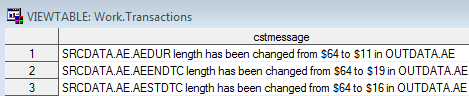
This example creates
the following records in the WORK.TRANSACTIONS data set:
Example 2: Set Column Length Based on the Maximum Expected Length
In contrast to example
1, in which each column length differs based on the maximum observed
value, you can set all columns to be the same length, regardless of
their current observed lengths.
This example sets the
lengths of the columns in example 1 to the maximum expected length
of 19:
%cstutilmanagecolumnsize(
_cstSourceDataSet=SRCDATA.AE,
_cstOutputDataSet=WORK.AE,
_cstColumnList=AESTDTC AEENDTC AEDUR,
_cstTrimAlgorithm=MAXEXPECTED,
_cstMaxExpected=19,
_cstRptType=CSTRESULTSDS
);
This example creates
the following records in the data set that is specified by the value
of the _cstResultsDS global macro variable:

Example 3: Set Column Length Based on the Length of the Maximum Codelist Value
The default action of
the %CSTUTILMANAGECOLUMNSIZE macro is to reduce column length. However,
there can be instances when you must increase column length. For example,
the length of the CDISC SDTM SEX column in the Demography domain was
increased with a controlled terminology update on 28MAR2014. (CDISC
controlled terminology is maintained by and distributed as part of
the National Cancer Institute (NCI) Enterprise Vocabulary Services
(EVS) Thesaurus.)
This example increases
the column length of the SEX column to be the maximum codelist value:
%cstutilmanagecolumnsize(
_cstSourceDataSet=SRCDATA.DM,
_cstOutputDataSet=WORK.DM,
_cstSourceMetadataDataSet=SRCMETA.SOURCE_COLUMNS,
_cstColumnList=SEX,
_cstResizeStrategy=INCREASE,
_cstTrimAlgorithm=MAXCODELIST
);
Notice that _cstResizeStrategy=INCREASE
specifies that the column length should be increased.
This example creates
the following SAS log file message:
[CSTLOGMESSAGE.CSTUTILMANAGECOLUMNSIZE]:
SRCDATA.DM.SEX length has been changed from $2 to $15 in WORK.DM
Example 4: Simplest cstutilmanagecolumnsize Macro Call
This example is the
simplest use of the %CSTUTILMANAGECOLUMNSIZE macro:
%cstutilmanagecolumnsize(_cstSourceLibrary=SRCDATA);
This example resets
all character variable column lengths in all data sets in the SRCDATA
library to their maximum current observed lengths. Each data set in
the SRCDATA library is written to the SAS Work library.
Each column modification
is documented in the SAS log file using the following syntax:
[CSTLOGMESSAGE.CSTUTILMANAGECOLUMNSIZE]:
SRCDATA.AE.AETERM length has been changed from $200 to $25 in WORK.AE
Copyright © SAS Institute Inc. All Rights Reserved.