Working with CDISC Dataset-XML Files
Overview
CDISC Dataset-XML defines
a standard format for transporting tabular data in XML between any
two entities based on CDISC ODM XML. In addition to supporting the
transport of data sets as part of a submission to the FDA, Dataset-XML
can be used to exchange data between two parties. For example, the
Dataset-XML data format can be used by a CRO to transmit SDTM or ADaM
data sets to a sponsor organization. Dataset-XML supports SDTM, ADaM,
and SEND data sets but can also be used to exchange any other type
of tabular data set.
Dataset-XML and Define-XML
Dataset-XML defines
a standard format for transporting tabular data set data in XML. The
metadata for a data set in a Dataset-XML file must conform to the
Define-XML standard. Each Dataset-XML file contains data for a single
data set, but a single Define-XML file describes all the data sets
included in the folder. Both Define-XML 1.0 and Define-XML 2.0 are
supported for use with Dataset-XML.
Assumption
You have a library of
CDISC SAS data sets from which you want to create Dataset-XML 1.0
files. You have a CRT-DDS 1.0 file or a Define-XML 2.0 file that describes
the metadata for these CDISC SAS data sets.
Furthermore, you want
to read the Dataset-XML files into SAS data sets and compare these
SAS data sets to the original SAS data sets.
Location of Dataset-XML 1.0 Driver Programs
The Dataset-XML driver
programs are located in the
sample study library directory/cdisc-datasetxml-1.0.0-1.7/programs folder.
Creating Dataset-XML Files from SAS Data Sets
The sample driver program
create_datasetxml_standalone.sas creates Dataset-XML files from a
library of SAS data sets.
After initialization,
the program runs the %DATASETXML_WRITE macro.
libname srcdata  "&studyRootPath/data";
filename srcmeta "&studyRootpathPath/xmldata/sdtm/define.xml";
libname dataxml  "&studyOutputPath/sourcexml";

%datasetxml_write(
  _cstSourceLibrary=srcdata,
  _cstOutputLibrary=dataxml,
  _cstSourceMetadataDefineFileRef=scrmeta,
  _cstCheckLengths=Y,
  _cstIndent=N,
  _cstZip=Y,
  _cstDeleteAfterZip=N
  );
The define.xml file
that describes the SAS data sets must contain metadata information
about all SAS data sets and all variables to convert. The Dataset-XML
files by themselves do not have any information about the SAS data
sets (names and labels) or the SAS variables (names, labels, data
types, lengths, and display formats). When a Dataset-XML file is converted
back to SAS data sets, this information must be provided by the define.xml
file.
Creating SAS Data Sets from Dataset-XML Files
The sample driver program
create_sas_from_datasetxml_standalone.sas creates SAS data sets from
Dataset-XML files.
After initialization,
the program runs the %DATASETXML_READ macro.
libname dataxml  "&studyRootPath/sourcexml";
libname sdtmdata "&studyOutputPath/data_derived";
filename defxml  "&studyOutPath/sourcexmldefine.xml";

%datasetxml_read(
  _cstSourceDatasetXMLLibrary=dataxml,
  _cstOutputLibrary=sdtmdata,
  _cstSourceMetadataDefineFileRef=defxml,
  _cstDatetimeLength=64,
  _cstAttachFormats=Y
  );
The define.xml file
that describes the Dataset-XML files must contain metadata information
about all Dataset-XML files and all variables to convert. The Dataset-XML
files by themselves do not have any information about the SAS data
sets (names and labels) or the SAS variables (names, labels, data
types, lengths, and display formats).
Comparing Original SAS Data Sets to SAS Data Sets Created from Dataset-XML Files
The sample driver program
create_sas_from_datasetxml_standalone.sas contains a call to the %CSTUTILCOMPAREDATASETS
macro to compare the original SAS data sets to the SAS data sets that
were created from the Dataset-XML files.
After initialization,
the program runs the %CSTUTILCOMPAREDATASETS macro.
libname sdtmdata  "&studyOutputPath/data_derived";
libname sdtmdat0  "&studyRootPath/data";

%cstutilcomparedatasets(
  _cstLibBase=sdtmdat0,
  _cstLibComp=sdtmdata,
  _cstCompareLevel=0,
  _cstCompOptions=%str(criterion=0.00000000000001),
  _cstCompDetail=Y
  );
For every SAS data
set that is compared, the macro reports the error code returned by
PROC COMPARE. Here are the error codes:
Error Codes Returned by PROC COMPARE
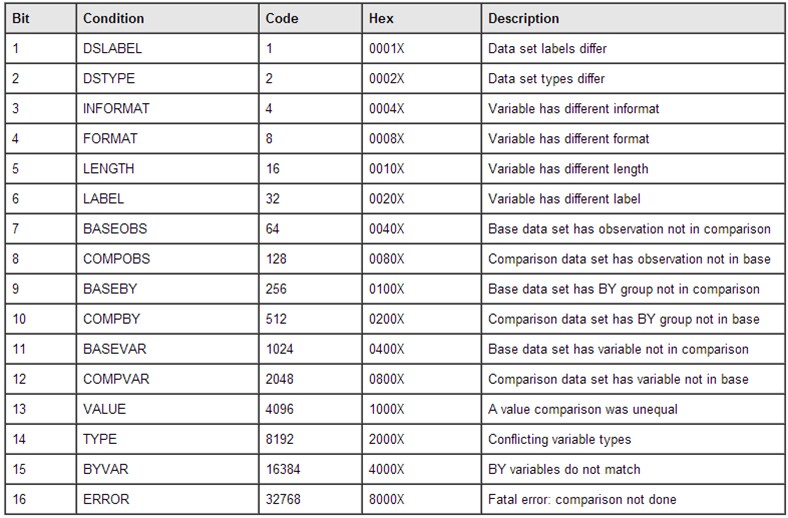
For example,
code=40 (8+32)indicates that a format and a label are different. The following message is written to the SAS log file:
WARNING: [CSTLOGMESSAGE.CSTUTILCOMPAREDATASETS] Comparing srcdata.adqs and
trgdata.adqs  - Differences: FORMAT/LABEL (SysInfo=40)
When converting SAS
data sets to Dataset-XML files and then converting them back to SAS
data sets, here are differences to expect:
-
The lengths of date- and time-related columns are not defined in the Define-XML metadata.Specify a length to assign in the macro (for example,
_cstdatetimeLength=64). The length is used to create date- and time-related columns but can be different from the original lengths. -
SAS numeric variables are created with a length of 8 to avoid loss of precision, even when the original length or the length specified in the define.xml file is less than 8.
-
The length of a character variable (DataType="text") that is not specified in the define.xml file is created with a length of 200.
-
Small differences in precision can be expected around the machine precision for numeric variables that represent real numbers.
-
Character data that contains leading spaces or trailing spaces loses the leading spaces and trailing spaces.
By specifying PROC COMPARE
options with the _cstCompOptions parameter, you can specify that the
comparison be less precise (for example,
_cstCompOptions=%str(criterion=0.00000000000001)).
Less precision prevents differences close to machine precision from
being reported as errors.
Copyright © SAS Institute Inc. All Rights Reserved.