Using Models
As previously explained, models
access and distribute data to controls which then display that data.
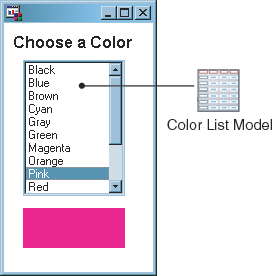
A simple example of how models and controls work together is populating
a List Box with color choices. This is something you might do to let
a user select the colors for a pie chart. You could add by hand to
the List Box each of the standard SAS colors: Black, Blue, Brown,
Cyan, Gray, Green, Magenta, Orange, Pink, Red, White, Yellow. Or you
could associate a Color List model with the List Box, and have the
List Box populated for you.
Just as people can only
communicate through a common language, certain models only work with
certain controls. The following table lists the controls and models
that SAS/AF software provides,
and which controls and models can be used together. Within each row
of the table, any control on the left can be used with any model on
the right.
For models and controls
that are designed to work with each other, all you need to do is connect
them and they automatically communicate with each other. To connect
models and controls at build time, simply drag a model onto a control
when you are designing the frame, and SAS/AF sets the connection for you. You can also connect
a model and a control manually, by setting the control's model attribute in the Properties window.
Copyright © SAS Institute Inc. All rights reserved.